Every digital photo you capture stores invisible hidden data known as image metadata, also labeled EXIF data by most photography tools. This embedded information records sensitive details most creators overlook until privacy risks surface online.
Metadata locked inside photos includes GPS location coordinates, exact capture timestamps, device model serial numbers, camera lens specs, editing software traces, and custom copyright tags added during post-production. When you upload dozens or hundreds of raw photos to blogs, social media, client portfolios, or marketplaces, all that private metadata transfers alongside every image file.
Manually deleting metadata from photos one by one wastes hours of work. Standard photo editors only offer single-file metadata stripping, which creates massive delays for anyone handling bulk photo batches. Paid desktop software locks batch metadata removal behind premium subscriptions, forcing casual creators to pay for basic privacy protection features.
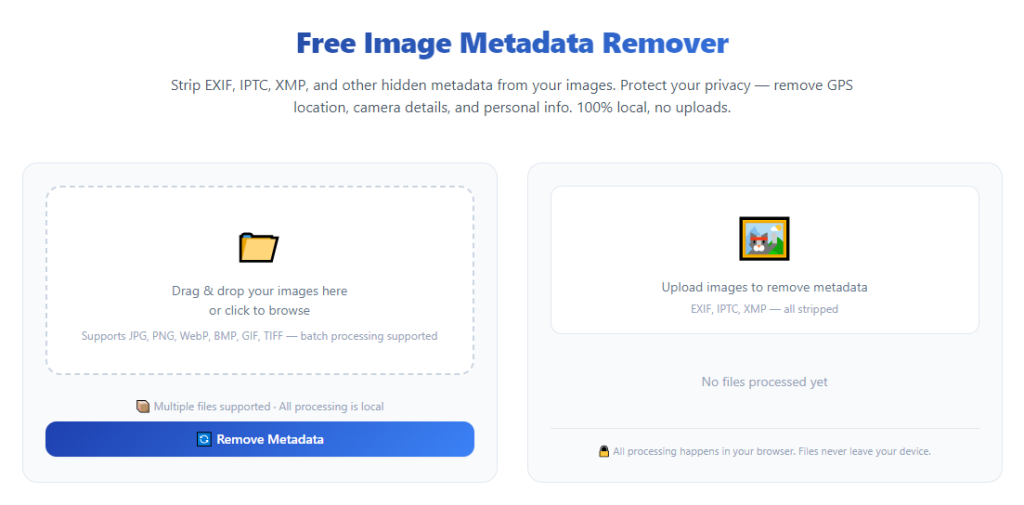
A reliable image metadata remover bulk photo processing free tool eliminates all these frustrating barriers. It processes hundreds of photos in one single session, fully wipes embedded metadata without charging fees, and protects your personal or business sensitive data before public image sharing.
This in-depth, beginner-friendly guide breaks down metadata privacy hazards, flaws of manual single-photo cleanup, core advantages of bulk free metadata removal tools, non-negotiable tool features, real-world creator use cases, and an ethical, complete step-by-step workflow for safe mass photo metadata stripping.
Hidden Privacy Risks of Unstripped Image Metadata
Most content creators, photographers, and small business owners underestimate how much sensitive data raw photo metadata exposes to the public internet. Every unedited batch of photos carries avoidable privacy threats.
Precise GPS location tracking data
Modern smartphones and mirrorless cameras automatically embed latitude and longitude coordinates into every captured photo. Anyone who downloads your uploaded photos can extract these coordinates and pinpoint exact addresses, travel routes, or private shooting locations instantly.
For travel bloggers, street photographers, or freelance creators shooting from home offices, this metadata creates direct safety vulnerabilities when publishing bulk photo galleries online.
Unique device identification markers
Metadata stores full device details: phone brand, camera model, serial codes, lens hardware, and firmware versions. Bad actors can cross-reference these markers to trace your gear, identify your personal devices, and match your uploads across multiple online platforms over time.
Timestamp and schedule exposure
Raw photos log precise capture dates, hours, and minutes for every shot. When you share bulk photo sets from personal trips, private events, or confidential business shoots, timestamps reveal your personal schedule and activity patterns to unknown viewers.
Hidden editing trail footprints
If you edit photos with desktop or mobile editing software, metadata retains records of which programs you used, saved edit layers, and previous file names. Competitors or third-party viewers can analyze these trails to reverse-engineer your editing workflows or confidential project drafts.
Copyright and internal tag leaks
Many creators add custom internal tags, client project codes, or draft labels to photo metadata during organization. Without bulk stripping, these internal labels leak proprietary business information to clients or random online visitors downloading your photo batches.
Why Manual Single-Photo Metadata Removal Fails Bulk Workflows
Many creators attempt to erase metadata using basic free photo viewers or lightweight editing apps. These single-file tools cannot keep up with bulk photo processing demands and introduce new workflow frustrations.
Extremely slow processing for large photo batches
Stripping metadata from one photo takes roughly 10 to 20 seconds per file. Processing a gallery of 200 photos manually requires over half an hour of repetitive clicking, a massive waste of time for content teams or freelance photographers managing daily uploads.
No unified batch export controls
Single-file tools only save edited photos one at a time. You cannot organize stripped photos into dedicated output folders automatically, leading to messy mixed folders of raw and cleaned image files on your hard drive.
Incomplete metadata wiping
Basic single-photo editors only remove surface-level EXIF tags. They leave hidden thumbnail metadata, ICC color profiles, and embedded comment tags intact, leaving partial privacy leaks in your photos after manual editing.
Constant repeated user input
Every single photo requires you to open the editor, locate the metadata menu, confirm deletion, and save a new file. This repetitive manual input breaks creative momentum and delays publishing deadlines for bulk photo releases.
Paid upgrade locks for multi-file functions
Many lightweight photo tools advertise free metadata removal but hide batch processing behind monthly paywalls. Creators must subscribe to unlock the exact bulk features needed for gallery and portfolio management.
Core Benefits of Image Metadata Remover Bulk Photo Processing Free
Integrating a trusted image metadata remover bulk photo processing free tool into your pre-publish workflow transforms how you prepare photos for online sharing, delivering privacy, speed, and zero-cost functionality for all creator types.
100% free permanent bulk metadata processing
Every core batch removal function stays fully unlocked with no hidden fees, trial time limits, or paywall prompts. You can process unlimited photo batches daily without purchasing software licenses or monthly subscriptions.
Mass multi-file simultaneous processing capability
The tool supports uploading dozens or hundreds of photos in one drag-and-drop batch. It runs metadata stripping across the entire file group at once, cutting multi-hour manual cleanup down to under one minute of processing time.
Complete multi-layer metadata elimination
Unlike single-photo editors, this bulk tool wipes all embedded data categories in one pass: GPS geotags, device markers, timestamps, edit trails, custom tags, thumbnail previews, and hidden comment metadata. No residual private data remains in processed image files.
Zero compromise to original photo visual quality
Metadata stripping only deletes hidden text data embedded inside files. The tool never alters photo resolution, color grading, lighting details, sharpness, or overall image quality. Your edited photos look identical after metadata removal with zero visible distortion or compression loss.
Customizable selective metadata retention
Creators can toggle which metadata categories to erase or preserve. For professional portfolio work, you may choose to keep public copyright tags while wiping all GPS and device location data. The free bulk tool lets you customize cleanup rules for every photo batch.
Separate output folder organization
The bulk processor saves stripped photos to an isolated new folder automatically. Your original raw photo files stay untouched and stored safely in their source directory, eliminating accidental permanent loss of unedited master image files.
Cross-format image compatibility
The free bulk metadata remover supports all standard photo file extensions used by creators: JPG, PNG, TIFF, RAW camera files, and web-ready compressed image formats. You can mix different file types within one single bulk processing batch with no compatibility errors.
Lightweight, low-resource operation
This browser or desktop free tool uses minimal system memory during bulk processing. It runs smoothly on basic laptops, older desktop computers, and low-performance devices without lagging or crashing during large photo batch scans.
Must-Have Key Features of a Quality Image Metadata Remover Bulk Photo Processing Free
Not every free bulk metadata stripping tool delivers reliable, privacy-focused results. When selecting your primary processing tool, prioritize these creator-focused core features built into top-tier image metadata remover bulk photo processing free platforms.
Drag-and-drop bulk photo upload interface
A streamlined drag-and-drop panel lets users drop entire folders or multiple selected photos directly into the tool. Manual single-file upload selection creates unnecessary friction for large gallery batches and should be avoided.
Full metadata preview scan before processing
Top free bulk tools display a readout of all hidden metadata tags contained within your uploaded photo batch. You can review exactly which private data will be erased before launching the mass cleanup operation.
Toggleable metadata category checkboxes
Customizable checkboxes separate metadata groups: geolocation data, device hardware tags, timestamps, edit history, custom internal labels, and copyright text. Users select only the data categories they want stripped for each unique photo batch.
Batch progress real-time status tracker
A live progress bar shows how many photos have completed metadata removal and how many remain in the processing queue. This feature eliminates guesswork during large multi-hundred-file batches.
Duplicate file skip functionality
The tool automatically detects duplicate identical photos within uploaded batches and skips reprocessing copies, cutting total processing time for oversized gallery folders filled with repeat image files.
Export naming template controls
Users can set simple renaming rules for output photos after metadata stripping, such as adding a “cleaned” suffix to every processed file to separate privacy-safe copies from original raw photo masters.
Local-only offline file processing
Premium free bulk metadata tools process all photos entirely on your local device. No uploaded photo files transfer to external remote servers during stripping, eliminating secondary privacy risks from cloud storage of your unprocessed private photo batches.
One-click bulk download and folder export
Once processing finishes, a single click exports all stripped photos to a user-selected local folder with fully preserved original image dimensions and visual quality intact.
Real-World Use Cases for Image Metadata Remover Bulk Photo Processing Free
A versatile image metadata remover bulk photo processing free tool fits every creator, business, and hobbyist workflow that involves mass photo uploads across digital platforms.
Freelance portrait and event photographers
Wedding, family, and event photographers deliver bulk photo galleries to dozens of clients weekly. Stripping GPS location and device metadata from every gallery batch protects client privacy and prevents third parties from tracing private event shooting locations online.
Blog and social media content creators
Lifestyle, travel, food, and DIY bloggers upload dozens of photos per post to website galleries and social feeds. Bulk metadata removal erases home GPS coordinates and personal timestamps before public publishing to avoid location tracking risks.
E-commerce product listing creators
Online store owners process hundreds of product photos weekly for marketplace listings. Wiping device metadata removes internal editing tags, serial device markers, and private shoot timelines that could leak confidential product development details to competitors.
Student and academic media projects
Media arts students working on class photo portfolios need free bulk privacy tools to remove location metadata before submitting work to public class galleries or university digital platforms without purchasing paid software subscriptions.
Real estate and property marketing teams
Real estate agents upload bulk property interior and exterior photos to listing websites. GPS metadata embedded in raw photos reveals exact property addresses; free batch metadata stripping removes geotags to avoid location exposure before listings go live.
Stock photo contributors
Stock image creators submit large photo batches to public stock platforms. Many stock websites ban embedded GPS and device metadata in public listings; the free bulk tool quickly sanitizes hundreds of stock photos in a single session to meet platform upload rules.
Small business marketing teams
In-house marketing teams generate bulk brand photos for websites, newsletters, and social campaigns. Free bulk metadata removal eliminates internal project tags and confidential shoot timestamps embedded in raw company photo files.
Personal photo archive organization
Hobbyists managing large personal photo libraries of travel, family, and vacation shots use the free bulk tool to sanitize archived photo folders before sharing with friends or posting to private online albums.
Step-by-Step Complete Workflow: Use Image Metadata Remover Bulk Photo Processing Free
Follow this privacy-safe, streamlined tutorial to process unlimited photo batches with your chosen image metadata remover bulk photo processing free tool, with zero risk of original photo file loss or incomplete metadata wiping.
Step 1: Sort and gather your photo batch source files
First, collect all raw photos you plan to sanitize into a single dedicated source folder on your local device. Separate photos into logical batches by project, shoot, or upload destination to simplify organized bulk processing later.
Do not move or edit original master photo files during this stage; keep all unaltered raw images stored safely in their permanent source directory.
Step 2: Launch the free bulk metadata remover tool
Open the tool on your desktop or browser interface. Confirm the offline local processing mode is enabled to ensure no photo data transfers to external remote servers during metadata stripping.
Navigate to the primary bulk upload panel, which features a drag-and-drop zone designed for multi-file photo batches. Familiarize yourself with the metadata category toggle checkboxes before uploading any images.
Step 3: Upload full photo batches via drag-and-drop
Click and drag your entire source photo folder, or multi-select individual photos, and drop the full batch directly into the tool’s upload zone. The tool will instantly scan every uploaded file and generate a preview list of all photos in the processing queue.
Review the file count displayed on the dashboard to confirm all intended photos loaded into the batch with zero missing image files.
Step 4: Run a full metadata preview scan
Select the preview scan button to pull a complete readout of all hidden metadata embedded across your uploaded photo batch. Scroll through the preview log to identify which sensitive data categories (GPS, timestamps, device tags) you need erased.
Note any metadata fields you wish to retain, such as public copyright text for professional portfolio work, to adjust your cleanup settings in the next step.
Step 5: Customize metadata removal toggle settings
Use the category checkboxes to select exactly which metadata layers the tool will strip from every photo in the batch. Uncheck any categories you want to preserve, such as basic copyright attribution tags for public stock photo submissions.
Double-check that geolocation GPS tags, device serial markers, and edit trail metadata remain selected for full privacy protection in most public upload scenarios.
Step 6: Choose a dedicated separate output folder
Select a brand-new empty folder on your local hard drive as the export destination for all stripped photos. Never select your original raw photo source folder as the output location to avoid overwriting unedited master files.
Optionally apply a simple file renaming template, such as adding “sanitized_” as a prefix to all processed photo filenames for easy visual separation later.
Step 7: Start bulk metadata processing batch job
Click the start bulk removal button to launch the automated stripping operation. Watch the live progress bar to track how many photos finish processing in real time.
For batches exceeding 100 photos, allow 30 to 90 seconds for full completion; processing speed depends on your device storage and photo file resolution size. Leave the tool open until the progress bar hits 100% and displays a completion confirmation alert.
Step 8: Verify post-processing metadata wipe results
Open one or two finished photos from your new output folder and run a manual metadata check using your device’s default photo viewer. Confirm all sensitive GPS coordinates, device markers, and timestamps have been fully removed from the processed image files.
If residual metadata still appears in test photos, repeat the workflow with stricter toggle settings to enable full deep metadata stripping mode for the batch.
Step 9: Export and organize sanitized photo files
Once verification confirms complete metadata removal, navigate to your selected output folder. All privacy-safe photos remain stored separately from untouched original raw masters for easy management.
Sort the cleaned photo batch into subfolders organized by upload platform, project name, or shoot date to streamline upcoming publishing workflows.
Step 10: Upload sanitized photos to your target platform
Your batch of metadata-free photos is now ready for safe public sharing. Upload the processed files to blogs, social media, marketplaces, client galleries, or stock photo platforms without risking hidden private data leaks.
Store your unedited original raw photo source folder in secure local storage as a permanent backup for future re-editing or reprocessing needs.
Common Costly Mistakes to Avoid With Bulk Free Metadata Removal Tools
Even when using a reliable image metadata remover bulk photo processing free tool, these frequent user errors can compromise photo privacy, waste processing time, or risk permanent loss of original image master files.
Overwriting original raw photo folders as export destinations
Many users accidentally select their source raw photo folder as the output directory during batch export. This overwrites unedited master photos with stripped copies and erases the original embedded metadata permanently with no recovery option. Always create a brand-new empty folder for processed photos.
Skipping the metadata preview scan before batch processing
Launching bulk stripping without reviewing embedded hidden data can erase valuable public copyright tags or professional attribution metadata you intended to keep in portfolio photos. Run the preview log to adjust toggle settings first for every unique batch.
Uploading oversized mixed media folders with non-image files
Dragging entire storage folders filled with videos, documents, and compressed archives alongside photos slows down bulk processing drastically. Separate only image files into dedicated photo batches before uploading to cut processing lag time.
Disabling offline local processing mode
Turning off local-only processing routes your uploaded photo batches through external cloud servers during stripping. This creates secondary privacy risks as unprocessed raw photo data transfers off your personal device to remote storage. Always keep offline mode active.
Processing single photos one at a time instead of bulk batches
Users with large galleries waste massive amounts of time by uploading individual photos rather than full multi-file batches. The core advantage of this free tool lies in simultaneous mass processing; utilize drag-and-drop folder uploads for maximum efficiency.
Forgetting to verify stripped photos post-processing
Automated bulk tools occasionally leave minor residual metadata tags in high-resolution RAW camera files. Skipping manual spot checks after processing can result in partially sanitized photos still leaking GPS or device data after public uploads.
Retaining full GPS metadata for public-facing photo batches
Leaving geolocation tags enabled for travel, residential, or private event photos creates direct safety vulnerabilities. Always deselect GPS coordinate metadata for any photo batch intended for public online publishing of any kind.
Expert Pro Tips to Maximize Performance of Image Metadata Remover Bulk Photo Processing Free
Use these practical creator-focused strategies to boost speed, privacy, and organization every time you run bulk photo sanitization with your free metadata removal tool.
- Create dedicated pre-processing source folders for every photo shoot or project to avoid mixing unrelated images in single bulk batches, speeding up scan and processing times significantly.
- Run full bulk metadata stripping immediately after finishing photo editing workflows, before storing images in long-term archives, to maintain permanent privacy-safe photo libraries.
- Save a preset toggle configuration for your most frequent upload types, such as “social media public batches” (full metadata wipe) and “stock portfolio batches” (retain copyright tags only).
- Split ultra-large photo batches over 300 files into two smaller processing groups to prevent minor device lag and speed up total completion time on low-performance laptops.
- Avoid uploading high-resolution RAW camera files alongside compressed JPGs in the same batch; separate file formats into dedicated groups for more consistent metadata stripping results.
- Bookmark the free bulk metadata remover tool for one-click instant access before every photo publishing session to build consistent privacy-focused editing habits long-term.
- Cross-reference platform upload guidelines before running bulk processing; some stock and marketplace sites require specific metadata fields to remain intact for image approval.
- Archive your untouched original raw photo source folders to external storage drives after batch sanitization, so you retain unmodified master files for future rework without recapturing photos entirely.
Final Thoughts
Hidden image metadata poses overlooked privacy risks for every creator sharing photos online in bulk. Manual single-file metadata cleanup creates unnecessary workflow delays, while paid bulk editing software locks essential privacy tools behind recurring subscription fees for casual and small-scale creators.
A functional image metadata remover bulk photo processing free tool resolves both pain points simultaneously. It delivers unlimited mass photo metadata stripping with zero costs, complete local offline processing privacy, full customizable data removal controls, and zero loss to original photo visual quality for every file format you work with.
This all-in-one step-by-step workflow works for photographers, bloggers, e-commerce operators, marketing teams, students, and hobbyists managing photo batches of any size. By following the outlined process, avoiding common user mistakes, and applying the expert optimization tips, you can fully sanitize hundreds of photos in seconds before every public upload session.
Prioritizing bulk metadata removal as a fixed pre-publish workflow step eliminates location tracking, device identification, and confidential internal data leaks from your digital photo galleries permanently. The free bulk processing tool turns a tedious privacy chore into a fast, one-click task that protects your personal and business information across every online platform you publish visual content to.
After learning the operation method, click the link below to enter the tool page for immediate use.