Hashtags are one of the most powerful tools to expand visibility on Instagram. Well-chosen tags help your posts reach new audiences, gain more engagement and build a loyal follower base over time.
Many creators and small business owners spend hours brainstorming hashtags manually. Picking random tags often leads to low traffic, wasted effort and posts that never get noticed.
It can also be hard to balance popular tags, niche tags and branded tags without clear guidance. New users frequently pick overly saturated or irrelevant hashtags that hurt their performance.
Understanding how to use hashtag generator for Instagram simplifies this work dramatically. This smart tool delivers targeted, performance-ready tags tailored for every type of Instagram content.
This detailed guide covers common struggles with manual hashtag selection, key tool benefits, essential features, real use cases and a full step-by-step walkthrough for all skill levels.
Common Problems With Manual Instagram Hashtag Selection
Creating Instagram hashtags without a dedicated generator brings a host of challenges that hold back your content growth on the platform.
Time-consuming manual brainstorming
Coming up with dozens of relevant tags for every post takes extra time. This repetitive work cuts into hours you could spend on creating visuals or engaging with your audience.
Picking overly saturated popular hashtags
Massive hashtags with millions of posts push your content down quickly. Your photos and videos disappear from feeds within minutes after publishing.
Using irrelevant or mismatched tags
When hashtags do not match your post theme, the algorithm struggles to categorize your content. This results in lower organic reach and fewer genuine interactions.
Lack of variety in tag types
Most people stick to one style of hashtags. A mix of broad, niche and mid-size tags is needed, but manual work makes it tough to build a balanced set.
No insight into tag performance
You have no way to tell which tags attract active users. Guessing which ones work means repeating mistakes across every new post you share.
Key Benefits of Learning How to Use Hashtag Generator for Instagram
Mastering how to use hashtag generator for Instagram upgrades your posting strategy and unlocks consistent growth for your profile or business page.
Saves massive amounts of content planning time
Instead of brainstorming tags one by one, you get a full list of options in seconds. Your daily posting routine becomes faster and more efficient.
Builds balanced hashtag combinations
Quality tools mix large, medium and niche hashtags automatically. This balanced set helps your content rank well in different search and feed sections.
Delivers topic-relevant tag suggestions
All generated hashtags align with your post content, niche and style. Relevant tags signal to the platform algorithm what your content is about.
Supports all Instagram content formats
Whether you post regular feed photos, short clips, reels or stories, the generator creates suitable tags for every format and goal.
Helps target specific audience groups
Niche-focused hashtags connect you with viewers who share your interests. This brings in real followers who are more likely to like, comment and follow your page.
Easy to update for trending topics
When new trends emerge, you can quickly generate matching hashtags. This lets you jump on viral moments and boost your post exposure right away.
Must-Have Features in a Reliable Instagram Hashtag Generator
Before fully learning how to use hashtag generator for Instagram, learn to identify core features that make a tool practical and results-driven.
Keyword-based tag generation
Input words related to your post, niche or brand. The tool expands these keywords into a wide range of related hashtags for immediate use.
Hashtag size and volume filters
Filter tags by usage volume. You can separate large popular tags, mid-range tags and small niche tags to build your perfect combination.
Niche and category grouping
Preset categories for lifestyle, fitness, food, business, travel and more narrow down results. You skip unrelated tags and focus on your industry.
Related and similar tag recommendations
The tool suggests alternative and complementary hashtags. This expands your tag library and prevents using the exact same set for every post.
One-click copy function
Copy full hashtag sets with a single click. You can paste the entire list directly into your Instagram caption or comment section.
Tag quantity adjustment
Set how many hashtags you want to generate. This helps you stay within the platform’s best practices for total tag count per post.
Common Use Cases for Instagram Hashtag Generator
Once you know how to use hashtag generator for Instagram, you can apply the tool to nearly every content strategy on the platform.
Regular feed photo posts
Standard feed posts rely heavily on hashtags for discovery. Generate well-balanced tag sets to make your photos visible to new audiences daily.
Instagram Reels and short video content
Video content competes for high traffic. Targeted hashtags help reels appear in dedicated video sections and reach viewers who love short-form content.
Business and brand profile posts
Small businesses use hashtags to attract local customers and potential clients. Niche and location-based tags connect brands with nearby interested people.
Creator and influencer content
Content creators build their audience with consistent hashtag use. Fresh tag sets keep their profile growing and maintain steady engagement rates.
Seasonal and holiday themed posts
For holidays, seasons and special events, generate themed hashtags quickly. Timely tags let you join popular conversations and gain extra visibility.
Story and highlight content
Even Instagram stories support hashtags. Use the generator to pick short, fitting tags to boost story views and profile visits.
Step-by-Step Guide: How to Use Hashtag Generator for Instagram
Follow this simple, actionable workflow to masterhow to use hashtag generator for Instagram and create high-performance tags every time.
Step 1: Identify your post core topic
Start by defining what your post is about. Note the main subject, theme, style and target audience for the content you plan to share.
Pick two to four core keywords that best describe your photo, video or overall niche. These words will be the foundation for your hashtags.
Step 2: Open the hashtag generator tool
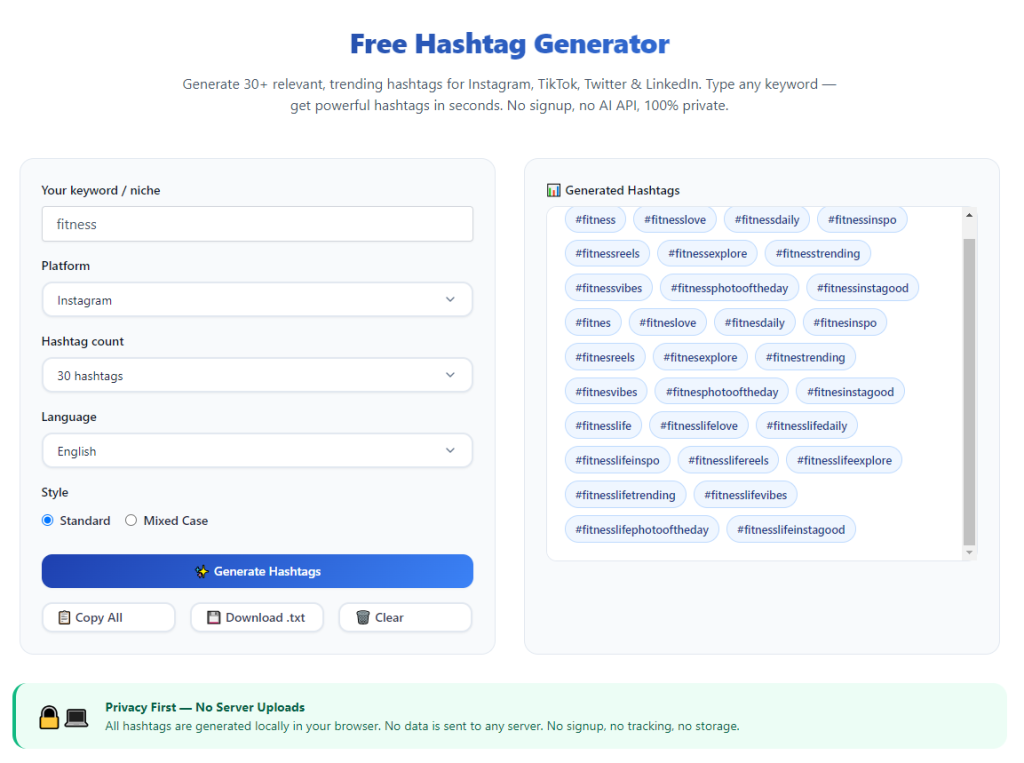
Launch the tool in your browser. The main interface is straightforward, with a keyword input box and various filter menus for customization.
Take a moment to locate volume filters, category options and the copy button before you begin generating tags.
Step 3: Enter your main keywords
Type your selected keywords into the input field. Use clear, specific terms that match your post to get the most relevant hashtag results.
Avoid overly long phrases. Single words or short word combinations work best for accurate and useful hashtag suggestions.
Step 4: Apply filters and preferences
Select your content category to filter out unrelated tags. Choose from lifestyle, food, travel, business or other niche groups.
Adjust volume filters to include a mix of popular, medium and small hashtags. Aim for a healthy blend to maximize reach across different user groups.
Set your preferred total number of hashtags. Follow standard best practices to avoid using too many or too few tags per post.
Step 5: Generate full hashtag sets
Click the generate button to create your list of Instagram hashtags. The tool will display all suggestions on screen within a second.
Scan through the full list. Remove any tags that feel irrelevant or do not match the tone of your post or brand.
Step 6: Sort and group your selected tags
Separate your hashtags into groups if needed. Many creators split broad tags, niche tags and branded tags for different placement options.
Check for repeated or very similar tags. Remove duplicates to keep your set clean and effective for the platform algorithm.
Step 7: Copy the final hashtag list
Use the one-click copy feature to save your curated hashtags to your clipboard. The full list is now ready to use for your Instagram post.
You can also save multiple different sets in a note file to reuse for similar posts in the future.
Step 8: Add hashtags to your Instagram post
Open your Instagram app and start creating a new post. Paste the copied hashtags into your caption or the first comment section.
Many users place tags in comments to keep captions clean. Choose the placement style that fits your personal or brand aesthetic.
Step 9: Publish and track performance
Finish editing your post, add captions and visuals, then publish live. Keep an eye on engagement, views and new follower activity afterward.
Note which types of tags bring the best results. You can adjust your generator settings next time based on real performance data.
Step 10: Generate new sets for future content
For your next post, repeat the process with new keywords. Rotate your hashtag lists regularly to avoid using identical tags across every update.
Common Mistakes to Avoid When Using the Hashtag Generator
Even when you know how to use hashtag generator for Instagram, simple mistakes can limit your content’s potential reach and growth.
Only selecting huge high-volume hashtags
Tags with billions of posts have fierce competition. Your content will get buried fast without smaller niche tags to support it.
Using irrelevant generated hashtags
Never copy every single tag blindly. Delete any suggestions that do not connect to your post topic, as this confuses the platform algorithm.
Reusing the exact same hashtag list repeatedly
Duplicating tag sets for every post can slow growth. Rotate keywords and generate new combinations to keep your strategy fresh.
Ignoring niche and local hashtags
Smaller targeted tags connect you with dedicated fans. Skipping these means missing out on highly engaged and loyal followers.
Adding too many hashtags in one post
Overloading posts with tags looks messy and may hurt performance. Stick to reasonable numbers based on platform best practices.
Pro Tips to Get Better Results From the Tool
Use these practical tips to refine your skills while learning how to use hashtag generator for Instagram and boost long-term profile growth.
- Bookmark the generator for quick access, so you can pull new hashtag sets right before creating each post.
- Create multiple tag groups for different content types, such as travel, food or product posts, to stay organized.
- Mix branded tags, niche tags and trending tags together for a well-rounded discovery strategy.
- Test different keyword combinations to see which ones bring the most views and new followers to your page.
- Update your hashtag lists regularly to match new trends, seasons and changes in your content focus.
- Save your highest-performing tag sets to reuse for similar posts and cut down on repeated work.
Final Thoughts
Hashtags remain a cornerstone of growth and discovery on Instagram. A smart hashtag strategy turns casual viewers into loyal followers and active customers.
Manual hashtag creation is slow, unreliable and easy to get wrong. Guessing which tags work puts unnecessary limits on your content potential.
Learning how to use hashtag generator for Instagram eliminates these challenges entirely. The tool delivers relevant, balanced and performance-focused tags in just a few clicks.
With keyword input, volume filters and quick copy features, it works for casual users, content creators and business profiles of all sizes.
By following the step-by-step process and expert tips above, you can consistently craft effective hashtag sets, expand your audience and build steady growth on Instagram for the long run.
After learning the operation method, click the link below to enter the tool page for immediate use.