Writing engaging blog content takes more than just sharing valuable ideas. How easy your text is to read directly impacts how long visitors stay on your pages and whether they return in the future.
Many blog writers spend hours drafting articles, only to see low engagement rates. Complex sentences, overly advanced vocabulary and messy paragraph structure push readers away before they finish reading.
Judging readability by eye alone is unreliable. What feels simple to you might seem confusing to casual readers from different backgrounds or skill levels.
A trusted free readability checker for blog content solves this common problem. It analyzes your writing objectively and points out areas to adjust for a smoother reading experience.
This detailed guide covers the downsides of manual readability checks, key advantages of using a dedicated tool, essential features, real use cases and a full step-by-step usage tutorial for bloggers of all levels.
Why Manual Readability Checks Fall Short for Blog Content
Relying on your own judgment to test blog readability creates multiple hidden issues that hurt your overall content performance.
Subjective personal judgment
Writers often grow familiar with their own style and word choices. You may overlook long sentences or complicated terms that confuse outside readers.
No standardized scoring system
There is no clear way to rank how readable your post is without tools. You cannot compare different articles or track improvements over time.
Missed structural issues
Dense blocks of text, repetitive phrasing and inconsistent sentence length are hard to spot manually. These small flaws add up and break reading flow.
Time-consuming self-review
Going back line by line to simplify content adds extra work to your writing routine. It slows down your entire blog publishing schedule.
Mismatch with target audience
Every blog serves a unique group of readers. Manual checks cannot tailor feedback to match the reading level your specific audience expects.
Lack of actionable fix suggestions
Even if you notice awkward text, you may not know how to rephrase it. Manual review only highlights problems without offering clear solutions.
Core Benefits of Using Free Readability Checker for Blog Content
Integrating a free readability checker for blog content into your workflow elevates your writing quality and creates a better experience for every visitor.
Objective, data-driven readability scores
The tool uses proven readability formulas to grade your content numerically. You get clear, unbiased results instead of guesswork about your text quality.
Identifies hard-to-read sections instantly
It flags lengthy sentences, difficult words and clunky phrasing across your blog post. You can locate problem areas in seconds instead of lengthy reviews.
Saves valuable writing and editing time
Automated analysis cuts down self-editing work drastically. You can focus more on creating meaningful content and less on repetitive readability checks.
Aligns content with your target audience
Most tools let you aim for specific reading levels. You can adjust your blog content to fit beginners, general readers or industry professionals perfectly.
Boosts on-page engagement metrics
Easy-to-read posts keep visitors on your blog longer. Higher average read time signals quality to search systems and helps your content rank better over time.
Completely free with no hidden costs
A reliable free readability checker requires no paid upgrades for core functions. All standard analysis tools stay open for every blog post you create.
Supports consistent writing standards
Using the same tool for every post keeps your overall blog style uniform. Readers will enjoy a steady, familiar experience across all your articles.
Key Features to Look for in a Free Readability Checker for Blog Content
Not all online analyzers deliver the same results. When selecting a free readability checker for blog content, prioritize these practical, blogger-focused features.
Multiple standard readability scores
Look for tools that display common scoring metrics. These ratings give you a full picture of how easy your blog text is for average web users to understand.
Sentence and paragraph analysis
The tool should detect overly long sentences and oversized text blocks. Breaking these up is one of the fastest ways to improve blog readability.
Difficult word highlighting
Advanced analyzers mark complex vocabulary and suggest simpler alternatives. This feature is extremely useful for blogs targeting general audiences.
Plain language recommendations
Useful tools offer rephrasing tips for awkward phrases. These actionable suggestions make editing quick and straightforward for new and experienced writers.
Full text paste support
You should be able to paste entire blog drafts into the tool. There are no limits on text length for complete post analysis.
Basic grammar and style checks
Extra style feedback helps you fix minor errors while checking readability. It combines two essential editing steps into one simple process.
Simple, ad-free interface
A clean layout lets you focus on analysis results. Distracting pop-ups or crowded screens slow down your daily blog editing workflow.
Common Use Cases for a Blog Readability Checker
A versatilefree readability checker for blog content works for nearly every type of blog and content goal across all niches.
General lifestyle and hobby blogs
These sites serve broad audiences of all ages and education levels. Readability checks ensure your casual, conversational tone stays accessible to everyone.
Business and marketing blogs
Professional blogs need clear, concise writing. The tool balances industry terms with plain language to keep content authoritative yet easy to follow.
Educational and tutorial blogs
How-to content relies on simple instructions. Optimized readability helps readers follow steps and learn new skills without confusion.
Niche industry and technical blogs
Even technical topics benefit from readable text. The tool helps you simplify jargon so newer followers can understand specialized information.
Personal journal and opinion blogs
Conversational personal posts feel more natural when sentences flow smoothly. Readability tools polish your writing while keeping your unique voice intact.
Guest post and collaborative content
When working with multiple writers, the tool enforces unified readability standards. All guest content matches your blog’s overall reading experience.
Old blog post updates
Refreshing archived articles often means rewriting sections. Use the checker to update old text and bring it up to modern readability standards.
Step-by-Step Guide: Use Free Readability Checker for Blog Content
Follow this easy workflow to run a full analysis and refine your posts using a free readability checker for blog content.
Step 1: Finish your first blog content draft
Complete your full article including headings, body text and closing sections. Do not worry about readability during the initial writing phase.
Write naturally to get all your ideas down first. The editing and polishing stage comes after your draft is complete.
Step 2: Copy your full blog text
Highlight and copy the entire content of your blog post. Include all body paragraphs, and you can choose to exclude titles if you prefer.
Make sure no text is left out so the tool runs a complete and accurate analysis of your full post.
Step 3: Open the readability checker tool
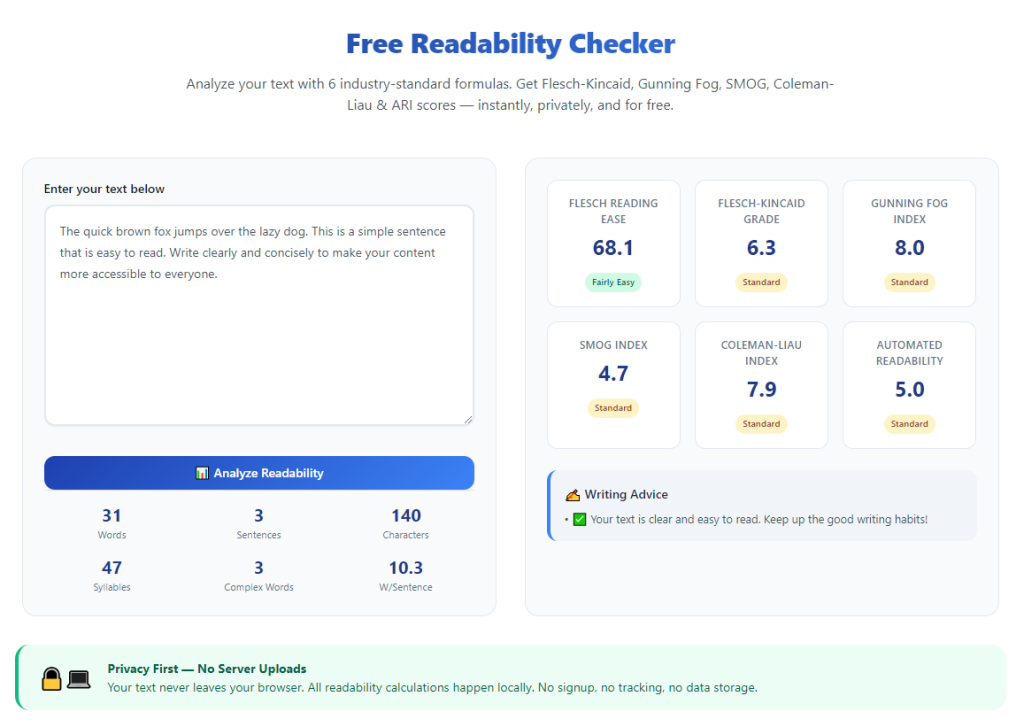
Launch the online tool in your browser. The main screen will feature a large text input box designed for pasting full articles.
Take a quick look at the main functions, including score displays, highlight settings and suggestion panels.
Step 4: Paste content into the input field
Paste your copied blog content into the designated text area. Review the pasted text briefly to confirm no formatting errors or missing lines.
You can keep original line breaks and short paragraphs, as these elements also factor into overall readability results.
Step 5: Start the content analysis
Click the analyze or check button to begin the scan. The process only takes a few seconds, even for long-form blog articles.
Once finished, the screen will display your overall readability scores and a breakdown of different metrics.
Step 6: Review readability scores and ratings
Check your main readability grade first. Compare it to the ideal level for your blog’s target audience and niche.
Note down areas where your score falls below expectations. These are your top priorities for editing and revision.
Step 7: Address highlighted problematic text
Move through the article section by section. Focus on highlighted long sentences, complex words and dense paragraph blocks.
Shorten lengthy sentences and split large paragraphs into smaller chunks. This creates breathing room for online readers.
Step 8: Apply suggested word and phrase changes
Look over the tool’s plain language suggestions. Swap overly complicated words for simpler alternatives where it fits your tone.
You do not need to accept every suggestion. Keep unique industry terms if they are necessary for your blog’s topic.
Step 9: Recheck revised content
After making edits, copy the updated text and run a second analysis. Compare the new scores against the original results.
Repeat small edits if your readability rating still needs improvement for your audience goals.
Step 10: Finalize and publish your blog post
Once you reach a satisfying readability level, copy the fully revised content back to your blog editor.
Add images, links and final formatting, then schedule or publish your post to your live blog.
Common Mistakes to Avoid When Using a Readability Checker
Even with a reliable free readability checker for blog content, these common errors can hold back your content quality.
Chasing an unrealistically low reading level
Dumbing down all text too much can make professional blogs feel shallow. Match your score to your audience, not just the lowest possible rating.
Accepting every automated suggestion blindly
Automated tips do not always match your unique writing voice. Adjust recommendations to keep your style authentic while improving readability.
Ignoring paragraph structure issues
Focusing only on words and sentences is not enough. Large blocks of text still hurt readability on mobile and desktop blog layouts.
Running checks only on finished posts
Waiting until the very end can lead to major rewrites. Run quick checks halfway through drafting to fix issues early.
Using the same standard for all blog niches
A technical blog can naturally use more advanced language. Avoid forcing every post to follow the exact same readability rules.
Overlooking tone while simplifying text
Simplifying sentences should not make your writing sound robotic. Balance easy reading with a natural, engaging tone for blogs.
Expert Tips to Get the Best Results From the Tool
Use these practical strategies to maximize the value of a free readability checker for blog content and build consistently high-quality posts.
- Bookmark the tool for quick access, so you can run checks immediately after finishing each blog draft.
- Set a standard readability target for your entire blog and use it as a benchmark for every new post.
- Alternate sentence length intentionally; mix short and medium lines to create a natural reading rhythm.
- Keep a list of complex niche terms and only replace them when simpler words work without losing meaning.
- Run readability checks on old archived posts during content updates to refresh their overall quality.
- Share your target readability goals with guest writers to maintain uniform standards across all blog content.
- Pair readability optimization with short subheadings to make long blog posts even easier to scan and follow.
Final Thoughts
Readability is a foundational element of successful blog content. When your text is clear and smooth, visitors stay longer, engage more and return to your blog regularly.
Manual editing and personal judgment can only take your writing so far. Objective analysis tools fill the gaps and catch issues your eyes might miss.
A dependable free readability checker for blog content streamlines your editing process, delivers unbiased scores and offers clear ways to improve every article you write.
It works for new bloggers building an audience and experienced writers managing large content libraries across all niches and topics.
By following the step-by-step process and expert tips above, you can craft consistently readable, audience-friendly blog content that stands out and performs well long into the future.
After learning the operation method, click the link below to enter the tool page for immediate use.