Social media content thrives on relatable, inspiring and shareable text. Short quotes have long been a favorite content type for creators, brands and regular users across all popular platforms.
Many people struggle to come up with fresh quotes day after day. Staring at a blank screen leads to repetitive content, slow posting schedules and lower interaction from followers.
Searching manually for suitable quotes across different sources also takes up valuable time. It pulls focus away from other important tasks like visual design and audience interaction.
Learning how to use quote generator for social media changes this routine entirely. This practical tool delivers endless quote ideas tailored for social feeds, and it is simple enough for anyone to master quickly.
This detailed guide covers common struggles with manual quote creation, key advantages of dedicated generators, essential tool features, typical use cases and a full step-by-step usage walkthrough.
Common Challenges of Creating Social Media Quotes Manually
Writing or hunting for quotes without a dedicated tool creates a range of small but persistent problems for daily social media posting.
Frequent creative blocks
After posting quotes for weeks or months, most creators run out of unique ideas. It becomes hard to find new angles, themes and word choices that resonate with audiences.
Time wasted on manual research
Browsing through books, articles and old posts to find fitting quotes is slow work. What could take minutes with a tool often stretches into long browsing sessions.
Mismatched tone for different platforms
A quote that works for one social channel may feel out of place on another. Adjusting wording manually to fit each platform doubles your daily workload.
Difficulty matching quotes to visual content
Many social posts pair text with photos or graphics. Finding a quote that complements your visuals perfectly requires extra trial and error when working alone.
Risk of repetitive or overused phrases
Popular quotes get shared constantly across social feeds. Using the same lines as everyone else makes your content blend in and lose its unique appeal.
Key Benefits of Learning How to Use Quote Generator for Social Media
Mastering how to use quote generator for social media streamlines your content workflow and elevates the overall quality of your social feeds.
Produces unlimited fresh quote ideas instantly
The tool generates original and themed quotes in seconds. You will never face a shortage of content ideas for your daily or weekly posting schedule.
Saves hours of manual searching and writing
You no longer need to hunt for quotes or draft lines from scratch. All core text creation is handled automatically, freeing up time for other creative tasks.
Offers tone and style options for every audience
Switch between inspirational, funny, motivational, thoughtful or casual styles. You can align every quote with your brand personality or personal account vibe.
Supports content for all social platforms
Generators adjust quote length and structure to fit different feed rules. Whether you need short snappy lines or longer reflective text, the tool has you covered.
Reduces repetition in your content feed
Diverse generated phrases keep your posts original. Your followers will see varied content and be more likely to stop, read and share your updates.
Works for personal accounts, small brands and creators alike
No matter if you run a personal profile, a small business page or a creator account, this tool adapts to your goals and content style with ease.
Must-Have Features in a Reliable Quote Generator for Social Media
Before fully learninghow to use quote generator for social media, take time to recognize the core features that make a tool practical and user-friendly.
Theme and category selection
Browse preset themes like positivity, lifestyle, business, friendship and wellness. Categories let you pull quotes that match your current content calendar or campaign theme.
Custom keyword input
Type in specific words related to your niche, topic or post idea. The generator builds custom quotes around your keywords for fully personalized content.
Tone and mood adjustment
Toggle between lighthearted, serious, uplifting, witty or professional moods. This simple setting ensures every quote matches the emotion you want to convey.
Length control settings
Choose short one-liners for fast-scrolling feeds or longer paragraphs for detailed posts. Length options optimize text for different platform layouts.
Quick copy functionality
One-click copy lets you move selected quotes directly to your clipboard. You can paste text into posts, design tools or notes without extra typing.
Multiple version generation
Each search returns several unique variations of a quote. Having multiple options makes it easy to pick the best fit for your visuals and messaging.
Top Usage Scenarios for Social Media Quote Generator
Once you understand how to use quote generator for social media, you can apply the tool to nearly every type of social content strategy.
Daily regular feed posts
Fill your daily posting slots with quick, engaging quotes. This keeps your account active and maintains steady visibility on social algorithms.
Motivational and business content for brand pages
Small businesses and professional accounts use motivational quotes to connect with clients. These lines build trust and reinforce brand values across the feed.
Lifestyle and personal profile updates
Personal accounts rely on relatable lifestyle quotes to engage friends and followers. The tool creates natural-sounding lines for everyday moments and thoughts.
Holiday and seasonal themed posts
Match quotes to holidays, seasons or special events. Themed content feels timely and encourages more likes, comments and shares from your audience.
Content paired with photos and graphic designs
Most social visuals work best with supporting text. Generate quotes that complement your images to create cohesive, eye-catching full posts.
Story and short-form social content
Short quotes are ideal for temporary story content. Generate concise lines that fit the quick-view format of modern social story features.
Step-by-Step Guide: How to Use Quote Generator for Social Media
Follow this simple, actionable workflow to master how to use quote generator for social media and create quality content in just a few clicks.
Step 1: Define your content goal and theme
Decide what type of quote you need. Think about the overall theme, mood and topic for your upcoming social post.
Note down any specific keywords or core ideas you want the quote to include. These details will guide the tool to create targeted results.
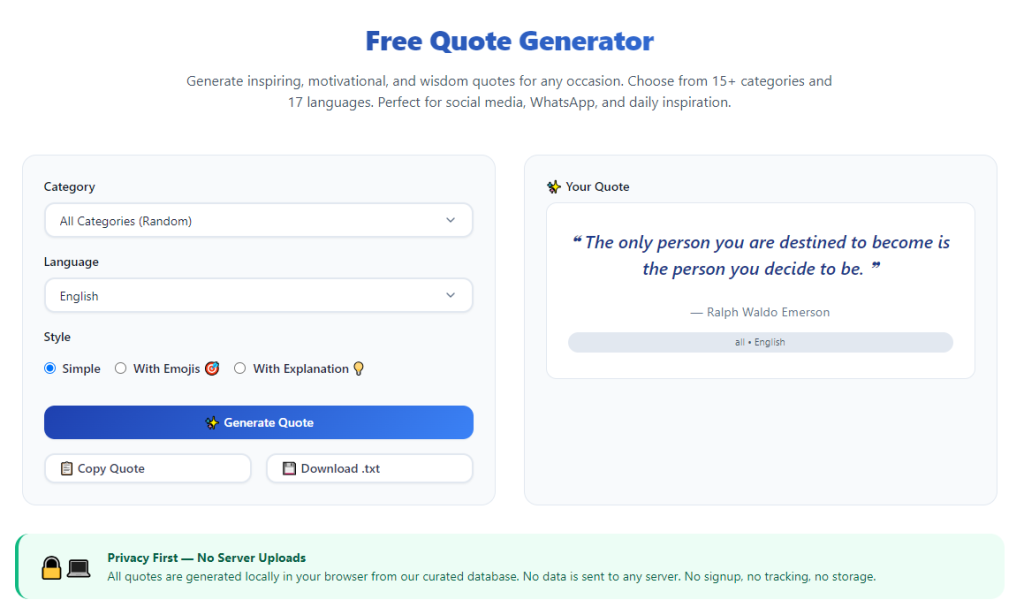
Step 2: Open the quote generator tool
Launch the tool on your browser and wait for the main interface to load. The layout is usually clean and focused on content creation.
Take a moment to locate key sections: category menus, keyword boxes, tone controls and the results display area.
Step 3: Select a content category or theme
Pick a preset category that matches your post topic. Common options include inspiration, humor, relationships, work and daily life.
Choosing a category first narrows down results and ensures all generated quotes stay relevant to your content plan.
Step 4: Adjust tone, mood and quote length
Set the tone to match your account style. Choose playful for casual pages, or professional for business and industry accounts.
Select your preferred quote length. Short lines work best for fast feeds, while longer text suits detailed posts and storytelling content.
Step 5: Add custom keywords (optional)
If you have specific words or phrases to include, type them into the keyword field. Keep keywords simple and focused for the most natural results.
You can skip this step if you only want generic themed quotes. The tool will still deliver solid ready-to-use content.
Step 6: Generate quote options
Click the generate button to create a set of unique quotes. The process takes only a second, and all options will appear on screen immediately.
Read through every result slowly. Pay attention to wording, flow and whether the line fits your planned visual or post message.
Step 7: Copy your chosen quote
Once you find the perfect line, use the built-in copy button to save the text to your clipboard.
You can also select multiple favorite quotes to save for future posts, building a small content bank for later use.
Step 8: Tweak text manually (optional)
Make small edits to the quote if needed. Adjust a few words to make the line sound more personal or aligned with your unique voice.
Minor changes keep the content original while retaining the core message from the generator.
Step 9: Prepare and publish your social post
Paste the copied quote into your social media post editor. Pair it with images, stickers or hashtags to complete the full post.
Review the full content one last time, then schedule or publish your post to your feed.
Step 10: Start a new generation session
Reset the settings if you need more quotes for additional posts. Repeat the process to build out multiple pieces of content in one sitting.
Common Mistakes to Avoid When Using a Social Media Quote Generator
Even after learning how to use quote generator for social media, small mistakes can lower the quality and performance of your social content.
Choosing mismatched themes for your audience
A humorous quote will not fit a serious professional page. Always match the selected category and theme to your followers’ expectations.
Ignoring tone settings
Leaving the default tone on for every post creates an inconsistent feed. Adjust mood based on the message you want to share each day.
Overlooking quote length for platform rules
Extra long quotes can get cut off on certain feeds. Always check length settings to fit the format limits of your main social platform.
Using every generated quote without review
Some automated lines may sound awkward out of context. Read each quote aloud to test flow before posting publicly.
Relying only on generic quotes long-term
Generic lines work for quick posts, but mixing in custom keyword-based quotes keeps your content more unique and personal over time.
Practical Tips to Get Better Results From the Tool
Use these simple tactics to refine your skills and get the most value as you learn how to use quote generator for social media.
- Bookmark the tool for instant access, so you can pull quotes anytime you need to fill a posting slot.
- Generate several quotes in one session and save them in a note file to build a content library for busy days.
- Mix different themes throughout the week to keep your feed varied and engaging for regular followers.
- Pair each quote with relevant hashtags to expand reach and connect with more people interested in your topics.
- Test different keyword combinations to create highly personalized quotes for niche content and brand campaigns.
- Alternate between fully generated quotes and lightly edited lines to maintain a natural, authentic voice across all posts.
Final Thoughts
Quotes remain one of the most reliable and shareable forms of social media content. They connect with audiences on an emotional level and keep feeds active and interesting.
Manual quote creation and research drain time and creativity, leaving many users stuck with dull or repetitive posts week after week.
Learning how to use quote generator for social media removes these hurdles entirely. The tool delivers fast, diverse and theme-ready quotes for every type of social account.
With flexible categories, tone controls and simple copy features, it suits casual users, content creators and small business marketers equally well.
By following the step-by-step process and practical advice above, you can consistently create appealing quote posts, save valuable time and grow engagement across all your social media profiles.
After learning the operation method, click the link below to enter the tool page for immediate use.