If you’ve ever planned any kind of event—big or small—you know how fast costs spiral out of control. I’ve been there, totally winging the budget process, guessing per-person expenses, and ending up way over my planned spending limit.
Early on when I started planning casual parties and small community gatherings, I tried tallying guest costs manually. I’d write down catering fees, venue add-ons, and misc expenses on a notebook, divide by my guest count, and call it a day. Spoiler alert: it was never accurate.
I’d forget tiny line items like dessert upgrades, drink service fees, or table rental costs. Those small overlooked expenses added up fast, and suddenly my low-budget event turned into an overpriced hassle. That’s when I started looking for a better system, and the event guest cost calculator became my go-to planning tool.
The problem most new planners face is simple: they open the tool and have no clue how to navigate it properly. They plug in random numbers, skip key fields, and end up with misleading budget estimates. Today, I’m breaking down exactly how to use event guest cost calculator step by step with real personal experience, no generic fluff, and no overly technical jargon.
This is the exact process I use for every event I plan now, and it completely eliminates budget guesswork.
Why an Event Guest Cost Calculator Beats Manual Math
You might be thinking, why not just calculate guest costs by hand? I get the thought. It feels faster at first glance, right? But speed means nothing if your numbers are wrong.
Manual event math is full of human error. You miscalculate a catering per-head fee, forget to multiply service charges by total guests, or miss a flat-rate fee that applies to the entire event. I’ve made every single one of these mistakes, and each one messed up my entire budget outline.
A dedicated accurate per-guest event budget calculation tool does all the repetitive math for you. It locks in your line items, applies fees evenly across every attendee, and generates a transparent breakdown you can actually trust.
What I love most is that it forces you to account for every single expense. No more hidden costs popping up last minute. No more scrambling to adjust budgets days before the event date. Once you master the tool’s workflow, event budgeting becomes stress-free and straightforward.
Pre-Setup Prep: What You Need Before Using the Calculator
Before jumping into the step-by-step process, let’s cover a quick prep phase most people skip. Skipping this part is the main reason your calculator results end up inaccurate, even if you follow every tool step perfectly.
First, gather all your fixed and variable event expenses. Fixed costs are flat fees that don’t change based on guest count—think venue rental flat rates, setup fees, or equipment rental charges. Variable costs scale directly with how many people attend, like catering plates, drinks, party favors, and seating place settings.
Second, lock in your confirmed guest count or estimated guest range. I used to input a random guess number just to test the calculator, and it threw off every per-guest average. Even if you’re estimating, use a realistic minimum and maximum attendee number for honest results.
Third, note down any percentage-based fees. This includes service fees, gratuity, tax rates, or vendor surcharges that apply to food and beverage costs. These small percentage values make a huge difference in final guest pricing if left out.
Doing this quick prep makes your event guest cost calculator setup for beginners way smoother and guarantees realistic, usable budget numbers.
How to Use Event Guest Cost Calculator Step by Step (Proven Workflow)
This is my full, unfiltered process I’ve refined after dozens of event planning sessions. It’s casual, no fancy rules, just practical steps that actually work for real-world events.
Step 1: Open a Dedicated Event Guest Cost Calculator Tool
First, find a basic, focused event guest cost calculator. Avoid generic budget calculators that try to handle business finances, travel costs, or personal budgeting. Those multi-use tools have irrelevant fields that confuse your event-specific math.
Stick to tools built exclusively for event per-guest pricing. They have pre-built fields for catering, favors, fees, and venue add-ons that match exactly what you need for how to calculate total event guest expenses.
Step 2: Input Your Total Confirmed or Estimated Guest Count
The first mandatory field is always guest count. This is the foundation of your entire calculation, so don’t rush it.
If you’re early in planning and don’t have confirmed RSVPs yet, use a conservative estimated number. I always round up slightly instead of rounding down. The last thing you want is to under-budget for extra last-minute guests.
One of the biggest common event calculator entry mistakes is inputting total event staff plus guests in this field. Staff is usually covered in flat venue fees, not per-guest catering costs. Double-check you’re only counting attendees here.
Step 3: Add All Variable Per-Guest Expenses
Next up is the most detailed section: variable per-guest costs. These are expenses charged individually for every person attending your event.
Start with catering costs: plated meals, buffet per-head pricing, appetizer servings, and dessert portions. Then add beverage costs, whether it’s open bar pricing, soda packages, or coffee service per guest.
Don’t forget small per-person items most people miss: custom party favors, individual place cards, guest seating rentals, and personalized event materials. Individually these items feel cheap, but they add up drastically across a full guest list.
I used to skip these minor line items entirely, and my final budget always looked way cheaper than the actual spend. Now I log every single per-guest cost for a custom event cost breakdown per attendee that’s 100% truthful.
Step 4: Enter Fixed Event Costs for Proper Allocation
This step is what separates amateur calculator usage from pro-level budgeting. Most beginners skip fixed cost allocation, which makes their per-guest numbers completely misleading.
Input all flat event fees: base venue rental, stage setup fees, audio visual equipment charges, decor flat rates, and vendor delivery fees. The calculator will automatically divide these fixed costs evenly across every guest to show your true per-person investment.
Before I started doing this, I thought my per-guest cost was only catering and drinks. Once I allocated venue and setup fees, I realized each attendee cost way more than I initially calculated. This step completely changed how I price my event budgets.
Step 5: Input Tax, Gratuity, and Additional Service Fees
Nearly every event vendor adds percentage-based fees, and these fees apply to your entire catering and service total. Never skip this section.
Type in your local sales tax percentage, standard gratuity rates, and any vendor service or administrative fees. The calculator will apply these percentages across your entire expense list instead of you calculating them manually.
Manual percentage math is so easy to mess up. I’ve undercalculated gratuity dozens of times, leaving me with unplanned expenses right before event day. The calculator eliminates that risk entirely.
Step 6: Review and Adjust Optional Custom Line Items
Most quality event guest cost calculators include optional custom fields for unique event expenses. This is where you add anything specific to your gathering that doesn’t fit standard categories.
This could be kids’ activity packs for family events, shuttle service fees for guest transportation, photo booth per-person prints, or custom guest signage. Every event is different, so these custom fields make your budget hyper-specific to your needs.
Step 7: Generate and Analyze Your Final Breakdown
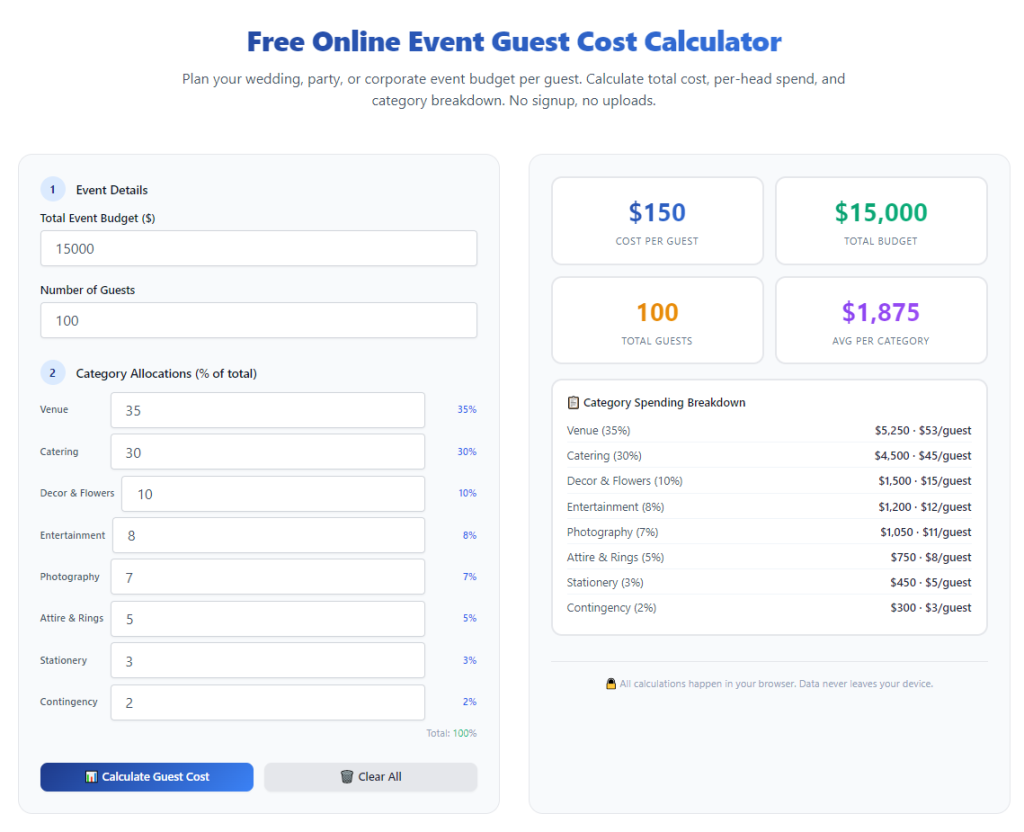
Once every field is filled out accurately, hit the calculate button. Within seconds, you’ll get two critical numbers: your total overall event cost and your exact per-guest average cost.
Take time to read the full breakdown, don’t just glance at the final number. The best tools show exactly how much each expense category contributes to your per-guest pricing. This lets you cut costs easily if your budget is too tight.
After running the numbers through the event guest cost calculator, I added fixed venue fees, AV setup charges, tax, gratuity, and custom guest swag. My true per-guest cost jumped to $52.
I’ve made every mistake in the book with these tools, so you don’t have to. Here are the most frequent errors that skew your event budget data.
Fourth, ignoring custom event expenses. Unique add-ons always exist for every event, and leaving them out leads to last-minute budget surprises.
I’ve used this exact process for tiny 20-person gatherings all the way up to 200-person corporate events, and it’s never failed me. It removes all the guesswork, stress, and manual math errors that make event planning overwhelming.
No more blown budgets, no more last-minute financial panics, no more guessing at per-guest pricing. Just clean, clear, accurate numbers that make event planning simple and stress-free.
After learning the operation method, click the link below to enter the tool page for immediate use.