If you’ve ever tried to calculate simple interest by hand, you know just how easy it is to mess up the numbers. I’ve been there too. A few years back, I was planning a small personal savings plan and tried crunching simple interest manually. I messed up the time conversion and ended up with a completely wrong total amount.
That tiny mistake threw off my entire budget plan, and it took me ages to fix all my numbers. That’s exactly why a simple interest calculator is such a game-changer for regular people, not just finance experts.
The best part? You don’t need any advanced math skills or financial background to operate it. In this complete hands-on guide, I’ll walk you through how to use simple interest calculator step by step, break down every confusing input field, share all the common user mistakes I’ve repeatedly encountered, unpack practical real-life calculation examples, and share actionable tips so you’ll never deal with inaccurate interest results again.
What Is a Simple Interest Calculator, Exactly?
Before jumping into the steps, let’s keep things clear. A simple interest calculator is a free, straightforward financial tool designed to compute simple interest earned or owed on a principal sum.
Unlike compound interest, which adds accumulated interest back to your principal, simple interest only calculates earnings based on your original principal amount. It’s the basic interest type for personal loans, savings accounts, short-term investments, and even student loans.
Most new users overcomplicate this basic financial tool for no reason at all, but it’s intentionally built for everyday people with zero finance experience. Every single input field serves one specific purpose, no redundant settings or confusing hidden functions. Once you get the hang of what each entry box requires, mastering basic simple interest calculator operations becomes totally effortless and intuitive.
Core Inputs You Need Before Using the Simple Interest Calculator
Before you start punching numbers into the tool, gather three basic pieces of information. Skipping this prep step is one of the biggest mistakes I see new users make. They rush to input random numbers and end up with inaccurate results.
First, you need your principal amount. This is the original sum of money you borrow, invest, or deposit. It’s your starting number, no added interest or fees included.
Second, note down your annual interest rate. This is the percentage rate charged or earned each year. Always use the decimal-based percentage the tool asks for, not a random whole number.
Third, confirm your time period for the calculation. This is hands down where most casual users slip up, myself included early on. The time frame you input has to perfectly match your rate’s annual basis, otherwise your entire calculation is off. I’ve messed this up countless times—blindly inputting month values instead of converted year values and ending up with wildly inflated, completely wrong interest totals that threw off my entire budget planning.
How to Use Simple Interest Calculator Step by Step (Beginner’s Guide)
Let’s get into the actual process. I’m keeping these steps super casual and easy to follow, no fancy financial jargon whatsoever.
Step 1: Locate a Reliable Simple Interest Calculator Tool
First off, find a standard online simple interest calculator. There are tons of free versions available with clean interfaces. Avoid overly complicated tools with extra investment add-ons—stick to basic models that only focus on simple interest calculations.
I used to pick random top-ranked calculators just because they popped up first on search results, and I quickly learned my lesson. A lot of generic tools come with hidden preset compound interest modes or auto-adjustment settings that skew your simple interest calculation results without you noticing. Always stick to basic, minimal tools built exclusively for simple interest math for the most accurate, consistent readings.
Step 2: Enter Your Exact Principal Amount
The first input box will almost always be labeled principal. Type in your exact starting money amount. Do not add commas, dollar signs, or special symbols in most calculators—only numeric values work.
This is such a tiny yet prevalent mistake I used to make all the time. I’d add commas for large principal numbers to keep things neat, and most calculator systems can’t process those symbols, causing the tool to either error out entirely or generate a completely wrong calculation. Taking one second to remove any special characters will save you tons of hassle and ensure valid simple interest calculator inputs.
Step 3: Input the Correct Annual Interest Rate
Next, fill in the interest rate field. This is your annual percentage rate for simple interest. If your rate is 5%, just type 5, not 0.05. Most user-friendly calculators are programmed for whole percentage numbers, not decimals.
Here’s a critical real-world tip I learned through trial and error: never mix up monthly rates with annual rates when filling out the tool. If your loan or savings plan only provides a monthly interest rate, always multiply it by 12 first before entering it into the simple interest calculator. Skipping this conversion is one of the fastest ways to produce drastically incorrect interest estimates.
Step 4: Adjust and Input the Accurate Time Duration
This is the make-or-break step for correct results. Most calculators default to years for time duration. If your loan or investment is in months or days, you have to adjust the unit manually.
For example, a 6-month savings term equals 0.5 years for annual rate calculations. Early on, I once forgot to convert months to years entirely and thought my short-term savings interest earnings were double what they actually were. It was such a frustrating, avoidable error, and it took me several minutes of cross-checking manual formulas to spot and fix the problem. This small conversion step is make-or-break for accurate simple interest math.
Always actively match your time unit to the calculator’s default annual setting to avoid subtle calculation drift that’s hard to spot at first glance.
Step 5: Double-Check All Input Fields for Errors
Don’t skip this quick check. I know it feels tedious, but it saves you from major mistakes. Glance over principal, rate, and time one last time.
Common typos and errors include accidental extra zeros, swapped rate and principal numbers, mismatched time units, and even accidental decimal point placement errors. That quick two-second visual check eliminates nearly all user-generated mistakes in online simple interest calculations.
Step 6: Calculate and Interpret the Final Results
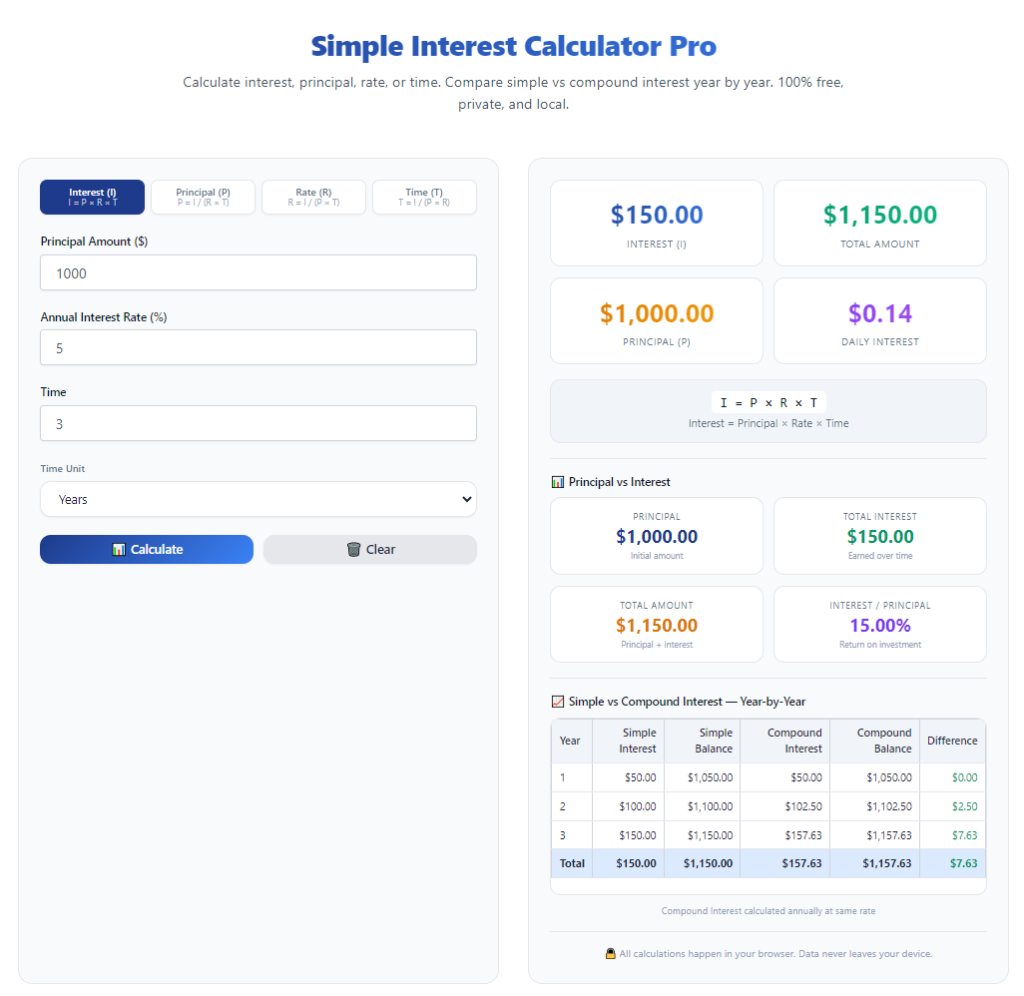
Hit the calculate button, and the tool will instantly generate two key numbers: total simple interest earned or owed, and the final total amount after adding interest to your principal.
A high-quality simple interest calculator will also display a detailed math breakdown, so you can visually verify how your principal, rate, and time work together to create your final number. I always recommend reading through this breakdown instead of just glancing at the final total—it helps you understand the calculation and catch any abnormal results instantly.
Real-World Example of Simple Interest Calculator Usage
Let’s use a real everyday scenario to make this concrete. Let’s say you deposit $8,000 into a savings account with a 4% annual simple interest rate for 3 years.
First, input 8000 as the principal amount. Next, enter 4 as the annual interest rate. Then set the time period to 3 years. Hit calculate.
The calculator will show your total simple interest is $960, and your final total balance is $8960. This matches the manual simple interest formula perfectly, but the tool does the math in one second instead of you calculating it manually.
I rely on this exact step-by-step process for all my personal short-term savings and small loan projections now. It’s incredibly fast, consistently reliable, and completely removes human calculation bias and error. It’s also perfect for anyone learning how to calculate simple interest for personal finance without formal training.
Most Common Simple Interest Calculator Mistakes to Avoid
After years of using these tools and helping friends fix their wrong calculations, I’ve noticed a handful of repeated errors. Avoid these, and your results will always be accurate.
First, incorrect time unit conversion. This is undeniably the number one mistake new users make. People will input 6 for a six-month term instead of converting it to 0.5 years, which instantly inflates interest numbers by 100% or more. Always convert months and days to standard years when working with annual interest rates for all your simple interest calculator entries.
Second, mixing up simple interest and compound interest tools. Some calculators advertise both functions, and users accidentally use compound settings for simple interest math. Always confirm the tool is set to simple interest calculation mode.
Third, entering outdated interest rates. If your loan or savings rate changed mid-term, don’t use the old rate. Update your input to match your current active rate for truthful results.
Fourth, ignoring decimal precision for small-value calculations. Even a tiny 0.1% typo in your interest rate can shift your final interest amount noticeably when you’re working with smaller principal sums. Never round off rates or principal amounts arbitrarily if you want precise, trustworthy simple interest calculator results.
Why Use a Simple Interest Calculator Instead of Manual Math?
You might be wondering why bother with a calculator when the simple interest formula is pretty basic. Trust me, the formula is easy on paper, messy in real life.
Manual calculations leave room for addition errors, multiplication typos, and time conversion mistakes. When you’re planning budgets, loans, or savings, even a tiny error can mess up your entire financial plan.
A simple interest calculator delivers instant, precise results every single time. It also lets you test different scenarios quickly. You can adjust the rate, time, or principal to see how your interest changes—something manual math can’t do fast.
I regularly run multiple what-if scenarios to plan my finances better: what if I increase my monthly deposit to boost principal? What if the market rate drops 1%? What if I extend my savings term by six months? The calculator lets me compare all these outcomes in minutes, something manual simple interest formulas could never do efficiently for everyday financial planning.
Best Use Cases for a Simple Interest Calculator
This tool isn’t just for students learning finance basics. It’s super practical for everyday financial decisions.
You can use it for short-term personal loan calculations to estimate total interest you’ll pay over your repayment term. It works great for car loans with simple interest structures too.
It’s perfect for savings account projections, especially for fixed-term deposit plans that use simple interest. You can easily estimate your passive earnings without guessing.
Even middle and high school students can use this tool to double-check homework answers and master basic finance concepts. It’s a fantastic, free study tool to verify manual math work and build a solid understanding of how simple interest works in real life.
Final Tips for Flawless Simple Interest Calculations
If you want consistently accurate results every single time you use the tool, stick to these small habits.
Always start with clean, verified numbers. Never guess your principal balance or active interest rate—use exact documented values from your loan agreement or savings account statements. Double-check all time units before hitting calculate. If you’re still new to the tool and unsure of its accuracy, run a small test calculation with known numbers first to confirm your simple interest calculator setup is correct.
Never rush through the input steps. I know it’s a quick tool to use, but rushing is where almost all errors happen. Take three extra seconds to review your entries, and you’ll never get a wrong result again.
Overall, learning how to use simple interest calculator step by step takes the stress and confusion out of basic personal finance math. It turns intimidating interest calculations into a simple, repeatable process that absolutely anyone can master, no matter your math skill level or financial experience. Mastering this tool makes budgeting, loan planning, and savings forecasting far more accurate and far less overwhelming for everyday life.
After learning the operation method, click the link below to enter the tool page for immediate use.