Base64 conversion stands as a routine task for developers, system admins and content creators every single day. People need to convert plain text into Base64 strings or revert encoded content back to readable format for configuration setup and data transmission.
Many popular Base64 conversion platforms force users to fill out registration forms and verify email addresses before unlocking basic encode and decode features. These formalities waste precious minutes for users who only need one-off quick conversion jobs.
Desktop-based Base64 software requires local installation and frequent version updates. Most advanced conversion options get locked behind monthly premium subscriptions, raising unnecessary expenses for casual personal use.
A reliable Free Base64 Encoder Decoder No Registration Required eliminates all these common obstacles entirely. Users finish full text conversion directly via regular web browsers without signup obligations or unexpected service costs.
This detailed user manual covers core downsides of registration-bound or paid Base64 conversion tools, key perks of Free Base64 Encoder Decoder No Registration Required, essential built-in functions, real-world applicable scenarios and step-by-step operation guidance for beginners across all industries.
Common Drawbacks of Registration or Paid Base64 Conversion Tools
Traditional Base64 encoder and decoder options tied to account creation and paid billing bring redundant restrictions during daily data conversion workflows.
Mandatory registration and mailbox verification before tool access
Numerous online converters lock core encode/decode functions behind signup pages. Hobby users and occasional operators have to submit private contact info just to process small text segments.
Unwanted spam emails after personal data submission
Platforms collecting user emails often share personal information with third-party advertisers, leading to persistent junk mail cluttering user inboxes long after initial registration.
Daily conversion quotas on free registered plans
Most freemium Base64 tools cap daily encode and decode volumes. Once users hit preset limits, upgrading to paid tiers becomes the only way to continue subsequent conversions.
Bulky installation for offline desktop Base64 utilities
Downloadable conversion programs occupy local disk storage space and demand regular patch updates to maintain stable encoding rules across different operating systems.
Distracting pop-up advertisements interrupt conversion operations
Ad-heavy Base64 sites load floating banners and sudden full-screen popups, breaking user focus while pasting source text and waiting for conversion outputs.
Core Benefits of Free Base64 Encoder Decoder No Registration Required
After switching to a trusted Free Base64 Encoder Decoder No Registration Required, users bypass signup barriers and extra fees seen on conventional Base64 conversion alternatives.
Instant browser access with zero account creation steps
Open the tool page on any available mobile or desktop browser and start conversion immediately. No email input, phone validation or profile setup is needed at any working stage.
Unlimited free encode and decode operations permanently
No daily conversion caps, trial expiration or hidden upgrade charges apply. Users process short phrases or large blocks of text countless times for personal and small commercial projects.
Lightweight page design for fast loading under unstable networks
With no extra ad scripts or tracking plugins embedded, the conversion page loads quickly even on weak mobile cellular connections or low-speed home internet links.
All conversion calculations run locally inside user browsers
Source text never gets uploaded to remote backend servers, protecting sensitive passwords, private configuration strings and confidential content from unauthorized data collection.
Cross-device uniform conversion performance
The same no-registration Base64 tool delivers identical encoding standards whether users operate on office laptops, smartphones or portable tablet devices outdoors.
One-click copy for generated conversion results
Finished Base64 strings or decoded plain text come with dedicated copy shortcuts, letting users save outputs to clipboard without tedious manual character selection.
Must-Have Core Functional Features on Free Base64 Encoder Decoder No Registration Required
When selecting a qualified Free Base64 Encoder Decoder No Registration Required, confirm these core functional modules exist to cover diverse daily conversion demands.
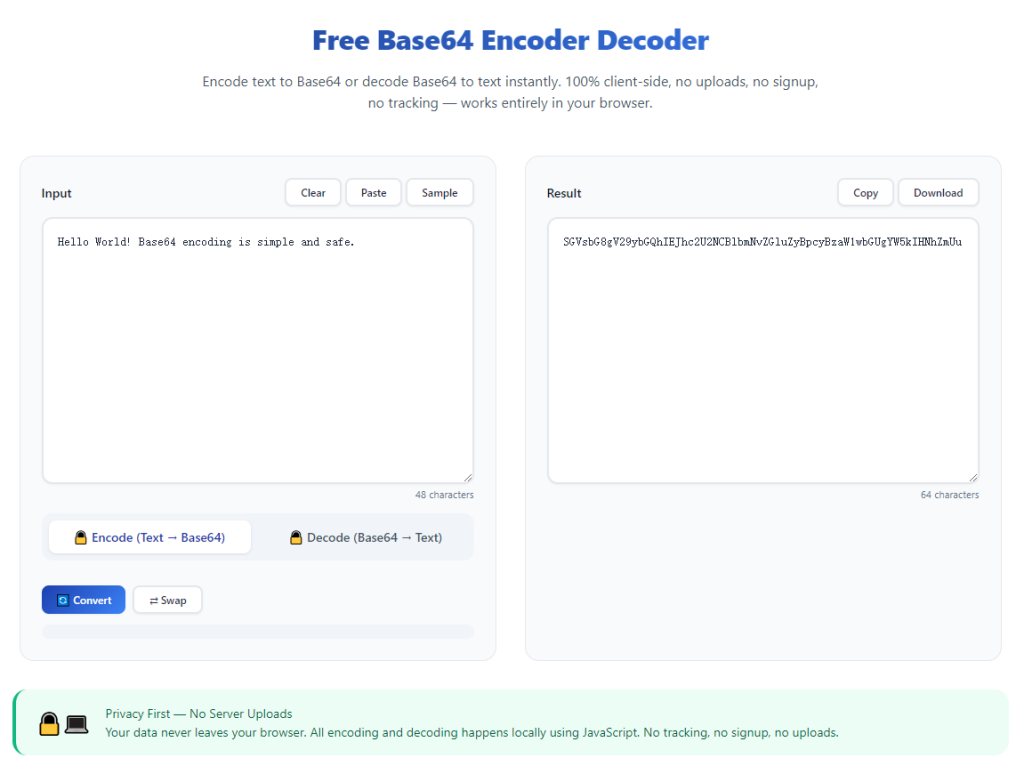
Dual dedicated input areas for original source content
Separate input boxes for plain text and Base64 encoded strings help users switch between encode and decode modes without manually clearing previous input content repeatedly.
One-touch toggle between Encode and Decode operation modes
A simple mode switch lets users shift from plain-text-to-Base64 encoding to Base64-to-original-text decoding in a single tap without reloading the entire webpage.
Spacious text field supporting bulk multi-line content pasting
Large input panels accept long paragraphs, configuration snippets and multi-line code copied from script files, server configs and application log documents.
Instant real-time conversion without waiting for backend processing
After pasting source content, conversion triggers instantly on-page, showing finalized results within milliseconds with no extra page refresh required.
Independent output block for separated conversion results
Original input data and finished conversion outputs sit in split sections, making side-by-side content comparison quick and straightforward for verification needs.
Quick reset option to wipe all input and output content
A dedicated clear button empties all text fields instantly, preparing a blank workspace ready for another round of independent Base64 conversion tasks.
Wide Practical Application Scenarios for No-Registration Base64 Conversion Tool
A fully featured Free Base64 Encoder Decoder No Registration Required serves IT staff, web developers, content editors and hobbyists across dozens of common daily use cases.
Backend developer server configuration parameter encoding
Backend engineers convert sensitive credential strings into Base64 format for app configuration files, avoiding plaintext password exposure inside source code repositories.
API payload quick encoding and content verification
Programmers encode test request content into Base64 before sending API calls, and decode returned encoded response data to read original readable parameter values smoothly.
DevOps staff environment variable setup adjustment
System administrators transform sensitive environment data into Base64 strings to comply with container deployment and cloud configuration formatting standards.
Content creator text obfuscation for short snippet sharing
Bloggers and content writers encode private note text into Base64 to share hidden messages on forums without exposing plain readable content directly.
Coding student programming assignment practice
New programming learners test Base64 conversion rules with free no-signup tools to finish class assignments without buying paid desktop coding suites.
Mobile developer local resource string conversion
App developers convert embedded text resources into Base64 for mobile project packaging and decode test strings during routine application debugging phases.
Complete Step-by-Step User Guide: Free Base64 Encoder Decoder No Registration Required
Follow this beginner-friendly sequential workflow to master fast Base64 encode and decode with no-registration free conversion tools easily.
Step 1: Prepare and copy your source text content
Select plain text or existing Base64 encoded strings from your documents, code files or message notes, then copy full target content to your device clipboard.
Remove accidental trailing blank spaces or invalid special symbols that may cause abnormal conversion outputs after pasting into the tool.
Step 2: Launch Free Base64 Encoder Decoder No Registration Required in your browser
Open your preferred desktop or mobile web browser and access the no-cost Base64 conversion tool directly from the browser address bar.
Check no signup popups, paywall alerts or mandatory download prompts appear after the webpage finishes full loading completely.
Step 3: Pick your target operation mode: Encode or Decode
Toggle the built-in mode selector first; choose Encode if converting regular text to Base64, or switch to Decode to revert Base64 strings back into original readable content.
Double-check selected mode matches your conversion goal to prevent reversed wrong-format outputs after subsequent content pasting.
Step 4: Paste pre-copied source content into corresponding input box
Insert your copied text into the dedicated input field matching your selected encode or decode working mode on the main tool interface.
Confirm full content finishes pasting without missing fragments caused by incomplete clipboard copying errors.
Step 5: Check auto-generated conversion results in output panel
Most optimized tools run instant conversion automatically right after content input, displaying finished Base64 or decoded plain text in the separated result block instantly.
Review generated output briefly to confirm formatting matches your expected Base64 structure or original plain text layout.
Step 6: Copy finished conversion result for saving and reuse
Click the available copy icon beside output content to save converted text directly into your clipboard for insertion into configuration files or project documents.
Switch operation mode and repeat the full workflow if you need to reverse-convert the newly generated result later on.
Step 7: Reset fields and bookmark tool page for future access
Tap the reset control to clear leftover input and output text, cleaning the conversion workspace ready for upcoming new Base64 conversion tasks.
Save the tool webpage into your browser bookmark folder to launch one-click access during sudden urgent conversion needs down the line.
Common Conversion Mistakes to Avoid With Free Base64 Encoder Decoder No Registration Required
Even with convenient no-cost no-signup conversion available, careless operation leads to broken outputs and wasted working time for regular users.
Keep using signup-locked paid converters for casual small-scale tasks
Registration steps and recurring fees slow routine conversion; rely on Free Base64 Encoder Decoder No Registration Required for all daily encode and decode work.
Paste content with invisible extra blank spaces or broken characters
Unnecessary hidden symbols distort Base64 formatting, forcing users to re-copy clean source content and redo full conversion cycles repeatedly.
Select wrong Encode/Decode mode before inputting source text
Mode mix-up turns valid Base64 into garbled random strings or encodes regular text into unusable broken encoded content entirely.
Close browser tab before copying finished conversion outputs
Unexpected page closure wipes all generated results completely, requiring users to re-paste original text and restart conversion steps from scratch again.
Attempt to decode non-Base64 random character strings blindly
Irregular non-standard text cannot parse into readable format, resulting in messy invalid output with no practical usable value after conversion.
Expert Productivity Tips to Optimize Free Base64 Encoder Decoder No Registration Required Usage
These actionable practical tips help users speed up daily Base64 conversion every time opening the no-registration free conversion tool.
- Depend on Free Base64 Encoder Decoder No Registration Required to cut spending on paid conversion software and skip tedious repeated registration formalities.
- Store the tool link inside browser bookmarks to complete emergency Base64 conversion with just one click amid sudden development debugging needs.
- Split extremely long multi-thousand-character text into smaller chunks to avoid browser lag and keep consistent clean conversion output formatting.
- Always confirm Encode or Decode selection before content pasting to eliminate redundant rework caused by inverted conversion results.
- Save frequently used encoded Base64 results inside local notes to skip repeated identical conversion operations for recurring project parameters.
- Cross-check decoded plain text against original source content after conversion to make sure no data loss happens during Base64 parsing processes.
Final Thoughts
Base64 encoding and decoding remains an irreplaceable basic operation for data hiding, configuration setup and cross-platform content transmission in modern IT work.
Registration barriers, hidden subscription costs and disruptive ads make many mainstream conversion tools inefficient, while Free Base64 Encoder Decoder No Registration Required resolves these pain points fully with permanent free browser-based access.
Whether you work as professional backend developer, part-time system administrator or entry-level coding learner, no-signup free Base64 conversion streamlines regular text encoding and decoding routines effectively.
Following the detailed step-by-step user guide above allows you to finish accurate Base64 conversion quickly anytime, cut down unnecessary operational friction and improve overall daily work efficiency consistently.
After learning the operation method, click the link below to enter the tool page for immediate use.