Raw copied JSON code often comes packed in a single dense line with zero line breaks or consistent spacing. This compact messy format makes manual reading, debugging and code editing extremely tough for developers and data analysts.
Many desktop-based JSON editing software lock flexible indent customization behind premium subscription tiers. Casual developers who only need occasional formatting end up paying unnecessary fees just to change basic code spacing rules.
Basic free JSON beautifiers online usually force fixed default indent sizes. Users cannot switch between 2-space, 4-space or tab-based indentation to match their team’s unified coding style requirements easily.
A qualified Free JSON Formatter With Custom Indentation Settings fixes these widespread formatting obstacles entirely. Developers refine code indent rules on demand directly from regular web browsers with zero extra costs or complicated installation steps.
This detailed user tutorial covers common downsides of rigid fixed-indent JSON formatting tools, core advantages of Free JSON Formatter With Custom Indentation Settings, essential built-in functional modules, real-world development scenarios and step-by-step operation guidance for new coders and data beginners.
Common Shortcomings of Fixed-Indent or Paid JSON Formatting Tools
Traditional JSON beautification options with locked indent rules or mandatory billing create unnecessary workflow friction during daily programming and data sorting work.
Hardcoded fixed indent values with no manual adjustment
Most entry-level free JSON tools apply permanent 2 or 4-space indent by default. Teams following unique internal coding standards cannot alter spacing to align with existing project file formats.
Premium paywall blocking indent customization features
Popular desktop JSON editors hide custom indent setup inside paid upgrade plans. Hobby coders and freelance beginners get stuck with rigid formatting limits on free trial versions.
Large installation footprint for offline JSON software
Downloadable code editors take up substantial local disk storage and require regular version updates to maintain stable JSON parsing performance across different system environments.
Account registration required to unlock advanced formatting
Multiple online formatting platforms demand email signup before letting users modify indent parameters, leading to persistent spam emails targeting developer inboxes later.
No instant preview for indent changes before final formatting
Rigid formatting tools apply fixed spacing instantly with no pre-check option, forcing users to reimport raw JSON repeatedly after unsatisfactory layout outcomes.
Core Advantages of Free JSON Formatter With Custom Indentation Settings
Once users start working with a reliable Free JSON Formatter With Custom Indentation Settings, they eliminate all formatting restrictions seen on rigid fixed-indent JSON alternatives effectively.
Full free access to all indent customization controls permanently
No hidden upgrade fees, daily formatting limits or trial expiration dates exist. Users tweak indent sizes and spacing styles as many times as needed for personal and commercial development projects.
Pure browser-based operation with zero software download
Open the formatting tool on mobile or desktop browsers instantly, skipping lengthy installer setup and extra local storage consumption for coding utilities.
Flexible switch between space and tab indent formats freely
Developers toggle between numeric space counts and tab character indentation to match company coding specifications without switching between multiple separate formatting programs.
Real-time layout preview before final JSON formatting execution
Adjust indent parameters first and check instant previews on-screen, avoiding repeated raw code re-pasting caused by mismatched final formatting results.
Cross-device uniform formatting logic across all browsers
The same indent configuration rules stay consistent whether users operate the tool on office desktops or portable mobile devices during outdoor field debugging tasks.
No mandatory personal info submission or user registration
All JSON parsing and indent setting processes run locally inside the browser, with no private contact data collected or stored on remote backend servers.
Must-Have Functional Features on Free JSON Formatter With Custom Indentation Settings
When selecting a trustworthy Free JSON Formatter With Custom Indentation Settings, prioritize tools equipped with these core formatting-focused functional components.
Adjustable numeric indent value input box
Custom numeric input lets users set exact indent spacing from 1 space up to 8 spaces to satisfy diverse project coding style guidelines seamlessly.
Toggle switch for tab or space-based indent selection
A simple selector alternates formatting between whitespace indent and tab indent to follow varying programming team layout standards for different software projects.
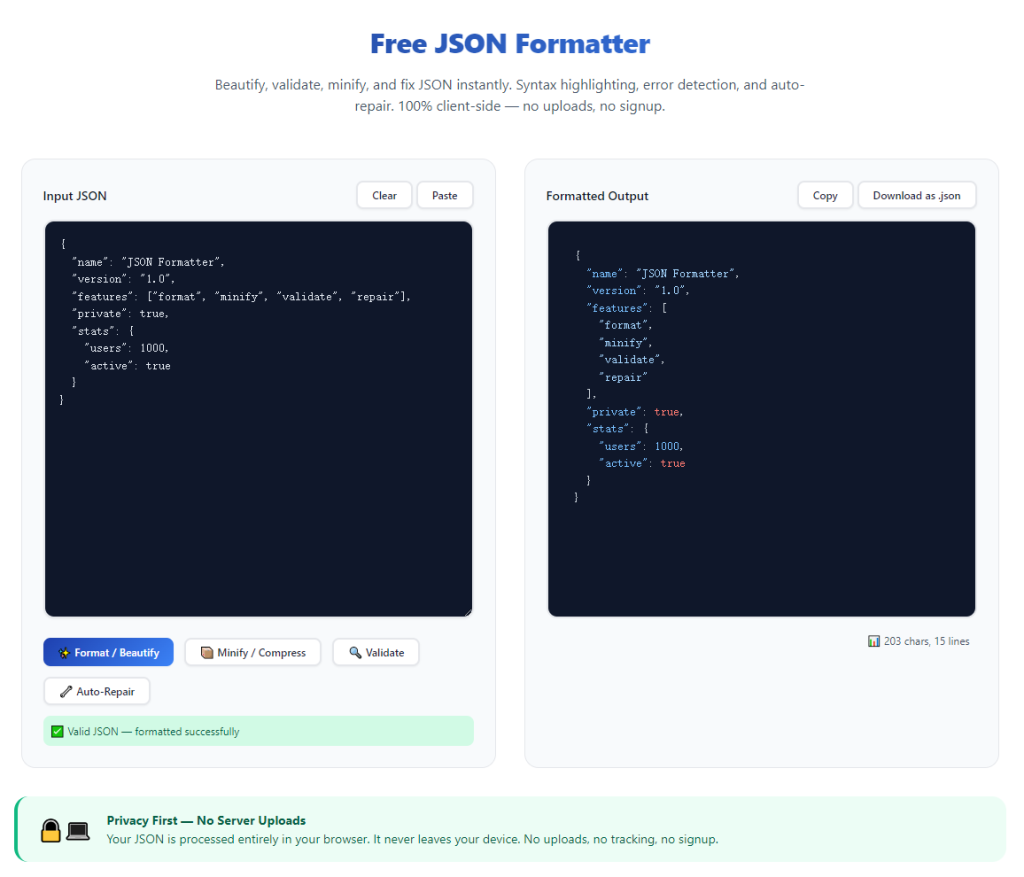
Raw JSON bulk paste input panel
Wide text area supports full bulk pasting of compressed single-line JSON copied from APIs, database exports or third-party application response logs.
One-click format trigger button after indent setup
After finalizing indent rules, a dedicated format button instantly restructures messy raw JSON into neatly spaced structured code matching pre-defined indent preferences.
Separate output panel for finished formatted JSON preview
Original raw code and beautified results split into independent viewing panels to help users compare layout differences directly after indent customization completes.
One-tap copy finished formatted JSON to clipboard
Copy shortcut sits next to output content for quick exporting into code editors, project files and database configuration documents effortlessly.
Built-in basic JSON syntax error checker
Top-tier free formatters flag missing brackets or misplaced commas during parsing, helping developers fix invalid JSON before final indent-based beautification.
Wide Practical Application Scenarios for Custom Indent JSON Formatting Tool
A fully featured Free JSON Formatter With Custom Indentation Settings serves web developers, backend engineers, data analysts and beginner coders across countless regular technical workflows.
Backend API response data sorting and debugging
Developers fetch compact single-line API return data, customize indent rules to match project specs and format JSON for fast parameter inspection and error troubleshooting.
Database exported JSON file layout standardization
Data analysts format bulk exported database JSON with team-specific indent sizes to unify file styling before importing datasets into spreadsheet or analysis software.
Frontend website configuration JSON editing
Frontend developers adjust indent spacing to align with existing frontend code formatting rules when modifying site setting and plugin configuration JSON files.
Student programming homework JSON arrangement
Coding learners tweak indent settings to match teacher’s required layout standards for school programming assignments and lab report code attachments.
Freelance developer cross-project code unification
Independent coders switch indent configurations quickly when shifting between different client projects that follow separate internal JSON formatting specifications.
IoT device configuration JSON parsing and cleanup
Hardware technicians tidy compact IoT device setting JSON with custom indent to review parameter values and adjust equipment configuration conveniently.
Complete Step-by-Step User Guide: Free JSON Formatter With Custom Indentation Settings
Follow this beginner-friendly sequential workflow to master indent customization and JSON beautification using free browser-based formatting tools efficiently.
Step 1: Confirm your target indent rules ahead of formatting
Check your project’s coding guide to confirm required indent size and format, deciding between numeric space indent or tab indent before opening the JSON formatter tool.
Copy raw compressed JSON data from API responses, database exports or source files and save it ready for later pasting into the tool’s input field.
Step 2: Launch Free JSON Formatter With Custom Indentation Settings in browser
Open your preferred desktop or mobile web browser and access the no-cost JSON formatting tool with full indent adjustment functionality directly.
Confirm no signup popups, paid upgrade prompts or mandatory download notifications appear once the tool page finishes full loading.
Step 3: Configure custom indentation parameters first
Locate indent setup controls on the tool’s top setting bar, input your preferred numeric space value or toggle the selector to switch formatting toward tab-based indentation.
Check the small real-time preview snippet if available to verify indent layout matches your pre-planned project formatting requirements.
Step 4: Paste raw unformatted JSON into input panel
Insert pre-copied messy single-line JSON content into the dedicated raw input text box without adding extra unnecessary blank spaces or symbols.
Double-check pasted content for accidental missing characters that may trigger JSON parsing errors during subsequent formatting steps.
Step 5: Trigger JSON formatting with pre-set indent rules
Tap the core format button to let the tool parse raw JSON and restructure the entire document following your pre-defined custom indentation settings automatically.
Wait less than a second for fully beautified structured JSON to populate inside the separate output panel on the same webpage.
Step 6: Copy finished formatted JSON for saving or code insertion
Click the built-in copy icon beside formatted output content to save beautified JSON directly into your device clipboard for immediate use in editors or project folders.
Re-adjust indent parameters and re-run formatting if final layout still fails to match your team’s required coding formatting standard.
Step 7: Clear content for next round of JSON formatting tasks
Use available reset option to erase leftover raw input and formatted output data, clearing workspace ready for another independent JSON beautification job.
Bookmark the formatter page inside your browser folder to access custom-indent JSON formatting instantly amid sudden urgent debugging needs.
Common Formatting Mistakes to Avoid With Free JSON Formatter With Custom Indentation Settings
Even with full access to flexible indent controls on free JSON formatting tools, simple operational missteps ruin final code layout and waste debugging working hours.
Sticking with fixed-indent paid editors unnecessarily
Subscription fees and rigid spacing limits slow development workflows; use Free JSON Formatter With Custom Indentation Settings for all regular daily JSON cleanup work.
Setting invalid non-numeric values inside indent input box
Letters and special symbols break indent configuration, forcing users to reset settings and re-input valid numeric indent spacing figures from scratch.
Pasting incomplete broken raw JSON before formatting
Syntax errors from truncated source code lead to parsing failure, so verify full JSON integrity before applying custom indent beautification rules.
Modifying indent rules after running initial formatting
Late setting changes require full reformatting; always finalize all indent customization options before pasting raw JSON and triggering the format command.
Closing browser tab before copying formatted output content
Unexpected page refresh wipes finished beautified JSON data completely, requiring repeated raw code pasting and indent configuration again.
Expert Optimization Tips to Maximize Free JSON Formatter With Custom Indentation Settings Efficiency
These practical developer-focused tips help streamline daily JSON cleanup every time you open Free JSON Formatter With Custom Indentation Settings for coding tasks.
- Rely on Free JSON Formatter With Custom Indentation Settings to skip expensive editor subscriptions and cut long-term development tool spending costs.
- Save the formatting tool page to browser bookmarks for instant access during urgent API debugging or sudden JSON configuration revision work.
- Note down frequently used project indent values to input preferred spacing quickly without repeated manual calculation or guideline checking each session.
- Always finalize indent type and size first before raw JSON pasting to avoid redundant repeated formatting cycles for identical source code content.
- Use the built-in syntax checker to fix broken JSON structures before indent formatting to guarantee fully usable finalized structured code every time.
- Separate large JSON datasets into smaller chunks when formatting massive exports to prevent browser lag and preserve accurate custom indent layout results.
Final Thoughts
Consistent indent styling stands as foundational for readable, maintainable JSON code across software development, data analysis and hardware configuration industries.
Fixed-indent formatting software and premium locked editors create avoidable cost and layout limitations, while Free JSON Formatter With Custom Indentation Settings delivers fully adjustable zero-cost JSON beautification for all user tiers.
Whether you are a professional backend developer handling bulk API data, a coding student finishing school projects or an analyst sorting exported dataset files, flexible indent free JSON formatting removes core layout frustrations entirely.
Following the complete step-by-step setup guide above lets you standardize JSON formatting matching unique project rules, speed up daily debugging and keep all your code files uniformly organized long-term.
After learning the operation method, click the link below to enter the tool page for immediate use.