Raise your hand if you’ve ever used a BMI calculator, gotten a result that felt way off, and thought, “Wait, that can’t be right.” 🙋♂️ Guilty! I did this a few months ago: I plugged in my height in centimeters instead of meters, and the calculator said I was “obese”—total panic mode, until I realized I’d messed up the units. That’s when I realized most people don’t know how to use BMI calculator correctly, and small mistakes like that lead to misleading results. Let’s fix that—no fancy jargon, just simple, step-by-step tips to get accurate BMI readings every time.
First, let’s keep it real: BMI (Body Mass Index) is a super useful tool to get a quick snapshot of your health, but it’s only as good as the data you put in. It’s not perfect—we’ll talk about its limitations later—but if you don’t use the calculator correctly, you might as well be guessing. I’ve seen friends input their weight in pounds but select kilograms, or round their height up by a few inches, and then wonder why their BMI is all wrong. The good news? Learning how to use BMI calculator correctly is easy—even if you’re not “good at math” or have never used one before.
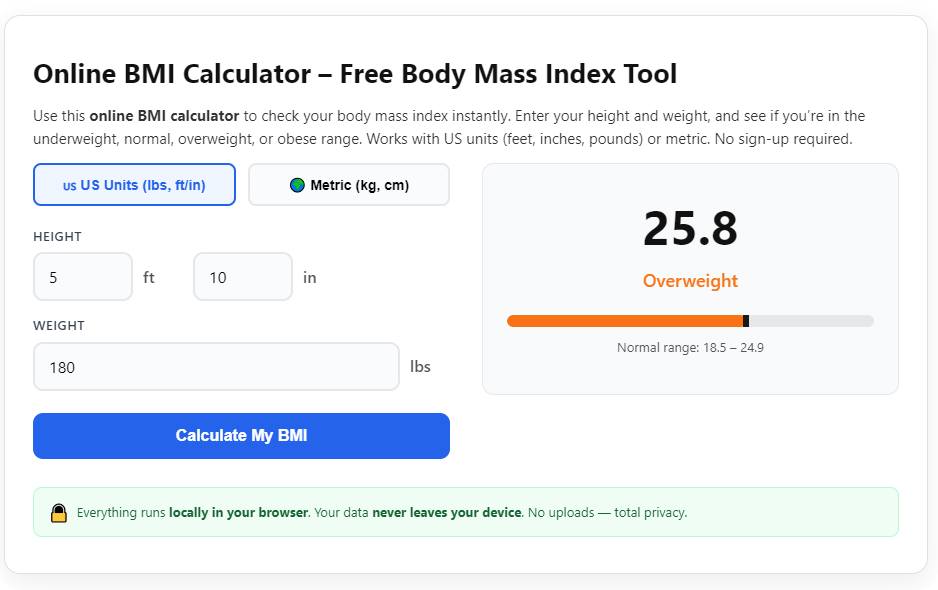
Whether you’re using a BMI calculator on your phone, a website, or even a doctor’s office tool, the steps are basically the same. The key is to get your measurements right, choose the correct units, and input the data properly. And once you get the result, you need to know what it means—not just “overweight” or “normal,” but what that actually tells you about your health. I’ll walk you through everything, from taking accurate height and weight measurements to interpreting your results like a pro.
I’ve tested dozens of BMI calculators (yes, really—my curiosity got the best of me) and found that the most reliable ones are from trusted sources like the CDC, NHS, or health apps built into your phone. They’re free, easy to use, and give consistent results—if you use them correctly. The biggest mistake people make? Skipping the “how to” and just plugging in numbers without checking units or measurements. Let’s make sure you don’t do that.
Why It Matters to Use BMI Calculator Correctly
You might be thinking, “So what if my BMI is a little off? Does it really matter?” The short answer: yes. BMI is used by doctors, nutritionists, and health professionals to assess your risk for health issues like high blood pressure, diabetes, and heart disease. A wrong BMI result could lead to unnecessary worry, or worse—missing a chance to address real health concerns. For example, if you input your weight incorrectly and get a “normal” BMI when you’re actually overweight, you might skip important lifestyle changes that could improve your health.
Plus, using a BMI calculator correctly is just common sense. It takes 2 extra minutes to check your measurements and units, and it ensures you’re getting a result that’s actually useful. I once had a client who thought she was in the “normal” range, but she’d been inputting her height in inches instead of centimeters—turns out, her BMI was in the “overweight” range, and she was able to make small changes to get back on track. That’s why learning how to use BMI calculator correctly is such a simple but impactful life hack.
Another thing: BMI calculators aren’t one-size-fits-all. There are different calculators for adults (20 and older) and kids/teens (2 to 19), and using the wrong one can give you inaccurate results. For adults, BMI is based on height and weight alone, but for kids and teens, it also takes into account age and sex, since their bodies are still growing. We’ll cover that later, but the main point is: using the right calculator the right way is key to accurate results.
What You Need Before Using a BMI Calculator
Before you even open a BMI calculator, you need two things: accurate height and weight measurements. This is the foundation of using a BMI calculator correctly—if your measurements are wrong, your result will be wrong, no matter how well you use the tool. Here’s how to get precise measurements (no fancy equipment needed):
• Weight: Weigh yourself in the morning, before eating or drinking anything, and wearing light clothing (or no clothing, if you’re at home). Use a digital scale—they’re more accurate than analog ones. Stand straight on the scale, feet together, and don’t lean on anything. Round to the nearest 0.1 kilograms (or 0.2 pounds) for the most accuracy. Avoid weighing yourself at night—your weight can fluctuate by a few pounds throughout the day from food and water.
• Height: Stand barefoot against a flat wall, with your heels, buttocks, and back pressed against the wall. Keep your head straight (look forward, not up or down) and use a ruler or measuring tape to measure from the floor to the top of your head. If you don’t have someone to help you, use a book—place it flat on top of your head, parallel to the floor, and mark the wall where the book meets it, then measure from the floor to the mark. Round to the nearest 0.1 centimeters (or 0.1 inches).
Pro tip: Don’t guess your height or weight! I know it’s tempting to say “I’m 5’7” even if you’re 5’6.5”, but that half-inch difference can throw off your BMI. Take 2 minutes to measure properly—it’s worth it for accurate results.
Also, decide which unit system you’re using: metric (kilograms and meters/centimeters) or imperial (pounds and inches). Most BMI calculators let you choose, but mixing units (e.g., weight in pounds and height in centimeters) is a surefire way to get a wrong result. Stick to one system—if you’re in the US, imperial is more common; in most other countries, metric is standard.
Step-by-Step: How to Use BMI Calculator Correctly
Now that you have your accurate measurements, let’s walk through how to use BMI calculator correctly—step by step. I’ll use the CDC’s adult BMI calculator as an example (it’s free, reliable, and easy to use), but the steps are the same for most calculators, including phone apps and other websites. We’ll also cover how to use BMI calculators for kids and teens later.
Step 1: Choose the Right BMI Calculator
First, pick a reliable BMI calculator. I recommend: - For adults (20+): CDC’s adult BMI calculator or NHS BMI calculator - For kids/teens (2–19): CDC’s child and teen BMI calculator - For convenience: Your phone’s built-in health app (iOS Health or Android’s Health app)—they’re pre-installed and super easy to use)
Avoid sketchy calculators with tons of pop-up ads or ones that ask for your personal info (like email or credit card). Reputable calculators are free, no-signup, and have clear instructions. Open the calculator in your browser or app—no downloads needed (unless you’re using a dedicated app, which is optional).
Step 2: Select Your Unit System
Most BMI calculators will ask you to choose between metric and imperial units. Select the one that matches your measurements: - Metric: Weight in kilograms (kg), height in meters (m) or centimeters (cm) - Imperial: Weight in pounds (lbs), height in inches (in) or feet and inches (ft/in)
This is one of the most common mistakes people make when learning how to use BMI calculator correctly. For example, if you input your weight in pounds but select “kilograms,” your BMI will be way too high (since 1 pound is about 0.45 kg). Double-check the unit selection before moving on—it takes 2 seconds and saves you from a wrong result.
Step 3: Input Your Height Accurately
Enter your height exactly as you measured it. If you’re using metric: - If the calculator asks for meters: Convert your height in centimeters to meters by dividing by 100 (e.g., 175 cm = 1.75 m) - If it asks for centimeters: Just enter the number (e.g., 175)
If you’re using imperial: - If the calculator asks for inches: Convert feet to inches by multiplying by 12 (e.g., 5 ft 7 in = 67 in) - If it asks for feet and inches: Enter them separately (e.g., 5 feet, 7 inches)
Don’t round up or down—enter the exact measurement. For example, if you’re 174.5 cm tall, enter 174.5 (or 1.745 m), not 175. That small difference can change your BMI category, especially if you’re on the edge of two categories.
Step 4: Input Your Weight Accurately
Next, enter your weight—again, exactly as you measured it. If you’re using metric, enter your weight in kilograms (e.g., 70.5 kg). If you’re using imperial, enter it in pounds (e.g., 155 lbs). Don’t round to the nearest 10 pounds or kilograms—precision matters here.
Pro tip: If you’re using a calculator that lets you input weight in stones (common in the UK), make sure you know how to convert pounds to stones (1 stone = 14 pounds) or use the imperial setting instead. Mixing stones and pounds without converting will lead to errors.
Step 5 (For Kids/Teens Only): Enter Age and Sex
If you’re calculating BMI for a child or teen (2–19), you’ll need to enter their age (in years) and sex (male or female). Unlike adults, kids’ and teens’ BMI is compared to other kids of the same age and sex, using percentiles. This is because their bodies are still growing, so a “normal” BMI for a 10-year-old is different from a 15-year-old. The CDC’s child and teen calculator will automatically calculate the BMI percentile and category for you.
Step 6: Click “Calculate” and View Your Results
Hit the “Calculate” button (it’s usually bright blue or green, so you can’t miss it). In less than a second, you’ll get your BMI result and category. For adults, the standard BMI categories are (from the CDC and WHO): - Underweight: Below 18.5 - Normal weight: 18.5–24.9 - Overweight: 25–29.9 - Obese: 30 or higher (30–39.9 is obese, 40+ is extreme obesity)
For kids and teens, the categories are based on percentiles: - Underweight: Below the 5th percentile - Healthy weight: 5th to 84th percentile - Overweight: 85th to 94th percentile - Obese: 95th percentile or higher
Most calculators will also give you a brief explanation of what your category means, which is helpful for understanding your results. For example, if you’re in the “overweight” category, it might mention that you’re at slightly higher risk for certain health conditions and suggest talking to a doctor.
Step 7: Interpret Your Results (Don’t Panic!)
This is a crucial step in how to use BMI calculator correctly: understanding what your BMI actually means (and what it doesn’t). BMI is a screening tool, not a diagnosis. It measures your weight relative to your height, but it doesn’t account for muscle mass, bone density, or body fat distribution. For example: - Athletes or very muscular people often have a high BMI (overweight or obese) because muscle weighs more than fat—but they’re actually very healthy. - Older adults may have a “normal” BMI but low muscle mass (called “skinny fat”), which can still be unhealthy. - People from Asian backgrounds may have higher body fat at the same BMI, so their health risks start at a lower BMI (around 23 instead of 25).
So if your BMI is in the “overweight” category, don’t panic—especially if you’re active and eat a balanced diet. And if it’s “normal,” don’t get complacent—you should still prioritize healthy habits. The best way to interpret your BMI is to talk to a doctor or nutritionist, who can take other factors into account (like waist circumference, blood pressure, and overall lifestyle).
Common Mistakes to Avoid When Using a BMI Calculator
Now that you know how to use BMI calculator correctly, let’s cover the most common mistakes people make—so you can avoid them. These are the mistakes I see all the time, and they’re easy to fix:
1. Mixing up units: This is the #1 mistake. Inputting weight in pounds but selecting kilograms, or height in centimeters but entering it as meters. Always double-check the unit selection before calculating.
2. Guessing measurements: Don’t estimate your height or weight—measure them properly. A half-inch or 2-pound difference can change your BMI category.
3. Using the wrong calculator: Using an adult BMI calculator for a child or teen (or vice versa) will give you inaccurate results. Always choose the calculator that matches the age group.
4. Rounding measurements too much: Rounding your height to the nearest inch or your weight to the nearest 10 pounds is lazy and leads to wrong results. Enter the exact measurement (e.g., 174.5 cm, 70.5 kg).
5. Weighing yourself at the wrong time: Weighing yourself after eating, drinking, or exercising can make your weight fluctuate by a few pounds. Always weigh yourself in the morning, before eating or drinking.
6. Ignoring BMI limitations: Don’t take your BMI as the be-all and end-all. It’s a screening tool, not a diagnosis. If your BMI is high but you’re muscular, or low but you’re undernourished, talk to a doctor.
7. Forgetting to update measurements: Your weight and height can change over time (especially for kids and teens). If you haven’t measured yourself in 6 months or more, take new measurements before using the calculator.
Pro Tips to Get the Most Out of Your BMI Calculator
Now that you’re a pro at how to use BMI calculator correctly, here are some extra tips to make the most of the tool:
1. Track your BMI over time: Instead of checking your BMI once, track it monthly. This helps you see trends—are you gaining or losing weight, or staying the same? Most phone health apps will automatically save your results, making it easy to track.
2. Combine BMI with other measurements: For a more complete picture of your health, pair your BMI with waist circumference (measured around your belly, just above your hips). Men with a waist circumference over 40 inches (102 cm) and women over 35 inches (88 cm) are at higher risk for health issues, even if their BMI is normal.
3. Use a consistent calculator: Stick to the same BMI calculator every time (e.g., CDC’s) to ensure consistent results. Different calculators use the same formula, but small differences in how they round can lead to slightly different results.
4. Don’t compare your BMI to others: BMI is personal—what’s “normal” for one person might not be normal for another. Focus on your own trends and how you feel, not someone else’s BMI.
5. Talk to a professional: If you’re confused about your results, or if your BMI is in the underweight, obese, or extreme obesity category, talk to a doctor or nutritionist. They can help you understand what your BMI means for your specific health and give you personalized advice.
Frequently Asked Questions (FAQ) – Things I Get Asked All the Time
Q: Is there a difference between BMI calculators for adults and kids? A: Yes! Adult BMI calculators only use height and weight, while kids/teens BMI calculators use age and sex to compare to other kids of the same age and sex (percentiles). Using the wrong one will give you inaccurate results. That’s an important part of how to use BMI calculator correctly.
Q: Why is my BMI high even though I’m muscular? A: BMI doesn’t distinguish between muscle and fat—muscle weighs more than fat, so athletes or very muscular people often have high BMIs. This is a limitation of BMI. If this is your case, talk to a doctor—they’ll look at other factors like body fat percentage or waist circumference to assess your health.
Q: Do I need to use a fancy BMI calculator to get accurate results? A: No! The best BMI calculators are free and simple—like the CDC’s or your phone’s health app. You don’t need to pay for a fancy calculator; the key is to input accurate measurements and use the right unit system. The formula for BMI is simple: metric (weight in kg ÷ height in m²) or imperial (weight in lbs ÷ height in in² × 703).
Q: How often should I check my BMI? A: For adults, checking every 1–3 months is fine—unless you’re making major lifestyle changes (like losing weight or building muscle), in which case you can check monthly. For kids and teens, check every 6 months to a year to track growth.
Q: Can BMI be wrong? A: It can be misleading, especially for people with a lot of muscle, older adults, or people from certain ethnic backgrounds. But if you use BMI calculator correctly (accurate measurements, right unit system), the result is mathematically correct—it just might not tell the whole story about your health. That’s why it’s a screening tool, not a diagnosis.
Q: Do I need to download an app to use a BMI calculator? A: No! Most BMI calculators work right in your browser—just search for “BMI calculator” and pick a reputable one (like CDC’s). You can also use your phone’s built-in health app, which is pre-installed and convenient, but it’s not required.
Final Thoughts – Mastering How to Use BMI Calculator Correctly
Learning how to use BMI calculator correctly is one of the simplest ways to take control of your health. It’s not rocket science—just a few simple steps: get accurate measurements, choose the right unit system, input the data properly, and understand what your results mean. The biggest takeaway? Your BMI is a starting point, not the final word on your health.
Don’t let small mistakes (like mixing up units or guessing measurements) give you wrong results. Take 2 extra minutes to measure properly and double-check your inputs—you’ll be glad you did. And remember, BMI is just one tool—pair it with healthy eating, regular exercise, and check-ins with your doctor for a complete picture of your health.
So go ahead—grab your scale and measuring tape, open a reputable BMI calculator, and put what you’ve learned into practice. You now know how to use BMI calculator correctly, and that’s a small but powerful step toward better health. No more guesswork, no more wrong results—just accurate, useful information to help you make the best choices for your body.