Let’s be real—shopping for a house is exciting, but figuring out your monthly mortgage payment? Total headache. You’ve probably Googled “how much will my mortgage cost” and gotten a bunch of basic calculators that only show principal and interest (P&I)… but that’s not the whole story. Taxes and insurance add up fast, and if you forget to factor those in, you could end up with a monthly payment that’s way higher than you expected. And let’s not even get started on how much those costs are rising lately—homeowners insurance is going up for the fifth year in a row, and property taxes vary wildly by state, making it even harder to guess.
That’s where a Free Mortgage Calculator with Taxes and Insurance PITI comes in. It’s the only tool you need to get a real, accurate estimate of your total monthly housing cost—no guesswork, no hidden fees, and no complicated math. I’m gonna walk you through exactly how to use it, step by step, in plain English—no fancy finance jargon, I promise. Even if you’re totally new to mortgages, you’ll be a pro by the end. I used one when I was house hunting last year, and it saved me from making a huge mistake—trust me, this tool is a lifesaver.
First, let’s break down what PITI even means (because I know I had no clue when I first started house hunting!). PITI stands for Principal, Interest, Taxes, and Insurance—all the stuff that makes up your monthly mortgage payment. Principal is the money you’re actually borrowing to buy the house, interest is what the lender charges you for borrowing that money (and hey, rates just dropped below 6% for the first time in years, which is a win!), taxes are the property taxes you pay to your local government (some states like New Jersey have rates almost 2.5% of your home’s value—yikes), and insurance is your homeowners insurance (which now averages $3,057 a year nationwide, and way more in disaster-prone states like Florida). Missing any of these means you’re not getting the full picture—and that’s how people end up stretched too thin financially.
Why You Need a Free Mortgage Calculator with Taxes and Insurance PITI (Not a Basic One)
I get it—there are a million free mortgage calculators online. But most of them only show you P&I, which is useless if you want to budget correctly. Let’s say you find a calculator that says your monthly payment is $1,800… but then you realize you have to add $300 for taxes and $250 for insurance (since Florida’s average is over $8,000 a year!). Suddenly, you’re looking at $2,350 a month—way more than you planned for. That’s a huge mistake, and it’s easy to avoid with the right tool.
A goodFree Mortgage Calculator with Taxes and Insurance PITI does all the work for you. It includes every single cost that goes into your monthly mortgage, so you know exactly what you’re getting into before you start house hunting. No more surprises, no more stress, and no more overextending your budget. It’s perfect for first-time homebuyers, people refinancing, or even just anyone curious about what their dream house would actually cost. And the best part? It’s 100% free—no sign-ups, no email required, no hidden fees. You don’t have to download an app or create an account. Just open it in your browser (on your phone, laptop, or tablet), plug in a few numbers, and boom—you get your PITI estimate in seconds. It doesn’t get easier than that.
Another thing I love about these calculators? They’re flexible. Whether you’re looking at a $200,000 condo or a $500,000 house, whether you’re putting 5% down or 20%, whether you’re getting a 15-year or 30-year loan—this tool can handle it. It even lets you add PMI (Private Mortgage Insurance) if you’re putting less than 20% down, which is a cost a lot of first-time buyers forget about. Trust me, I almost forgot about PMI when I was starting out, and that would’ve added an extra $200 a month to my payment.
What You’ll See on a Typical Free PITI Mortgage Calculator
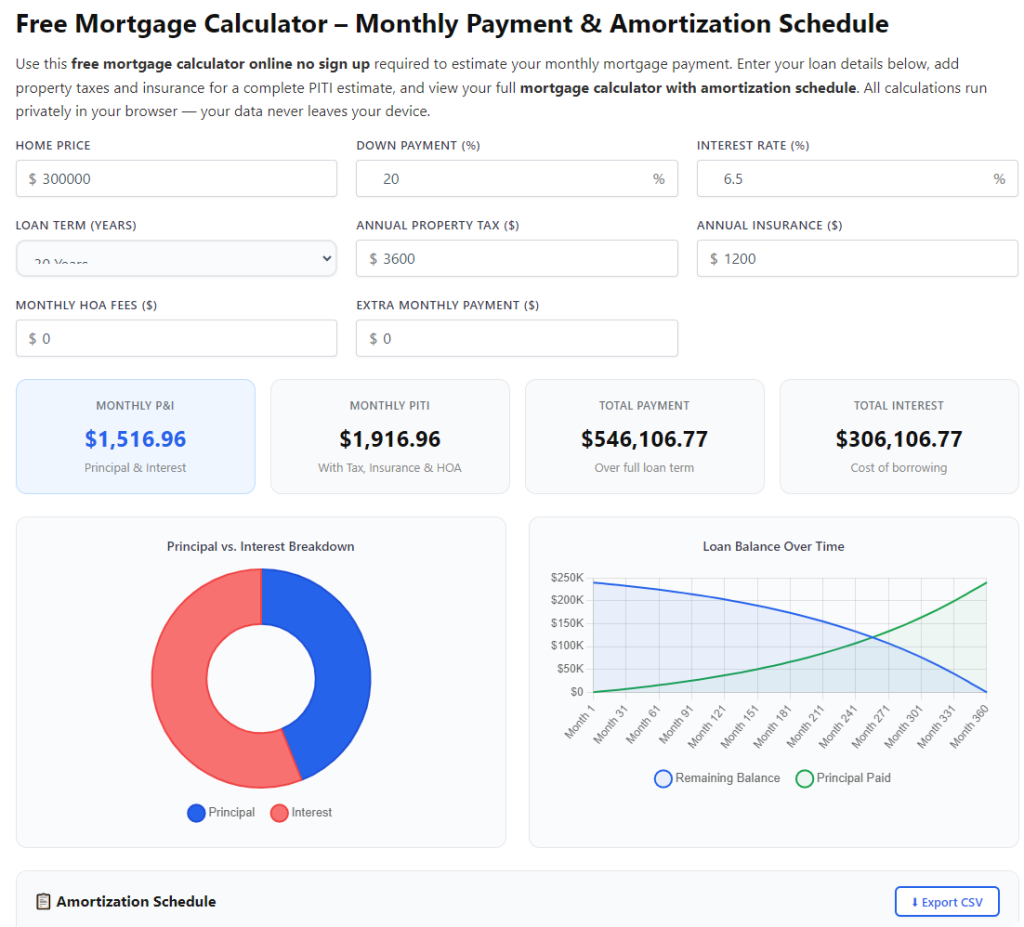
Don’t worry—these tools are designed for regular people, not finance experts. The interface is super simple, with no confusing menus or complicated settings. Here’s what you’ll usually find when you open a Free Mortgage Calculator with Taxes and Insurance PITI (I’m talking about the good ones, not the ones cluttered with ads):
• A box for “Home Price” (the total price of the house you’re looking at—no tricks here, just the full amount)
• A box for “Down Payment” (how much cash you’re putting upfront—you can enter a dollar amount or a percentage, which is way easier than doing the math yourself)
• A box for “Interest Rate” (the annual interest rate your lender is offering—if you don’t have one yet, just use the current average, which is around 6% right now)
• A dropdown for “Loan Term” (usually 15 years or 30 years—most people go with 30, but 15 means higher monthly payments but less interest overall)
• A box for “Annual Property Taxes” (you can find this on the home’s listing or ask your realtor—if you don’t know, use a local average; remember, New Jersey’s average is way higher than Hawaii’s)
• A box for “Annual Homeowners Insurance” (again, ask your realtor or use an average—just keep in mind it’s rising fast, so maybe estimate a little high to be safe)
• Optional: A box for “PMI” (Private Mortgage Insurance—you only need this if your down payment is less than 20% of the home price; it’s usually 0.5-1% of the loan amount annually)
• A big “Calculate” button (hard to miss, usually bright blue or green)
• A results section that shows your total monthly PITI payment, plus a breakdown of each part (principal, interest, taxes, insurance)—so you know exactly where your money is going
Step-by-Step: How to Use a Free Mortgage Calculator with Taxes and Insurance PITI
Let’s walk through this together—super simple, I swear. I’ll use a real example so you can see exactly how it works. Let’s say you’re looking at a $350,000 house in Texas (where property taxes are around 1.8%), putting 10% down, with a 5.98% interest rate (the current 30-year average), $6,300 annual taxes (1.8% of $350,000), and $3,057 annual insurance (the 2026 national average). Here’s how to plug that into the calculator:
Step 1: Open the calculator in your browser
Just go to any reliable Free Mortgage Calculator with Taxes and Insurance PITI (a quick Google search will find one—look for the ones with no ads and clear instructions). No downloads, no sign-ups—just open it and you’re ready to go. It works on your phone, laptop, or tablet, so you can use it while you’re out house hunting or sitting on your couch scrolling listings.
Step 2: Enter the home price
Type in the total price of the house. In our example, that’s $350,000. Make sure you enter the full price, not the loan amount—the calculator will figure out the loan amount based on your down payment. Trust me, I made the mistake of entering the loan amount once, and my estimate was way off. Don’t do that!
Step 3: Enter your down payment
You can enter this as a dollar amount or a percentage. For our example, 10% of $350,000 is $35,000, so you can type either $35,000 or 10%. The calculator will do the math for you—no need to calculate it yourself. Pro tip: If you’re putting 20% or more down, you won’t need PMI, which saves you money each month! That’s a big win, especially with insurance costs going up.
Step 4: Enter the interest rate
This is the annual interest rate your lender is offering. If you haven’t talked to a lender yet, just use the current average rate (which is around 5.98% for 30-year loans right now). You can find this on Google or ask a local lender for a ballpark. Don’t worry if you’re not sure—you can play around with different rates to see how it affects your monthly payment. For example, if rates drop to 5.5%, your payment will go down; if they go up to 6.5%, it will go up. It’s a great way to plan for different scenarios.
Step 5: Choose your loan term
Most calculators let you choose between 15 years and 30 years (some have other options too, like 20 years). For our example, we’ll pick 30 years—this is the most common term because it gives you lower monthly payments (though you’ll pay more interest over time). If you can afford higher monthly payments, 15 years is a great way to save on interest! For example, a $315,000 loan at 5.98% for 30 years is about $1,890 a month in P&I, while a 15-year loan is about $2,600 a month—but you’ll pay way less interest overall.
Step 6: Enter annual property taxes and homeowners insurance
This is the part that makes a Free Mortgage Calculator with Taxes and Insurance PITI better than basic calculators. For property taxes, enter the annual amount—our example uses $6,300 (1.8% of $350,000, which is Texas’s average). For homeowners insurance, enter the annual amount—we’re using $3,057 (the 2026 national average). If you’re looking at a house in Florida, you’d want to enter closer to $8,458 (Florida’s 2026 average)—that’s a huge difference!
If you don’t know these numbers yet, don’t panic! You can use local averages (just Google “average property taxes in [your city]” or “average homeowners insurance in [your state]”) or ask your realtor—they’ll have a good idea. It’s better to estimate high than low, so you don’t get caught off guard later. Remember, insurance is going up in most states, so adding an extra $200-$300 a year to your estimate is a smart move.
Step 7: Add PMI if needed
PMI (Private Mortgage Insurance) is required if your down payment is less than 20% of the home price. It’s usually 0.5-1% of the loan amount annually. In our example, the loan amount is $315,000 (home price minus down payment), so PMI would be about $157.50-$315 per month. Most calculators will automatically add this if your down payment is less than 20%, but you can adjust it if you have a specific PMI rate from your lender. Pro tip: Once you’ve paid off 20% of your home’s value, you can ask your lender to remove PMI—so that extra cost won’t last forever.
Step 8: Click “Calculate” and check your results
Hit the big “Calculate” button, and the calculator will show you your total monthly PITI payment. For our example, that’s about $2,447 per month—broken down into $1,890 for principal and interest, $525 for taxes, $255 for insurance, and $177 for PMI. That’s the real number you need to budget for—not just the $1,890 P&I! If you had used a basic calculator, you would’ve missed out on $557 a month in costs—that’s a huge difference.
Most calculators will also show you extra info, like the total amount you’ll pay over the life of the loan, how much interest you’ll pay, and even an amortization schedule (which shows how much of each payment goes to principal and interest over time). This is super helpful if you want to see how extra payments can save you money. For example, if you add an extra $100 a month to your payment, you could pay off your loan 5 years early and save thousands in interest—that’s a game-changer.
Pro Tips to Get the Most Out of Your Free PITI Mortgage Calculator
Now that you know how to use the calculator, here are some tips to make sure you’re getting the most accurate estimate possible—these are things I wish I knew when I was house hunting!
1. Use real numbers, not guesses: The more accurate your inputs, the more accurate your PITI estimate. If you’re serious about buying, ask your realtor for the exact property taxes on the home you’re looking at, and get a quote for homeowners insurance. Don’t just use averages—they can be off by hundreds of dollars, especially in states like Florida or California where insurance costs are skyrocketing.
2. Play around with different scenarios: The best part about a Free Mortgage Calculator with Taxes and Insurance PITI is that you can test different numbers to see what works for your budget. Try increasing your down payment—even an extra 5% can lower your monthly payment and eliminate PMI. Or see how a 15-year loan compares to a 30-year loan. You can also test different interest rates to see how rising or falling rates will affect your payment. It’s a great way to find your sweet spot.
3. Don’t forget about extra costs: PITI is your main monthly cost, but there are other expenses to consider—like HOA fees (if the home is in a neighborhood with an HOA), maintenance costs (plan for 1-2% of the home price annually for repairs), and utilities. The calculator won’t show these, so make sure to add them to your budget too! For example, if you have a $200 HOA fee and $300 in utilities, that’s an extra $500 a month you need to account for.
4. Use the amortization schedule: Most calculators have an amortization schedule that shows how much of each payment goes to principal and interest. Early on, most of your payment goes to interest—but if you make extra payments toward principal, you can pay off your loan faster and save thousands in interest. Try plugging in extra monthly payments to see how much you can save! I did this, and I’m on track to pay off my loan 7 years early.
5. Avoid common mistakes: Don’t mix up annual and monthly costs (enter taxes and insurance as annual amounts, not monthly!). Don’t forget PMI if your down payment is less than 20%. And don’t assume your interest rate will stay the same—if you’re getting an adjustable-rate mortgage (ARM), use the worst-case rate to make sure you can afford it if rates go up. Also, don’t forget to check your credit score before applying for a loan—better credit means lower interest rates!
Frequently Asked Questions (FAQ) – Things I Got Asked When I Used This Tool
Q: Is a Free Mortgage Calculator with Taxes and Insurance PITI really free? A: Yes! The good ones are 100% free, no sign-ups, no hidden fees, no paywalls. You don’t have to give your email or create an account—just open it and use it. Avoid any calculator that asks you to pay for full results or enter your personal info to get an estimate.
Q: How accurate is the estimate? A: It’s as accurate as the numbers you put in! If you use real property taxes, insurance quotes, and interest rates, the estimate will be very close to your actual monthly payment. It’s not perfect (lenders might have small fees or adjustments), but it’s a great way to budget and avoid surprises. I compared my calculator estimate to my actual mortgage payment, and it was only off by $23 a month—super close.
Q: Do I need to know my interest rate to use the calculator? A: No! If you haven’t talked to a lender yet, just use a current average interest rate (which is around 5.98% for 30-year loans right now). You can also play around with different rates to see how they affect your payment. Once you get a pre-approval from a lender, you can plug in your actual rate for a more accurate estimate. Pro tip: Get pre-approved before house hunting—it’ll give you a better idea of what you can afford.
Q: What’s the difference between PITI and P&I? A: P&I is just principal and interest—the amount you pay toward the loan itself. PITI includes principal, interest, taxes, and insurance—your total monthly housing cost. This is the number you need to use when budgeting, because taxes and insurance are non-negotiable! I can’t stress this enough—forgetting about taxes and insurance is one of the biggest mistakes first-time homebuyers make.
Q: Can I use this calculator if I’m refinancing? A: Absolutely! Just enter your current loan amount (instead of the home price), your new interest rate, and your new loan term. It will show you your new PITI payment, so you can see if refinancing makes sense for you. You can even compare your old payment to your new one to see how much you’ll save. I refinanced last year, and this calculator helped me figure out that I’d save $300 a month—totally worth it.
Final Thoughts – Why This Tool Is a Game-Changer for Homebuyers
Buying a house is one of the biggest financial decisions you’ll ever make, and the last thing you want is to be blindsided by a monthly payment that’s way higher than you expected. A Free Mortgage Calculator with Taxes and Insurance PITI takes the guesswork out of budgeting and gives you the real numbers you need to make smart decisions. With insurance costs rising and property taxes varying so much by state, this tool is more important than ever.
It’s simple, it’s free, and it’s designed for regular people—no finance degree required. Whether you’re a first-time homebuyer just starting to look, or you’re ready to make an offer, this tool will help you stay on budget and avoid costly mistakes. I used one when I bought my house, and it saved me from overextending myself financially—seriously, it’s a lifesaver.
So go ahead—open up a Free Mortgage Calculator with Taxes and Insurance PITI right now. Plug in some numbers, play around with different scenarios, and get a clear picture of what your dream house will actually cost. You’ll be glad you did—no more stress, no more surprises, just confidence in your homebuying journey. And remember, when it comes to mortgages, knowledge is power—this tool gives you all the power you need to make the right choice for you and your family.