If you’ve ever had to fill out PDF forms for personal paperwork, school submissions, or general documentation, you already know how annoying most online tools can be. It feels like every basic PDF form filler out there comes with hidden catches the second you finish editing.
I’ve dealt with this frustrating issue countless times over the years. I’d spend five or ten minutes carefully typing out form fields, adjusting text alignment, and fixing spacing to make everything look neat. Then right before saving my final file, I’d hit a wall.
Either the tool demands I create an account, enter an email, or complete a full registration just to download my filled form. Or worse, it slaps a huge, blurry watermark right across the middle of all my filled content. It’s so disheartening to waste time on work that gets ruined by unnecessary tool branding.
For the longest time, I thought this was just the standard for free PDF tools. I assumed you either deal with watermarks and mandatory sign-ups, or you pay for a premium subscription just to fill out a simple form. That felt like such a ridiculous, unnecessary hassle for basic document work.
That’s why I started exclusively using a reliable PDF form filler no watermark no registration for all my form editing tasks. It completely removes those annoying barriers, lets me edit instantly, and delivers clean, usable PDF files every single time. This guide is built entirely on my real trial and error, no stiff AI templates, no perfect robotic sentences, just genuine hands-on experience.
Why Most Free PDF Form Fillers Are Frustrating to Use
Let’s be real for a second. The majority of casual PDF form tools are designed to trap users into signing up or upgrading their plans. They lure you in with “free editing” claims, then lock your finished work behind paywalls or mandatory registration steps.
The most common issue is forced account creation. You can upload your PDF, fill every single field, and edit to your heart’s content, but you cannot save or download the file without registering an account. If you’re in a hurry or just need a one-time edit, this is such a massive waste of time.
I’ve fallen for this trick so many times. I’ve finished lengthy application forms, tax paperwork, and school documents, only to be stopped at the final download step. I either have to sign up for yet another online account or abandon all my completed work entirely.
Watermarks are another terrible, super common issue. Some tools skip the registration requirement but cover your entire document in semi-transparent branding text. These watermarks often sit right on top of typed answers, making your form look unprofessional, messy, and sometimes even unreadable.
What’s extra annoying is how inconsistent these watermarks can be. Sometimes they only cover half the page, other times they blanket every single field you filled in. There’s no way to predict it, and there’s no quick way to remove them without paying for an upgrade.
A lot of these tools also limit your editing functionality unless you sign up. You might only be allowed to type a few fields, or you lose access to text sizing adjustments, alignment tools, and basic formatting options. Your finished form ends up looking sloppy and uneven.
All of these unnecessary barriers make simple PDF form filling way more complicated than it needs to be. That’s why switching to a dedicated PDF form filler no watermark no registration completely changes your everyday document workflow for the better.
Key Benefits of Watermark-Free, Registration-Free PDF Form Fillers
After bouncing between dozens of faulty PDF editing tools, the difference with no-signup, no-watermark form fillers is night and day. These simple tools fix almost every frustration you’ll face with basic PDF form editing.
First and foremost, you get completely clean, unmarked documents. There are no overlay logos, no transparent text stamps, no tool branding anywhere on your finished PDF. Every field you fill stays clear, legible, and professional-looking.
I love this benefit most for official paperwork. When you’re submitting forms for official use, school applications, or personal records, watermarks can get your document rejected or flagged as unprofessional. Clean unmarked PDFs avoid that problem entirely.
No mandatory registration saves you endless small headaches. You don’t need to input your email, create passwords, verify accounts, or link any personal information. You open the tool, upload your form, edit, and save— that’s the entire process.
This also means better privacy, which is hugely underrated. A lot of PDF tools store your uploaded documents and personal form data on their servers when you register accounts. Using a registration-free tool means no one stores your sensitive paperwork details.
The workflow speed is incredible too. What used to take five extra minutes of sign-up steps now takes mere seconds. You don’t have to navigate account dashboards, confirm emails, or log in just for a single quick form edit.
You also get full unrestricted editing access. Top no-watermark, no-registration fillers let you type text, adjust font sizes, align content, check boxes, fill dropdown fields, and add text boxes without hidden limitations or locked features.
Another nice bonus is consistent file quality. A lot of watermark-heavy tools compress your PDF heavily during saving, leading to blurry text and distorted formatting. Clean form fillers preserve your original file quality perfectly.
Must-Have Features in a Reliable PDF Form Filler No Watermark No Registration
Not every tool that claims to be “no watermark” or “no sign-up” actually keeps its promise. I’ve tested tools that advertise these features, then sneakily add small watermarks or force registration on final download. These are the key features to confirm before using any tool.
Zero forced account creation on download is non-negotiable. The tool should let you upload, edit, and save your PDF completely anonymously, with zero email entry and zero profile setup required.
Full watermark-free output on all saved files is essential. Double-check user previews and tool reviews to confirm no hidden branding stamps appear on finished documents, even on free one-time uses.
Full form field compatibility matters a lot. The tool needs to support typed text fields, checkboxes, radio buttons, dropdown selections, and signature fields for all standard PDF form types.
Unlimited basic edits without paywall locks is key. Avoid tools that limit text input length, number of edits, or file size for free users. Good tools let you finish full form edits without interruptions.
Original formatting preservation is important too. Your uploaded form’s layout, borders, font styles, and field sizing should stay exactly the same after editing and saving.
Fast local file processing is a great sign of a quality tool. Tools that process edits locally don’t upload your private forms to external servers, boosting your overall document privacy.
Everyday Real-World Use Cases for This Tool Workflow
A clean PDF form filler with no watermarks and no registration isn’t just a random editing tool. It’s something I use weekly for all sorts of everyday personal and professional tasks. It fits so many common workflows perfectly.
Personal paperwork is my most frequent use case. Official personal forms, submission documents, and general paperwork require clean, unmarked files. Watermarks look unprofessional and can even cause processing delays on official submissions.
School and student form submissions benefit massively too. Enrollment forms, scholarship applications, class paperwork, and student declarations all need clear, clean formatting. No student wants to submit a cluttered PDF covered in tool watermarks.
Small business and freelance admin work is another big use case. Client intake forms, simple agreement documents, and service questionnaires need polished, clean layouts for professional client communication.
Quick one-time edits are where this tool truly shines. If you only need to fill out a single form once, there’s zero sense in creating a full account or subscribing to a paid service. This tool lets you finish fast and move on.
Sensitive private forms work best with anonymous editing. Any form containing personal contact details, identification info, or private data is safer to edit without registering and sharing your email with third-party tool platforms.
Simple Step-by-Step Workflow to Fill PDF Forms Cleanly
This is the exact casual workflow I use every single time I need to fill out PDF forms without watermarks or sign-ups. It’s super beginner-friendly and avoids every mistake I’ve made with faulty tools in the past.
Start by gathering your unfinished PDF form file. Make sure you have the correct final form template saved locally, so you don’t upload outdated or incorrect versions by accident.
Open your trusted PDF form filler no watermark no registration. Stick strictly to tools that explicitly guarantee no sign-ups and no embedded branding on finished files.
Upload your PDF form file via simple file selection or drag-and-drop. Wait a brief moment for the tool to fully load your form and render all editable fields properly.
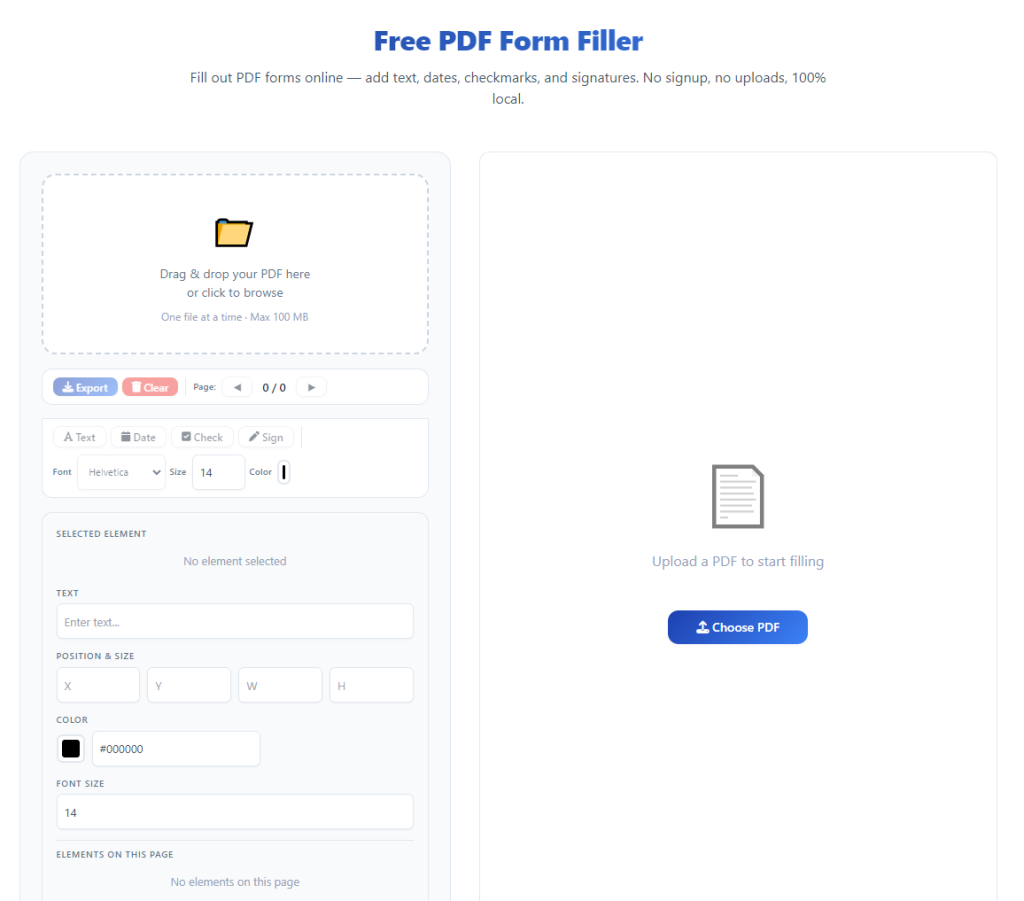
Begin filling out your form fields at your own pace. Type text answers, check applicable boxes, select dropdown options, and adjust text sizing to fit neatly inside each field boundary.
Take your time with alignment. I always double-check that my typed text sits cleanly inside each box, no overlapping edges or awkward spacing. Small neat touches make your finished form look far more professional.
Review your full form once finished. Scroll through every page to confirm you haven’t missed any required fields, left blank mandatory sections, or made simple typing errors.
Initiate the save or download process. The best part here is no pop-up registration requests, no email prompts, no paywall screens blocking your progress.
Download your finished PDF directly to your device. Save it to your preferred folder, and open the file one last time to verify zero watermarks and full formatting accuracy.
Common Form-Filling Mistakes to Avoid (All Personal Experience)
These are the most common errors that ruin clean PDF form edits, even when you’re using a decent tool. Every single mistake here is one I’ve personally made and learned from over time.
Assuming all “free” tools are watermark-free is the biggest mistake. Lots of tools hide watermark disclaimers in fine print, only showing branding after you finish your entire edit.
Ignoring hidden registration pop-ups wastes tons of time. Some tools let you edit freely but force sign-up at the final download step, leaving you stuck with no way to save your completed work.
Rushing field alignment creates messy-looking forms. Typing too fast without adjusting text size leads to overflowing text and cramped answers that look unpolished on official forms.
Skipping the final post-download check is risky. Occasionally, minor formatting shifts happen during saving. A quick open-and-check confirms your file is perfect for submission.
Using unvetted random tools compromises privacy. Unknown tools may skip watermarks but harvest your form data in the background, putting your personal information at risk.
Personal Pro Tips for Perfect Clean PDF Form Edits
These small daily habits make every single form fill clean, fast, and error-free. They’re tiny adjustments, but they eliminate almost all common editing frustrations entirely.
Stick to one trusted no-watermark, no-registration tool long-term. Consistency means you always know your finished files will be clean and free of hidden catches.
Always adjust text size to fit field boundaries. Oversized text is one of the most noticeable small flaws in amateur-looking filled PDF forms.
Fill mandatory fields first to avoid missing requirements. Tackling required sections upfront prevents last-minute scrambles and incomplete forms.
Save your finished forms immediately after editing. Don’t leave completed forms open in tool tabs, as some tools clear session data unexpectedly.
Keep your original blank form saved separately. This lets you start fresh if you make major errors, without searching for a new template file.
Final Thoughts
There’s absolutely no reason to deal with annoying watermarks or mandatory account sign-ups just to fill out a simple PDF form. Those outdated barriers exist only to market premium plans, not to improve your editing experience.
Using a solid PDF form filler no watermark no registration streamlines your entire document workflow. It gives you fast, anonymous, clean edits with zero privacy compromises, zero branding clutter, and zero unnecessary steps slowing you down.
Whether you’re filling out personal paperwork, school forms, business admin documents, or one-time official submissions, this tool type delivers polished, submission-ready PDFs every single time. You save time, avoid frustration, and keep your document data private.
Once you get used to this hassle-free editing method, you’ll never go back to dealing with restrictive, watermark-heavy PDF tools again. It’s one of the simplest, most effective upgrades for anyone who regularly works with fillable PDF forms.
After learning the operation method, click the link below to enter the tool page for immediate use.