High school students taking Advanced Placement courses face unique grading rules that regular grade trackers cannot handle. AP classes carry extra grade weight that boosts your overall weighted GPA, a critical metric colleges review during admissions.
Most students manually tally their grades each semester, and this process is full of avoidable math errors. Standard unweighted calculators ignore AP point bonuses, leaving students with inaccurate numbers for college applications.
Many families and counselors waste hours recalculating scores by hand to account for AP class multipliers. Simple addition and division mistakes lead to wrong GPA projections that misguide college planning decisions.
Mastering how to use GPA calculator for weighted AP classes eliminates all these errors and guesswork. This specialized student tool automatically applies official AP weight scales to generate reliable, college-ready weighted grade totals in seconds.
This detailed student guide breaks down the flaws of manual GPA math, core tool advantages, critical built-in calculator features, real high school use cases, and a full beginner step-by-step workflow for calculating weighted AP GPAs without mistakes.
Common Pitfalls of Calculating Weighted AP GPA Manually
Countless AP students rely on pen-and-paper math or basic unweighted spreadsheets to tally their class grades. These outdated methods create consistent, costly errors that skew your official GPA numbers.
Confusion over official AP grade weight multipliers
Every high school follows a standard weighted scale that adds extra points to AP course letter grades. Most students mix up the bonus values for A, B, C and D marks during manual calculation.
Miscalculating these weight increments leads to drastically lower or inflated GPA estimates that do not match your school’s official transcript values.
Cumulative arithmetic errors across multiple semesters
Students with 4+ AP classes each semester work through dozens of separate grade calculations. Adding weighted points, multiplying course units, and averaging totals creates multiple opportunities for simple addition and division mistakes.
Even small math miscalculations compound over four years of high school and alter your cumulative weighted GPA by several tenths of a point.
Inability to separate weighted vs unweighted totals
College admissions offices review both weighted and unweighted GPA separately. Manual tallying forces students to recalculate their grades twice, doubling the work and doubling the risk of inconsistent results.
Without a dedicated tool, many students only compute one version and submit incomplete data on college planning worksheets.
Slow, repetitive recalculation after grade changes
Whenever a student retakes an AP exam, earns extra credit, or adjusts a semester course load, they must redo their entire GPA math from scratch. This repetitive work eats up valuable college prep and study time.
No long-term cumulative tracking for four-year high school records
Handwritten grade logs get lost, smudged, or outdated quickly. Students cannot easily compare yearly GPA trends or project future weighted scores when adding new AP classes the next semester.
Key Benefits of Learning How to Use GPA Calculator for Weighted AP Classes
Integrating the specialized tool into your college planning routine streamlines grade tracking and delivers fully accurate weighted AP GPA results with minimal effort.
Automatically applies standardized AP weighted grade scales
The core purpose behind learning how to use GPA calculator for weighted AP classes is its built-in school-approved AP point multipliers. The tool instantly adds official bonus weight to every AP course grade you input.
You no longer need to memorize complex point charts or look up district grading rules before computing your cumulative score.
Eliminates all manual arithmetic mistakes
Every multiplication, addition, and averaging step runs automatically through the calculator’s system. Human error from pencil math, mental counting, or spreadsheet formula typos disappears entirely from your GPA workflow.
Generates both weighted and unweighted GPA simultaneously
Admissions officers require both grade metrics for application review. This specialized calculator outputs both values in one single session, cutting your grade tracking workload in half.
Fast recalculations for updated semester grades
If your AP exam score improves, you drop a course, or add a new Advanced Placement class mid-year, you only update one entry in the tool. The full cumulative weighted GPA refreshes instantly with zero extra math work.
Tracks four-year cumulative high school GPA history
You can input grades from freshman through senior year AP courses and save your full academic record within the tool. This long-term tracking lets you map GPA growth and set realistic grade targets for remaining semesters.
Builds accurate college admissions projections
Colleges use weighted AP GPA to compare applicants taking rigorous coursework. Reliable calculator results help you accurately gauge your competitiveness for target universities without overestimating or underestimating your academic standing.
Works for students, parents, and school counselors
This tool fits every user group involved in high school grade planning. Students self-monitor their progress, parents verify transcript accuracy, and counselors run quick GPA checks for groups of AP enrollees.
Must-Have Features in a Quality GPA Calculator for Weighted AP Classes
Not all online grade calculators support Advanced Placement weighted scoring. When selecting a reliable tool to learn how to use GPA calculator for weighted AP classes, prioritize these student-focused core functions.
Customizable AP weighted grade point scales
Top calculators let you adjust the AP bonus multiplier to match your local high school’s exact grading policy. Some districts add 1.0 weight to AP classes, while others use a 0.5 incremental boost for advanced coursework.
Adjustable scale settings guarantee your final GPA matches official transcript calculations from your guidance office.
Separate course category tagging for AP, honors, and regular classes
The tool includes labels to mark each class as standard, honors, or AP coursework. Tagging every subject correctly ensures the system applies the proper weighted bonus exclusively to your Advanced Placement courses.
Credit hour / course unit input fields
High schools assign different credit weights for full-year vs semester AP classes. Built-in unit entry lets the calculator weight multi-credit AP courses more heavily in your cumulative average.
Letter grade and numerical grade dual input support
You can type in raw percentage test scores or standard letter grades (A, A-, B+, B, etc.) for each AP class. The tool converts both formats to matching weighted GPA points automatically.
Semester-by-semester grade organization tabs
Dedicated sections for each school year split freshman, sophomore, junior, and senior AP coursework separately. You can edit single semesters without altering your full four-year cumulative data.
Dual result display: Weighted GPA + Unweighted GPA
Every calculation session outputs two clear final scores side-by-side, formatted to match the layout college admissions forms require for applicant reporting.
Save and export full grade records
Functional calculators store your entered AP class data for repeat visits. You can copy your full grade list to paste into college planning spreadsheets or share with guidance counselors quickly.
Real-World Use Cases for Weighted AP GPA Calculators
A robust tool built for AP coursework serves every common academic planning task students encounter throughout their high school career.
Semester-end GPA verification after report cards release
When your school sends home semester transcripts filled with AP exam and class grades, use the calculator to cross-check the weighted GPA printed on your official paperwork for math errors made by school administrative systems.
College admissions worksheet preparation
Most university applications ask applicants to self-report four-year weighted GPA with AP coursework included. The calculator generates exact, verifiable numbers you can safely copy into application fields.
Future course load planning for upcoming semesters
Before enrolling in new AP classes, input projected target letter grades to preview how adding advanced coursework will lift your overall weighted GPA. This helps you set realistic academic goals each year.
Retaken AP exam score recalculation
If you retake an AP end-of-year exam to raise your class letter grade, update the corresponding entry in the calculator to view your new adjusted cumulative weighted GPA instantly.
Academic scholarship eligibility checks
Many merit-based high school and college scholarships require a minimum weighted GPA threshold that factors in AP class weight bonuses. Accurate calculator results confirm if you meet award requirements.
Counselor group grade reviews
Guidance advisors managing cohorts of AP students use the tool to run fast individual GPA assessments during college planning meetings, without relying on time-consuming manual math.
Post-graduation transcript review
Alumni returning to update college transfer applications can re-input their full high school AP course history to recalculate official weighted GPA years after graduation.
Step-by-Step Complete Guide: How to Use GPA Calculator for Weighted AP Classes
Follow this beginner-friendly, streamlined workflow to compute fully accurate cumulative weighted GPA for all your Advanced Placement coursework with zero calculation errors.
Step 1: Gather all your official semester grade records
Collect every high school transcript, semester report card, and AP exam score slip from freshman through current senior year. Note down every AP class you have completed or are actively taking.
For each Advanced Placement course, write down three key data points: final letter grade or percentage score, full-year/semester credit units, and course type tag (AP).
Step 2: Confirm your high school’s official AP weighted scale
Check your student handbook or consult your school guidance counselor to verify the exact point weight added to AP course grades. Common scales add 0.5 or 1.0 extra grade points for all completed AP classes.
Write down this multiplier value to input into the calculator’s custom scale adjustment menu later.
Step 3: Open the weighted AP GPA calculator tool
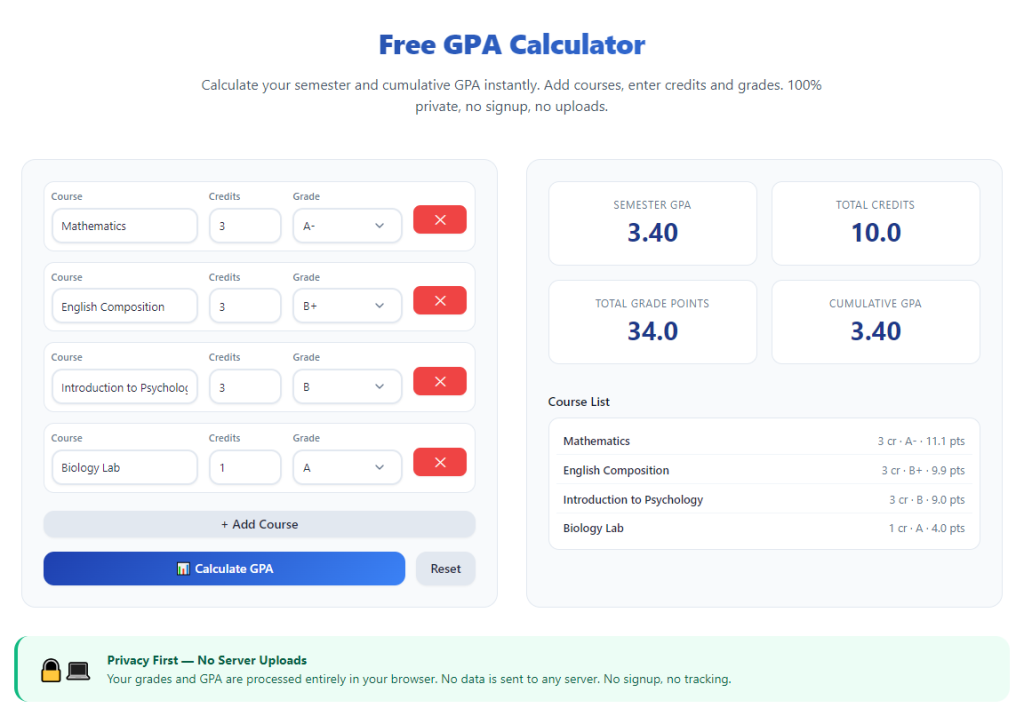
Launch the student grade calculator in your browser. The main dashboard will display organized input sections separated by high school year, with dedicated fields for course name, grade, unit credits, and class type label.
Take 30 seconds to locate core tool menus: scale adjustment panel, semester grade entry tabs, calculate button, and results display area.
Step 4: Adjust the weighted AP grade scale settings
Navigate to the scale customization menu within the calculator. Input the official AP weight multiplier confirmed from your high school handbook to align the tool’s math with district grading rules.
Save your custom scale preference so the system applies matching AP weight bonuses to every course entry automatically for future sessions.
Step 5: Input coursework year by year, tagging all AP classes
Start with your earliest freshman semester and work forward to your current senior classes. For each subject line entry:
- Type a short course name label for easy tracking
- Select the course classification tag: AP, Honors, or Regular
- Enter the assigned credit units for the semester or full-year class
- Input your final letter grade or raw percentage score
Tag every Advanced Placement course accurately; untagged AP classes will not receive the required weighted point boost and skew your final GPA totals.
Step 6: Repeat data entry for all four high school years
Continue adding every completed and in-progress AP, honors, and standard class across freshman, sophomore, junior, and senior semesters. Double-check each entered grade and unit value to avoid typos that alter final calculations.
You may skip elective classes with zero credit weight if they do not count toward your cumulative GPA per school policy.
Step 7: Run the weighted GPA calculation
Once all coursework data is fully entered, locate and select the calculate button on the tool’s main screen. The system will process all semester credit values, AP weight multipliers, and individual class grades in a split second.
Step 8: Review dual GPA output results
Two distinct scores will populate the results panel after processing finishes: your unweighted cumulative GPA and weighted AP-inclusive cumulative GPA.
Compare the weighted figure to your official school transcript GPA to confirm alignment with district grading math standards. If numbers differ, revisit your scale settings or course tag entries to fix mismatches.
Step 9: Adjust entries for projected or updated grades
If you want to forecast future GPA after upcoming AP semesters, edit existing grade lines to input target letter grades for classes you have not yet finished. The calculator refreshes your weighted total instantly to show potential GPA growth.
If you receive an improved AP exam score mid-year, simply overwrite the original grade entry and recalculate your cumulative average with the updated value.
Step 10: Save or copy your full grade dataset
Use the tool’s copy or save function to store your complete AP course and GPA results. Paste the organized grade list and final weighted GPA numbers into college application worksheets, planning documents, or share with your school counselor as needed.
Step 11: Recalculate periodically after new semester grades release
Repeat the full process at the end of every grading period to keep your weighted AP GPA data current. Regular updates ensure you maintain accurate college admissions and scholarship eligibility projections all four years of high school.
Common Mistakes to Avoid When Using a Weighted AP GPA Calculator
Even with a reliable specialized tool, these frequent user errors will produce inaccurate weighted GPA results and mislead your college planning decisions.
Failing to tag AP courses with the correct class label
Leaving Advanced Placement classes marked as regular coursework removes the critical AP weight multiplier from your calculation. This generates an artificially low weighted GPA that does not reflect your actual transcript standing.
Using the wrong district AP weight scale preset
Every high school follows unique AP bonus rules. Using a generic default scale instead of your local school’s official multiplier creates a consistent offset between calculator results and official transcript GPA values.
Ignoring credit unit differences for semester vs full-year AP classes
A one-semester AP course carries half the credit weight of a full-year Advanced Placement class. Leaving unit values set to a generic 1.0 for all courses skews cumulative average math significantly.
Mixing letter grades and percentage scores without conversion checks
Inputting partial percentage values alongside letter grades without confirming the tool’s conversion chart can create inconsistent point assignments for your AP coursework.
Only calculating GPA once senior year before college applications
Waiting until your final semester to run a full weighted GPA calculation leaves no time to adjust course loads or improve AP grades to hit target admissions and scholarship GPA thresholds.
Deleting past semester AP coursework entries
Removing freshman or sophomore year AP classes from the calculator erases critical credit data needed for accurate four-year cumulative GPA computation. Always keep all completed coursework entries intact.
Expert Pro Tips to Maximize Accuracy From Your Weighted AP GPA Calculator
Use these actionable student strategies to get the most precise, useful results as you master how to use GPA calculator for weighted AP classes throughout high school.
- Bookmark the calculator tool for instant access at the end of every semester to refresh your cumulative weighted AP GPA without repeated setup steps.
- Create a physical or digital grade log to write down new AP class scores immediately after receiving report cards, to avoid forgotten or misremembered grades during calculator data entry.
- Test multiple projected grade combinations for upcoming AP courses to map out minimum letter grade targets needed to hit your ideal weighted GPA for target colleges.
- Schedule a quick cross-check with your school guidance counselor once per year to confirm calculator weighted GPA matches the district’s official transcript calculation method.
- Separate summer AP coursework entries into their own semester tab, as summer classes often follow unique credit weight rules distinct from standard school-year courses.
- Avoid rounding individual class grade points manually before inputting data; let the calculator run full decimal math to preserve precise cumulative GPA totals.
- Save a copy of your full four-year AP grade dataset at the end of junior year to reference while completing early action and regular decision college applications senior year.
Final Thoughts
Weighted GPA accounting for AP coursework stands as one of the most important metrics college admissions teams evaluate when comparing high school applicants. Rigorous Advanced Placement classes boost your weighted average and signal academic initiative to university review boards.
Manual grade tallying carries too much risk of math errors, slow recalculation cycles, and confusion over district AP weight policies. Generic unweighted calculators entirely ignore the bonus points assigned to AP courses and deliver incomplete, unusable results for college prep.
Learning how to use GPA calculator for weighted AP classes removes all these planning barriers. This student-focused tool automates complex weighted scoring math, supports custom district grading scales, tracks four-year AP coursework, and generates both weighted and unweighted GPA figures in moments.
The calculator fits every stage of high school planning: semester grade verification, future course forecasting, scholarship eligibility checks, and official college application self-reporting. Students, parents, and academic counselors all benefit from its fast, precise grade tracking functionality.
By following the step-by-step workflow and avoiding common user mistakes outlined in this guide, you can maintain consistently accurate weighted AP GPA records across all four years of high school, build realistic college admissions projections, and track your academic progress with total confidence.
After learning the operation method, click the link below to enter the tool page for immediate use.