Email communication remains a core part of personal outreach, business outreach, marketing campaigns and daily online interactions. Every message relies on a valid address to reach the intended recipient.
Many people spend time crafting thoughtful emails, only to face bounced messages or delivery failures. Most of these problems stem from simple formatting mistakes in email addresses.
Small typos, missing symbols or incorrect character placement are easy to overlook when typing manually. These minor errors stop messages from reaching inboxes entirely.
Most traditional verification tools require large software packages or app installations. Extra downloads take up storage space and add unnecessary steps to a quick checking task.
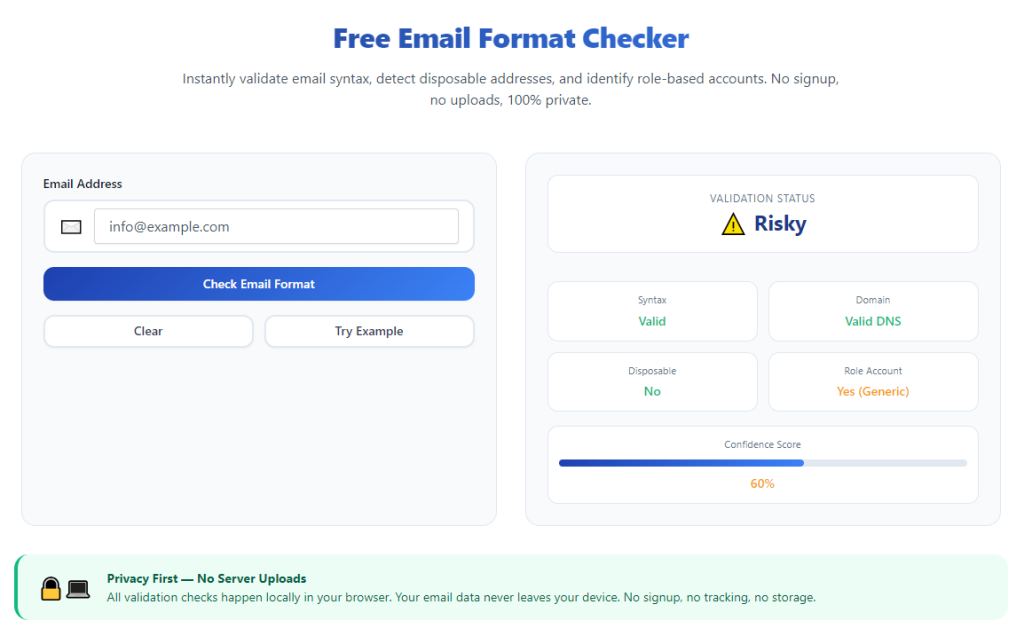
A reliable free email format checker no download solves these common troubles. It runs entirely online, verifies address syntax instantly and requires zero software setup of any kind.
This complete guide covers the flaws of manual checks and downloadable tools, key advantages, essential features, real-world use cases and a detailed workflow for accurate email validation.
Problems With Manual Email Format Checks & Downloadable Tools
Relying on your own eyes or traditional downloadable software creates multiple setbacks for anyone who regularly works with email addresses.
Easy to miss tiny formatting errors
Characters like dots, underscores and special symbols look similar at a glance. A single misplaced mark can render an entire email address invalid without you noticing.
No clear standard for correct syntax
Different providers follow specific formatting rules. Without reference tools, you cannot confirm if an address follows universal email structure guidelines.
Extra storage usage from downloaded software
Standalone email checking programs take up hard drive or device space. This becomes a hassle for users with limited storage on laptops, phones or work devices.
Slow setup and regular updates
Downloadable tools need installation steps, permission approvals and ongoing updates. These processes waste time for users who just want a fast format check.
Restricted use across multiple devices
Software you download stays tied to one device. You cannot quickly verify email formats when switching between computers or mobile gadgets.
Hidden fees for advanced validation
Many downloadable email tools lock full format analysis behind paid plans. Basic free versions only offer shallow checks that miss critical syntax issues.
Security risks from unknown downloads
Installing third-party software always carries small security concerns. Online tools eliminate exposure to risky files or unwanted bundled programs.
Key Benefits of Free Email Format Checker No Download
Adding a free email format checker no download to your daily workflow streamlines email management and prevents common delivery failures for all types of messages.
100% online operation with zero installations
You can access the tool directly through any web browser. There are no setup files, install wizards or system permissions needed to start checking.
Complete freedom from storage waste
Since nothing saves to your device, you preserve full storage space. This is ideal for lightweight devices, work computers and personal mobile gear.
Instant results in just seconds
The online system processes each email address right away. You get a clear valid or invalid result without waiting for software to launch or load.
Full free access to all core features
Every standard format check function stays free forever. You can verify single addresses or multiple entries with no paywalls or upgrade prompts.
Works on every device and browser
Use the tool on desktops, laptops, tablets and smartphones. It functions consistently across all major browsers with no compatibility issues.
Detailed breakdown of formatting mistakes
Beyond a simple pass or fail mark, it points out exactly where errors lie. You learn which characters or sections break standard email structure.
Protects your device security
Using a browser-based tool means no external files enter your system. You avoid malware, adware and unwanted add-ons that often come with downloaded programs.
Unlimited checking volume every day
There are no daily limits or usage caps. You can check dozens or hundreds of email addresses repeatedly for personal or business tasks.
Must-Have Features in a Quality Free Email Format Checker No Download
Not all browser-based email validators deliver reliable results. The best free email format checker no download includes these practical, user-focused features.
Full syntax rule validation
It follows global email formatting standards to scan every part of an address. This includes username sections, domain names and required separating symbols.
Error location and clear explanations
When an address fails the check, the tool highlights the exact faulty section. It also explains why the format breaks standard rules for easy fixes.
Bulk address checking support
For users managing contact lists, bulk input saves massive time. Paste a full list to run format checks on multiple entries all at once.
Domain structure verification
A strong checker reviews domain endings and structure. It flags incomplete domains or unsupported character combinations in website segments.
Clean, simple user interface
The layout stays focused on the checking task. No distracting ads, pop-ups or extra tools clutter the screen during your work.
One-click clear and reset functions
Quick buttons let you erase old entries and start fresh. This keeps the workflow smooth when moving from one address to the next.
Basic duplicate detection
When checking long lists, the tool can spot repeated entries. This helps you clean up contact records while verifying format quality.
Common Use Cases for Download-Free Email Format Checkers
A flexible free email format checker no download serves personal users, small business owners, marketers and team members across countless daily tasks.
Personal daily email use
Before sending messages to friends, family or new contacts, run a quick check. This stops simple typos from preventing personal emails from arriving.
Business client communication
Professional outreach depends on reliable delivery. Verify client and partner email formats to maintain smooth business conversations and avoid miscommunication.
Marketing email list management
Marketers maintain large contact databases. Regular format checks remove invalid entries and improve overall campaign delivery rates.
Customer service and support work
Support teams collect user email addresses for follow-ups. A fast checker ensures every submitted address works for future replies and updates.
Event and registration form review
After collecting sign-up information, scan all submitted emails. Fix formatting errors early to stay connected with event attendees or program participants.
Remote team collaboration
Remote workers switch devices often. A no-download tool lets every team member verify emails from any work device without installing software.
Resume and application submissions
Double-check your own email address on resumes or applications. A correctly formatted contact builds a more professional first impression.
Updating old contact records
When cleaning up old address books or archived lists, use the tool to refresh entries. Remove broken formats and update outdated contact details.
Step-by-Step Guide: Use Free Email Format Checker No Download
Follow this straightforward workflow to verify single or multiple email addresses accurately with a free email format checker no download.
Step 1: Gather all email addresses to check
Collect every address you plan to validate. You can work with a single contact or compile a full list from documents, forms or contact books.
Organize long lists in advance to keep the checking process orderly and easy to track.
Step 2: Open the tool in your web browser
Launch your preferred browser and pull up the email format checker. The page loads instantly with no download prompts or installation steps.
Take a moment to locate the main text input box and core function buttons on the main screen.
Step 3: Enter or paste email content
Type a single email address directly into the input field. For multiple entries, paste your full list into the same area.
Review the pasted content briefly to make sure no lines are missing or cut off before running the scan.
Step 4: Start the format validation scan
Click the check or validate button to begin the analysis. The tool scans each entry against standard email formatting rules right away.
Even for long lists of addresses, the full process finishes within a few seconds.
Step 5: Read validation results
Look over the on-screen results. Valid addresses will show a clear confirmation mark.
For invalid entries, review the error notes. The tool will name the exact formatting issue affecting each broken address.
Step 6: Correct detected formatting errors
Follow the tool’s guidance to fix typos, misplaced symbols or incomplete domain sections.
Make simple edits to match standard email structure while keeping the original intended address intact.
Step 7: Recheck revised email addresses
After making corrections, re-enter the updated address or list into the input field.
Run a second scan to confirm all fixes work and every entry now follows proper formatting rules.
Step 8: Separate valid and invalid entries
Sort your full list into two groups: fully verified addresses and entries that cannot be fixed.
Discard or flag permanently broken addresses to keep your contact records clean and reliable.
Step 9: Save verified email addresses
Copy all fully validated addresses and save them to your contact list, document or email platform.
These checked entries are now ready for messages, campaigns, follow-ups or long-term record keeping.
Step 10: Close or reset for next use
Use the clear button to erase all content from the input box once you finish your task.
The tool stays ready for future checks anytime you need to verify new email formats.
Common Mistakes to Avoid While Using the Tool
Even when using a dependable free email format checker no download, these frequent mistakes can reduce accuracy and efficiency.
Ignoring detailed error explanations
Many users only look at the pass or fail result. Skipping error details means you may repeat the same formatting mistakes later.
Rushing through bulk list checks
When working with dozens of addresses, take time to review every failed entry. Rushing leads to unfixed errors in large contact databases.
Assuming format validity means active inbox
A correct format only means the structure follows rules. It does not guarantee the account is currently active or monitored by a user.
Using special unsupported characters
Avoid adding unusual symbols to usernames or domains. Most standard email systems do not support rare characters, even if the tool allows them.
Forgetting to recheck edited entries
A quick edit does not always fix the problem entirely. Always run a second scan to confirm changes work as expected.
Mixing extra text with email addresses
Names, notes or extra text mixed into the input area can disrupt scans. Keep the input field limited to only email addresses for best results.
Expert Tips to Maximize Tool Performance
Use these practical strategies to get the most value out of afree email format checker no download for all your personal and professional tasks.
- Bookmark the tool in your browser for one-click access, so you can run format checks anytime without searching again.
- Make it a habit to check every new email address before saving it to your permanent contact list.
- Schedule regular bulk checks for large marketing or customer lists to keep records clean year-round.
- Keep notes on common formatting mistakes you make, so you can type addresses more accurately over time.
- Use the tool on public devices or work computers where downloads and software installs are not permitted.
- Share the tool with team members to create a uniform process for verifying all company email contacts.
- Combine format checks with basic list cleaning to remove duplicates and outdated entries at the same time.
Final Thoughts
Successful email communication starts with correct formatting. A single error can stop important personal messages, business proposals and marketing content from reaching audiences.
Manual reviews are prone to human error, while downloadable tools bring storage, setup and security drawbacks. Neither option fits fast, modern online workflows well.
A trusted free email format checker no download resolves all these issues. It operates fully online, costs nothing, requires zero installations and delivers fast, accurate validation every time.
This simple yet powerful tool works for casual users, business teams, marketers and anyone who regularly manages email contacts of any size.
By following the step-by-step process and avoiding common errors, you can maintain clean, valid email lists, cut down on delivery failures and make your digital communication far more reliable overall.
After learning the operation method, click the link below to enter the tool page for immediate use.