Calculating accurate take-home income is one of the most critical financial tasks for full-time and salaried employees across every industry. Many people struggle to forecast their actual paycheck amount after accounting for mandatory and voluntary workplace deductions.
Pre-tax deductions create major shifts in taxable income, and 401k retirement contributions are one of the most impactful pre-tax expenses most workers encounter. Guessing how these reductions alter final pay often leads to flawed personal budgeting and savings planning.
Manual math for net salary requires tracking federal income tax brackets, state tax rates, Medicare, Social Security, variable 401k contribution percentages, and additional pre-tax line items like health insurance premiums. This layered calculation is error-prone and extremely time-consuming to complete by hand.
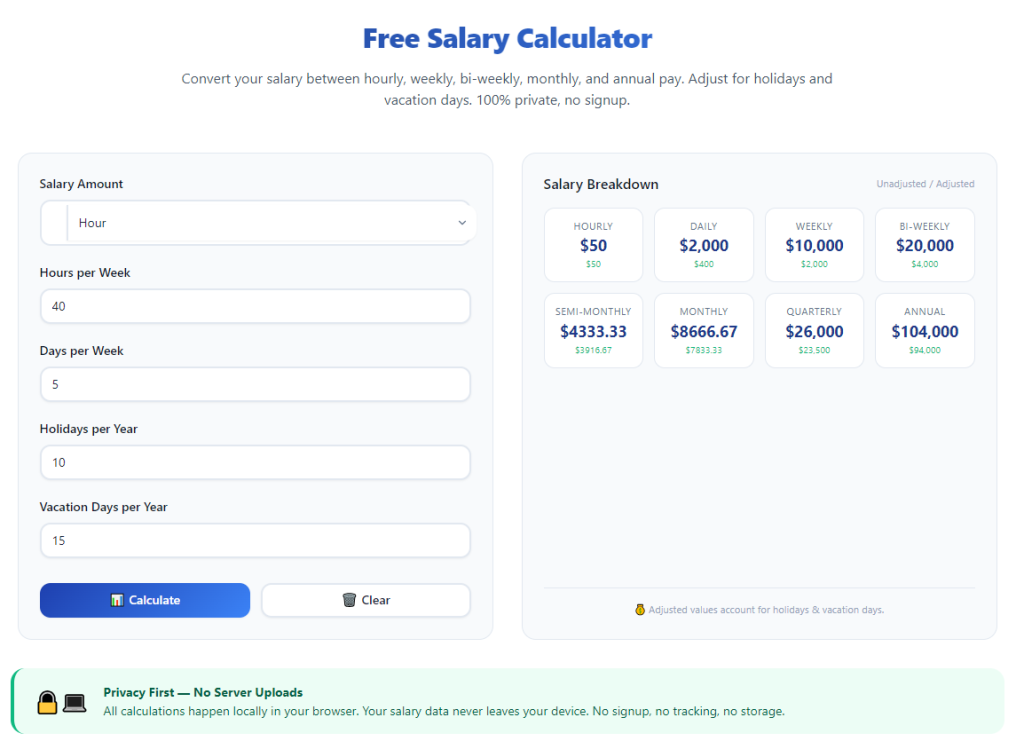
A reliable salary calculator with 401k and pre-tax deductions streamlines all these complex computations automatically. It combines retirement savings math and pre-tax withholding rules into a single, easy-to-navigate tool built exclusively for employee financial planning.
This comprehensive guide breaks down the flaws of manual salary math, core advantages of dedicated deduction calculators, must-have functional features, common real-world use cases, and a detailed beginner workflow to generate precise net pay estimates every time.
Common Pitfalls of Calculating Salary Manually With 401k and Pre-Tax Costs
Most employees rely on rough mental math or basic spreadsheets to estimate paychecks, but these outdated methods create consistent financial miscalculations that disrupt monthly budgets.
Confusion over pre-tax vs post-tax classification
Many workers cannot distinguish which expenses reduce taxable gross income versus costs subtracted after tax calculations. Misclassifying 401k contributions or medical premiums skews every subsequent tax calculation.
Complex layered tax bracket math
Federal progressive tax brackets, local state income taxes, and fixed FICA rates all apply separately to adjusted gross income after pre-tax deductions. Recalculating these tiers manually opens the door to arithmetic mistakes on every line item.
Variable 401k contribution percentage adjustments
401k plans support fixed dollar amounts or percentage-based contributions. Switching between these two input formats during manual recalculations adds extra steps and opportunities for numerical errors.
Forgotten secondary pre-tax deductions
Healthcare coverage, flexible spending accounts, commuter benefits, and dental plans all qualify as pre-tax withholdings. Most manual calculations leave these line items out entirely, leading to inflated net pay guesses.
Hours wasted on repeated recalculations
Any adjustment to salary, 401k savings rate, or pre-tax benefit cost requires reworking the entire formula from scratch. This repetitive work eats into personal financial planning time each month.
No side-by-side comparison capability
Manual notes or basic spreadsheets cannot instantly show how raising or lowering 401k contributions impacts take-home pay and annual tax liability. Employees lack clear data to optimize retirement savings rates.
Key Advantages of a Salary Calculator With 401k And Pre-Tax Deductions
Integrating a dedicated salary calculator with 401k and pre-tax deductions into your personal finance routine eliminates every barrier tied to manual paycheck math and delivers consistent, reliable financial insights.
Automatically separates pre-tax deductions before tax computation
The tool first subtracts all eligible pre-tax costs including 401k contributions, medical insurance, and FSA allocations from gross salary. Tax calculations only run on the remaining adjusted taxable income, matching official payroll department logic exactly.
Supports both percentage and fixed-dollar 401k contributions
Whether you contribute a set percentage of each paycheck or a flat monthly dollar amount to your retirement plan, the calculator accepts both input formats and recalculates deductions instantly without extra manual conversion.
Accounts for all standard mandatory and voluntary pre-tax line items
Beyond core 401k savings, the tool includes dedicated input fields for every common workplace pre-tax benefit: group health premiums, vision and dental coverage, transit reimbursement accounts, and dependent care FSAs.
Generates fully itemized breakdowns of every withholding
Instead of only outputting a single net pay number, the calculator displays a full line-by-line breakdown: gross annual salary, total pre-tax reductions, taxable income, federal tax, state tax, FICA taxes, and final monthly/biweekly take-home pay.
Enables instant "what-if" financial planning
Users can adjust their 401k contribution rate, add or remove pre-tax benefits, or update their base salary to see immediate shifts in net income and annual tax savings. This functionality simplifies long-term retirement and budget planning drastically.
Eliminates human arithmetic errors entirely
All tax brackets, FICA rates, deduction caps, and pre-tax eligibility rules are pre-programmed into the tool’s backend logic. There is no need for users to look up tax tables or complete multi-step multiplication and subtraction manually.
Works for all standard payroll pay cycles
The calculator supports weekly, biweekly, semimonthly, and monthly pay schedules. It automatically distributes annual salary, annual 401k limits, and yearly pre-tax benefit costs to match your company’s specific payroll cadence.
Must-Have Functional Features for a Quality Salary Calculator With 401k And Pre-Tax Deductions
Not all payroll estimation tools properly handle combined 401k and pre-tax deduction logic. The top-tier salary calculator with 401k and pre-tax deductions includes these employee-focused core features for accurate financial forecasting.
Dual-format 401k contribution input
The tool must accept two separate input modes: percentage of gross income or fixed dollar per pay period. This accommodates every employer’s 401k plan enrollment structure without forced manual conversions.
Comprehensive pre-tax benefit entry panel
Dedicated input slots for every IRS-qualified pre-tax withholding: medical insurance premiums, flexible spending accounts, dependent care accounts, commuter transit benefits, and group wellness plan fees. Users can toggle each deduction on or off individually.
State and local tax selection menu
Adjustable tax location settings pull the correct state income tax brackets and standard deductions for every U.S. region. This critical feature ensures tax calculations reflect your exact geographic payroll rules.
Multiple pay cycle toggle options
Clear selector for weekly, biweekly, twice-monthly, and monthly paycheck schedules. The calculator automatically prorates annual salary, 401k maximum contribution limits, and pre-tax benefit costs to align with your pay frequency.
Full itemized pay statement output
The final results page displays a complete simulated pay stub. Every line item from gross earnings through final net pay is labeled clearly, matching the format of official employer payroll documents.
Marginal tax bracket visualization
Supplementary output showing your effective tax rate after pre-tax deductions and 401k reductions. This helps users visualize how retirement savings lower their overall annual tax burden.
No arbitrary input caps for salary and deductions
High-income earners and employees with robust pre-tax benefit packages need unlimited input ranges for gross salary, 401k contributions, and combined pre-tax withholding totals without locked maximum values.
Side-by-side comparison mode
A built-in comparison function lets users save two separate calculation profiles. For example, you can compare take-home pay at a 5% 401k contribution versus a 10% contribution to weigh savings growth against monthly budget flexibility.
Real-World Use Cases for a Salary Calculator With 401k And Pre-Tax Deductions
A versatile salary calculator with 401k and pre-tax deductions supports nearly every personal finance scenario for salaried full-time employees, job seekers, and small business HR administrators alike.
Pre-job salary offer evaluation
When reviewing a new employment offer, candidates input the proposed base salary and estimated pre-tax benefit costs plus planned 401k contributions to calculate actual net take-home pay. This removes surface-level salary bias during compensation negotiations.
Monthly household budget creation
Employees building fixed monthly spending plans use the tool to lock in accurate net income numbers. Factoring in consistent 401k and medical pre-tax deductions prevents overestimating available spending cash each pay cycle.
401k contribution rate optimization
Workers deciding whether to raise or lower their retirement savings percentage run multiple calculator simulations. They balance higher long-term retirement growth against short-term monthly take-home pay adjustments.
Annual tax liability forecasting
By inputting full-year salary and pre-tax deduction totals, users estimate their year-end tax refund or payment amount ahead of tax filing season. This reduces surprise tax bills during filing months.
New benefit enrollment planning
During open enrollment windows, employees test adding or dropping pre-tax benefits (such as upgraded health insurance or transit accounts) to measure the exact impact on their regular paycheck amount.
Small business payroll preliminary estimates
HR staff at small companies use the calculator to generate preliminary pay stub previews for new hires. This speeds up onboarding by giving new team members clear advance take-home pay projections.
Cross-state job relocation financial analysis
Employees considering a move to a different state input identical salary, 401k savings rate, and pre-tax benefit values while switching the tax state setting. They compare net pay differences between locations before accepting relocation offers.
Step-by-Step Complete Tutorial: How to Use a Salary Calculator With 401k And Pre-Tax Deductions
Follow this structured, beginner-friendly workflow to generate precise, fully itemized net salary estimates with all 401k and pre-tax withholding values accounted for.
Step 1: Gather all core payroll and deduction information
First, compile all data points required for accurate calculation: annual base gross salary, your company’s pay cycle frequency, current planned 401k contribution amount, and every pre-tax workplace benefit you elect each year.
Separate your 401k savings plan details into either a fixed percentage of gross pay or a flat dollar amount deducted per paycheck. Note monthly costs for health insurance, FSAs, transit benefits, and any other pre-tax line items.
Step 2: Launch the salary calculator tool
Open the calculator tool within your browser. The main landing page will display organized input sections separated into core income, 401k retirement contributions, pre-tax benefits, tax location, and pay cycle settings.
Spend a moment navigating each panel to identify where every piece of collected data will be entered before starting your input process.
Step 3: Input your base gross salary and pay schedule
Locate the gross salary input field and enter your full annual pre-401k, pre-benefit compensation. Next, open the pay cycle dropdown menu and select the exact schedule your employer follows (biweekly, monthly, weekly, semimonthly).
The tool will automatically convert the annual salary into per-pay-period gross earnings for all subsequent deduction and tax math.
Step 4: Configure your 401k contribution settings
Navigate to the dedicated 401k contribution panel. Toggle between percentage mode or fixed dollar mode to match your current plan enrollment setup, then type in your selected contribution value.
If your employer offers a matching 401k program, locate the employer match input field and enter the company match percentage to view total combined annual retirement savings in your final report.
Step 5: Enter all eligible pre-tax deductions
Move to the pre-tax benefits input section. For every workplace benefit that subtracts from gross income before tax calculations, enter the per-pay-period cost into its corresponding dedicated field.
Common entries include medical/dental/vision insurance premiums, health flexible spending accounts, dependent care FSAs, and qualified commuter transit benefits. Leave blank any pre-tax benefits you do not elect to avoid skewed deduction totals.
Step 6: Set your tax filing status and geographic tax rules
Select your federal tax filing status from the available options: single, married filing jointly, married filing separately, or head of household. Next, use the state selector dropdown to choose the state where your payroll taxes are withheld.
Some tools include optional local county tax input fields; fill these out if your region collects additional local income tax for maximum calculation precision.
Step 7: Run the full payroll calculation
Double-check all entered numbers to catch typos in salary, 401k rates, or pre-tax benefit costs. Once all data is verified, click the generate calculate button to run the full multi-layer payroll computation.
The tool will process pre-tax deductions first, then compute adjusted taxable income, federal and state income tax, FICA Social Security and Medicare taxes, and final net take-home pay within seconds.
Step 8: Review the full itemized pay breakdown
Scroll through the complete generated pay statement report. Start by confirming your gross per-period income, then review the aggregated total of all pre-tax deductions including your 401k contribution.
Examine the taxable adjusted gross income line, followed by separate line items for federal income tax withholding, state tax withholding, and mandatory FICA payroll taxes. Locate the final net take-home pay value at the bottom of the breakdown.
Step 9: Run comparative what-if scenario adjustments
If you want to test different financial scenarios, return to the main input panels to modify one variable at a time. For example, increase your 401k contribution percentage or remove a pre-tax transit benefit to see immediate shifts in net pay.
Save separate calculation profiles if the tool includes a comparison feature to view multiple scenarios side-by-side for retirement and budget planning decisions.
Step 10: Save or export the finalized pay estimate report
Once you land on a calculation that matches your current or target payroll setup, use the tool’s export or copy function to save the full itemized breakdown. You can paste the data into personal budget spreadsheets or digital planning documents for long-term reference.
Update the calculator inputs anytime your salary, 401k savings rate, pre-tax benefits, or tax residency status changes to maintain accurate monthly budget projections.
Common Costly Mistakes to Avoid When Using a Salary Calculator With 401k And Pre-Tax Deductions
Even with a fully featured salary calculator with 401k and pre-tax deductions, these frequent user errors lead to inaccurate net pay estimates and flawed personal financial planning.
Mixing pre-tax and post-tax benefit entries
Entering post-tax costs (such as supplemental life insurance) into pre-tax deduction fields artificially lowers calculated taxable income and overestimates your actual take-home paycheck amount. Always verify IRS eligibility before inputting a benefit as pre-tax.
Mismatching 401k input mode values
Accidentally entering a dollar amount into the percentage field or vice versa creates wildly incorrect retirement deduction totals. Double-check the toggle setting before typing your contribution value to align with your actual payroll setup.
Forgetting to update pay cycle frequency
Using biweekly pay settings for a monthly payroll schedule skews all annual and per-period deduction math, including 401k annual contribution limit tracking and pre-tax benefit proration.
Leaving out secondary pre-tax line items
Skipping FSA, dependent care, or transit pre-tax deductions understates your total pre-tax withholding. This raises calculated taxable income and produces an unrealistically high net pay estimate that will not match your real paycheck.
Ignoring state and local tax selection
Leaving the tax state set to a default generic location disregards unique state tax brackets, standard deductions, and local withholding rules, creating major gaps between calculator output and actual payroll results.
Running calculations without adjusting filing status
Filing status directly impacts federal tax brackets and standard deduction amounts. Using the wrong filing status for your household over- or under-calculates annual income tax withholding totals.
Only testing a single fixed financial scenario
Relying on one static calculation prevents effective retirement planning. Failing to adjust 401k contribution rates to compare tradeoffs between take-home pay and retirement growth limits long-term financial optimization.
Expert Pro Tips to Maximize Accuracy From Your Salary Calculator With 401k And Pre-Tax Deductions
Use these practical financial planning strategies to get the most precise, actionable insights every time you run calculations on your chosen deduction tool.
- Update your calculator inputs immediately after open enrollment season to reflect any new or removed pre-tax workplace benefits for the coming plan year.
- Test incremental 1% or 2% increases to your 401k contribution rate to find the highest savings level that still fits comfortably within your monthly household budget.
- Save separate calculation profiles for baseline current payroll and future target salary offers to simplify compensation comparison during job searches.
- Cross-reference the calculator’s itemized breakdown against your official employer pay stub once per quarter to catch any persistent input formatting errors.
- Factor annual 401k contribution caps into long-term planning by running full-year calculation totals to avoid hitting IRS savings limits prematurely mid-year.
- Use the calculator before submitting changes to your 401k enrollment form to preview exactly how each savings adjustment alters your immediate take-home income.
- Combine calculator net pay results with separate monthly fixed expense tracking to build a fully balanced household budget aligned with your actual post-deduction cash flow.
Final Thoughts
Accurate salary forecasting forms the backbone of responsible personal finance, retirement planning, and monthly household budgeting. Pre-tax workplace benefits and 401k retirement contributions drastically alter taxable income, making manual pay calculations unreliable and unnecessarily complex for most employees.
Generic wage calculators that ignore layered pre-tax deduction rules and dedicated 401k contribution logic consistently produce incomplete, misleading net pay estimates that derail budget and savings goals.
A fully functional salary calculator with 401k and pre-tax deductions resolves all these calculation challenges in a single streamlined tool. It automates tax bracket math, separates pre-tax withholdings from taxable income, accommodates all standard payroll schedules, and generates fully itemized simulated pay stubs for clear financial visibility.
This tool delivers value for job seekers negotiating compensation, active employees optimizing retirement savings rates, HR staff building new hire pay previews, and anyone preparing accurate annual tax liability projections.
By following the complete step-by-step calculation workflow and avoiding common input mistakes outlined in this guide, you can generate consistent, precise take-home pay estimates, balance short-term monthly spending flexibility with long-term 401k retirement growth, and build a sustainable, realistic personal financial plan for every stage of your career.
After learning the operation method, click the link below to enter the tool page for immediate use.