If you’ve ever tried converting a JPG image to PNG online, you know how frustrating the process can be. You find a seemingly decent free tool online, spend time uploading your picture, and right before the final conversion step, you’re suddenly hit with annoying pop-ups asking for your email address, mandatory new account sign-up, or even a premium paid subscription to unlock basic conversion features. Worse still, countless free conversion tools sacrifice image quality for speed, leaving you with blurry graphics, washed-out faded colors, distorted edges, or pixelated tiny details that completely ruin your carefully edited work.
I’ve dealt with all these annoying headaches firsthand over the years, whether I’m editing casual social media graphics, prepping clear screenshot images for work PPTs and school reports, or designing simple custom logos and icons for personal small projects. That’s exactly why a free JPG to PNG converter no registration required is such an absolute game-changer for anyone who regularly works with and edits digital images in daily life, study, or work.
Let’s be real, most of us don’t need bulky, fancy professional editing software like Photoshop just for simple basic image conversions. Paying for expensive professional tools or learning complicated editing skills solely to turn a JPG into a PNG is totally unnecessary and a huge waste of time and money. All we really want is a quick, simple, and reliable way to turn standard JPG files into high-quality, usable PNGs without jumping through endless tedious hoops.
To understand why this conversion matters so much, it’s important to know the core differences between the two formats. JPG files are undoubtedly great for storing ordinary photos and large image batches because they feature compressed file sizes that save device storage space. However, they rely on lossy compression technology, which means every single edit, re-save, or adjustment slowly reduces the original image quality bit by bit.
On top of that, standard JPGs cannot support transparent backgrounds at all — this is a massive downside for anyone making logos, UI icons, overlay graphics, presentation visuals, or design materials. PNG files, by contrast, use professional lossless compression, which perfectly preserves every single pixel, subtle color gradient, and fine detail of your original image. Paired with its unique transparent background support, PNG becomes the ideal format for all kinds of creative design and professional display uses.
The biggest and most annoying issue with the vast majority of online image converters is the pile of unnecessary man-made barriers. Almost all mainstream tools force users to complete mandatory account registration, subscribe to unwanted email newsletters, or upgrade to paid plans just to access the most basic JPG to PNG conversion features. For casual daily users, students completing coursework, freelance creators, and small business owners who only need occasional image conversion, these rigid requirements are totally unreasonable and extremely time-wasting.
A fully reliable free JPG to PNG converter no registration required completely cuts out all these annoying redundant steps. It allows every user to complete image conversions instantly, with zero personal information submitted, zero hidden service fees, zero forced ads, and absolutely zero original image quality loss. In this detailed practical guide, I’ll walk you through everything you need to know about this user-friendly tool, break down its unique advantages over ordinary converters, share real applicable usage scenarios, and teach you how to get flawless, professional-grade PNG conversion results every single time with zero learning cost.
Why Choose a Free JPG to PNG Converter No Registration Required?
You might be wondering: why not just use random free conversion tools or built-in device editors? The answer is simple — most alternatives come with major flaws that ruin your workflow or image quality. Here’s exactly why a free JPG to PNG converter no registration required is the best choice for everyday image conversion tasks:
No sign-up hassle, no personal data risk. Most online image processing tools make it a mandatory rule to complete email verification and account registration before users can unlock formal file conversion functions. This tedious process not only wastes your precious time but also brings potential privacy risks. Once you submit your personal email and information, you’ll often be flooded with endless spam emails, promotional advertisements, and even face the risk of personal data leakage from unsafe platforms.
In sharp contrast, a qualified no-registration converter lets you skip all complicated verification steps and jump straight to uploading and converting images, with absolutely no personal data entry required at all. All your uploaded images will not be stored or leaked, your personal privacy is fully protected, and your inbox stays clean and clutter-free without any irrelevant spam messages.
100% lossless, high-fidelity conversion. One of the most common problems with those random cheap free converters on the market is excessive automatic image compression during the conversion process. This flawed mechanism directly leads to blurry text details, washed-out and distorted colors, lost tiny textures, and overall reduced image clarity. Whether you’re converting crisp desktop screenshots for school reports and work documents, high-definition product images for social media promotion, delicate custom logos for personal branding, or simple design materials for daily creation, a dedicated free JPG to PNG converter no registration required can perfectly retain every pixel, delicate color gradient, and subtle fine detail of your original JPG file. No matter how many times you convert files, you will always get crystal-clear, high-fidelity PNG images with zero quality degradation, zero pixelation, and zero color deviation.
Supports transparent background conversion. This core feature is undoubtedly the biggest advantage and the main reason why people need to convert JPG to PNG. Standard JPG images are fixed with solid white or single-colored backgrounds, which look very stiff and unprofessional when overlaid on different colored backgrounds, custom design templates, website pages, and colorful presentation slides. A top-tier free JPG to PNG converter can intelligently remove redundant solid backgrounds and generate pure transparent PNG files seamlessly. This makes your images highly versatile, allowing them to fit perfectly into any design style, scene layout, and display platform, greatly improving the overall aesthetics and professionalism of your works.
Completely free with no hidden fees. Unlike freemium tools that lock high-quality conversion or batch processing behind paid upgrades, this tool offers full conversion functionality for free. There are no paywalls, no trial periods, and no hidden charges, no matter how many images you convert.
Universal device compatibility. This practical conversion tool is designed with full platform compatibility, abandoning the limitations of traditional desktop software that requires fixed device installation. You can freely use this converter on any device equipped with a mainstream browser, including Windows and Mac laptops, desktop computers, Android and iOS smartphones, and tablets. Whether you’re processing images at home, in the office, on campus, or even on the go during travel, the tool can run smoothly and stably. There is no need to download bulky client software, install cumbersome plugins, or occupy local device storage, bringing you a lightweight and efficient conversion experience anytime and anywhere.
Step-by-Step Guide to Using a Free JPG to PNG Converter No Registration Required
Using this tool is incredibly straightforward, even if you have zero image editing experience. There’s no complicated setup, no confusing settings, and no technical jargon. Follow these simple steps to convert your JPG files to perfect PNGs in seconds:
Step 1: Open the free converter tool
Launch any mainstream browser on your electronic device and open the online entrance of the free JPG to PNG converter no registration required. As a completely online tool, it gets rid of all tedious pre-use preparations. You don’t need to download any third-party apps, install additional browser plugins, update software versions, or register and log in to any account. The entire tool interface is clean and intuitive, with no redundant advertisement pop-ups. It is fully ready for official use instantly for all visitors, saving you a lot of pre-operation time.
Step 2: Upload your JPG files
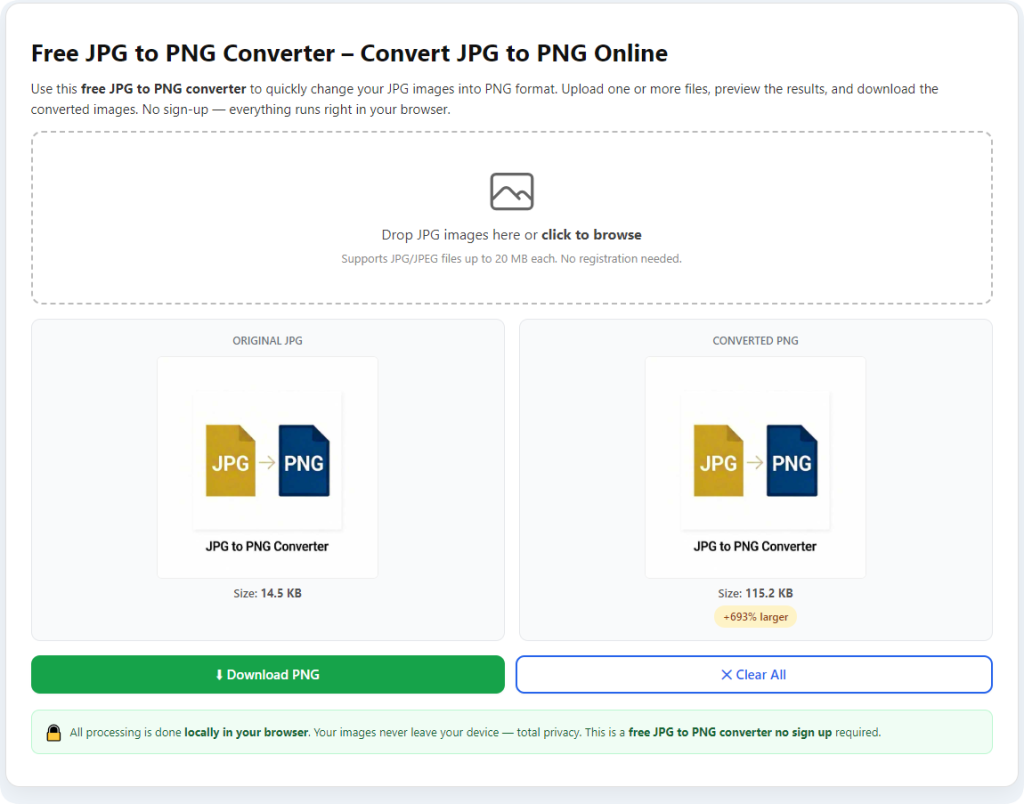
Find the obvious upload button on the tool’s main interface and click it to select the target JPG images from your local device storage folder. The tool supports flexible single-file conversion and efficient batch conversion modes to meet different usage needs. You can upload a single JPG image for quick independent conversion, or select multiple JPG files at one time for batch processing, which greatly improves efficiency when you have a large number of images to process. It fully supports all standard JPG file sizes and resolutions, with no harsh size or quantity limits for regular personal learning and non-commercial use. Before formal conversion, you can double-check the uploaded file names and previews to avoid conversion errors caused by selecting wrong images.
Step 3: Start the conversion process
Once your JPG files are successfully uploaded and displayed on the interface, you only need to click the one-click convert button to start the automatic conversion process. Relying on lightweight and efficient processing technology, this tool can complete precise format conversion in just one to three seconds for single files, and even batch files can be processed quickly without long waiting. Unlike those bulky traditional conversion software that are prone to lagging, freezing, or crashing during operation, this online converter maintains stable operation throughout the whole process, ensuring a smooth and hassle-free conversion experience every time.
Step 4: Preview and download your PNG files
As soon as the conversion progress is completed, the tool will automatically generate high-definition previews of all your converted PNG images for free. You can click to zoom in on the pictures to carefully check the image clarity, color restoration accuracy, edge fineness, and background transparency effect, to ensure the finished products fully meet your usage expectations. If you find any unsatisfactory details, you can re-upload and convert again at will with no extra cost. After confirming everything is perfect, you can click the download button to save the converted PNG files directly to your local device. All downloaded files are pure and clean, without any bundled software, malware, or pop-up ads, ensuring your device safety and file usability.
Common Use Cases for JPG to PNG Conversion
Wondering what real scenarios require JPG to PNG conversion in your daily study, work and creation? These practical and common usage scenarios can fully reflect how essential and convenient a free JPG to PNG converter no registration required is for every ordinary user:
School and office presentations: In daily study and office work, we often need to insert screenshots, charts, and material pictures into PPTs and work reports. Ordinary JPG screenshots usually come with bulky and abrupt white backgrounds, which will make the overall layout of the slides messy and destroy the unified aesthetic style of the document. Converting these JPG materials to transparent PNGs can perfectly remove redundant backgrounds, making the pictures fit closely with various slide themes and document styles, making your presentation works look cleaner, neater and more professional.
Social media and content creation: For social media operators, bloggers, and short video creators, exquisite and flexible image materials are the core of high-quality content. Creators often need transparent icons, text overlays, decorative stickers, and product display graphics for Instagram posts, short video reels, blog articles, and other content. PNG files can maintain ultra-sharp picture quality and flexible background adaptability, ensuring that the visual effects of materials remain consistent and exquisite across different platforms and different background colors.
Logo and graphic design: Whether it is personal brand logos, team activity icons, or simple graphic design works, high-definition and transparent visual effects are essential. Most novice designers save draft works in JPG format for convenience, but fixed backgrounds will make the logos unable to adapt to different application scenarios. Converting draft JPG logos and design works to PNG can realize transparent background display, making the works look more polished and delicate when applied to websites, business cards, posters, and various marketing materials.
E-commerce product displays: For e-commerce sellers and product display practitioners, the clarity and background purity of product images directly affect consumers’ viewing experience and purchase intention. Ordinary JPG product photos with fixed backgrounds appear rigid and unrefined on store pages. Using transparent PNG product images can eliminate background interference, highlight product details and textures, make online store listings more neat and high-end, and effectively improve the overall display grade of store products.
Common Mistakes to Avoid During Conversion
Even with a simple tool, small mistakes can ruin your final images. Here are the key errors to skip for flawless results:
First, avoid using those unknown low-quality generic converters scattered online. Stick exclusively to a professional free JPG to PNG converter no registration required that clearly promises lossless quality output. Most unknown generic tools will automatically compress image data in the background, which easily erases fine textures, distorts color matching, and damages the overall integrity of the picture. Second, never upload corrupted, incompletely saved, or excessively edited JPG files for conversion. Damaged source files have inherent data errors, which will directly lead to blurry, distorted, or faulty PNG outputs that cannot be used normally. Third, don’t be lazy and skip the preview step after conversion. A quick manual check only takes a few seconds, but it can help you timely find minor problems such as incomplete background removal and blurred details, allowing you to reprocess and optimize before officially saving the files.
Final Thoughts
Image conversion is a basic and frequent demand in our daily study, work and creative creation, but it should never be a stressful, time-consuming and risky task filled with tedious sign-up forms, hidden consumption traps, and uncontrollable quality loss. A high-quality free JPG to PNG converter no registration required perfectly solves every pain point of traditional online conversion tools and offline editing software. It integrates fast conversion speed, 100% free service, absolute privacy security, and ultra-high image restoration quality, with zero threshold for use. Whether you are a student who needs to process course materials, an office worker who sorts out work documents, a content creator who makes creative works, or an ordinary user who needs occasional image processing, this tool can fully meet your daily conversion needs.
Say goodbye to wasting precious time on tedious account registrations and email verifications, no longer settle for blurry, distorted converted images, and stop risking your personal privacy and data security just for a simple file format conversion. This no-registration free JPG to PNG converter focuses on the most core user needs, simplifies all redundant operating steps, and retains the most professional lossless conversion effect. Next time you need to convert ordinary JPG images into high-quality, transparent, versatile PNG files, this is definitely your best choice. You can get stable, professional-grade conversion results in just a few seconds, with every use smooth, reassuring and efficient.
After learning the operation method, click the link below to enter the tool page for immediate use.