Working with long PDF files gets frustrating fast without built-in navigation bookmarks.
Students, freelancers, business owners, and content creators all rely on multi-page PDFs for reports, textbooks, whitepapers, and client handouts. Without clickable chapter bookmarks, readers waste minutes scrolling through hundreds of pages to find key sections.
Most offline PDF editors lock bookmark creation behind paid subscriptions. Many free online tools stamp large, distracting watermarks across every page after editing. This ruins professional documents, school assignments, and shareable public resources.
A reliable PDF bookmark adder no watermark free online eliminates both of these common headaches. It lets you generate multi-level nested bookmarks for any PDF at zero cost, with zero branded watermarks added to your final exported file.
This complete walkthrough breaks down every part of using a free online PDF bookmark creator without watermarks. We cover the downsides of paid tools, core advantages of watermark-free online bookmark tools, must-have features, real-world use cases, a full 10-step operation tutorial, common user mistakes, and expert optimization tricks for polished, easy-to-navigate PDFs.
Why Paid PDF Editors & Watermarked Free Tools Fail Most Users
Many people default to desktop PDF software or random free web editors, only to run into costly, annoying limitations that slow down document work. Every workaround carries clear drawbacks that a PDF bookmark adder no watermark free online fully solves.
Locked Bookmark Tools Behind Monthly Subscriptions
Popular desktop PDF suites hide bookmark creation in premium tiers. Basic free reader versions only let you view existing bookmarks, not create new ones.
Paying monthly fees just to add simple chapter navigation is wasteful for casual users who only edit PDFs a few times each month. Small business owners and students cannot justify recurring charges for one-off bookmark edits.
Heavy Watermarks Ruin Final PDF Exports
Nearly all generic free online PDF editors stamp semi-transparent watermarks over every page after you add bookmarks. Some tools also print large text overlays on headers or footers stating “Free Trial Version.”
These marks make documents unfit for client sharing, academic submissions, or public digital downloads. You end up forced to pay for a single unlock just to remove the overlay after finishing your bookmark edits.
Manual Bookmark Creation Takes Hours of Extra Work
If you skip online tools entirely and try to build bookmarks manually inside basic readers, the process becomes extremely time-heavy.
You must jump to every target page one by one, type out each heading name, and drag items to adjust hierarchy. For PDFs with 50+ chapters, this repetitive work eats up hours of your schedule.
No Nested Multi-Level Bookmark Support
Cheap watermarked online PDF bookmark makers only support single flat bookmarks. They lack drag-and-drop nesting for subsections, sub-chapters, and appendix labels.
Long technical guides, textbooks, and business proposals rely on tiered navigation to stay organized. Flat single-line bookmarks destroy readability for anyone browsing your document.
Slow Upload & Export Speeds With File Size Caps
Most free watermarked PDF editors enforce strict file upload limits. If your document exceeds 10–20 MB, you cannot upload it to add bookmarks.
Large textbooks, scanned reports, and full business portfolios regularly surpass these tiny caps, forcing users to split files into messy separate PDFs before editing.
Core Benefits of a PDF Bookmark Adder No Watermark Free Online
Switching to a watermark-free free online PDF bookmark creator streamlines your entire document editing workflow and delivers tangible advantages for every user type. Every feature is accessible without paywalls, hidden fees, or branded page overlays.
Zero Cost, Zero Hidden Upgrades for Bookmark Functions
The full bookmark editing suite stays completely unlocked for every PDF you upload. There are no paywalls to unlock nested bookmarks, bulk editing, or high-resolution exports.
Unlike competing tools, you never hit a usage limit after a certain number of PDF edits each week. You can upload, edit, and export unlimited documents with this PDF bookmark adder no watermark free online.
Fully Watermark-Free Exported PDF Files
After you finish building and arranging bookmarks, the downloaded file arrives completely clean. No text overlays, logo stamps, or semi-transparent brand marks cover your pages.
Your edited PDF looks identical to the original file, with only functional clickable navigation bookmarks added to the sidebar. This makes files suitable for professional, educational, and public distribution without extra cleanup steps.
Instant Nested Multi-Tier Bookmark Building
This free PDF bookmark maker online supports unlimited bookmark hierarchy. You can create main chapter bookmarks, drag secondary subsections underneath, and add tertiary subheadings for deep document navigation.
Readers can expand or collapse groups in the PDF sidebar to jump straight to exact paragraphs, cutting down page-scrolling time drastically.
Fast Upload & Export With Generous File Size Limits
The online tool handles large PDF files smoothly, even documents up to hundreds of pages and dozens of megabytes. Upload and processing times stay fast without lag or frozen browser tabs.
You avoid splitting long PDFs into fragmented smaller files just to fit arbitrary upload caps set by cheaper watermarked editors.
No Software Installation Required
Since this is a fully web-based PDF bookmark adder no watermark free online, you never download heavy desktop software or mobile apps. It runs inside any standard browser on Windows, Mac, Chromebook, and tablet devices.
Save hard drive space and skip lengthy installation setup every time you need to add PDF chapter bookmarks.
Simple Drag-and-Drop Bookmark Organization
Rearranging your navigation structure takes one click and drag. Reorder chapters, move subsections between parent bookmarks, rename labels, or delete unused navigation entries in seconds.
No complicated menu navigation or confusing keyboard shortcuts are required to restructure your PDF’s bookmark sidebar layout.
Preserves Original PDF Formatting 100%
When adding bookmarks, the tool leaves all original PDF content untouched. Fonts, images, page margins, form fields, and embedded links stay fully intact after processing.
You will not face broken layouts, distorted images, or shifted text blocks that often happen with low-quality free PDF editing platforms.
Must-Have Features to Check When Choosing a Free Online PDF Bookmark Creator
Not every watermark-free online PDF bookmark tool delivers the same level of functionality. When picking your PDF bookmark adder no watermark free online, prioritize these blogger, student, and business-focused core features for reliable results every time.
Multi-Level Nested Bookmark Hierarchy Support
Always confirm the tool lets you build layered bookmarks. Flat single-level navigation fails long-form documents like textbooks, research papers, and business manuals.
The best platforms let you drag sub-bookmarks inward to create chapter, section, and subsection groupings visible in the PDF reader sidebar.
Bulk Bookmark Creation Options
Top-tier free PDF bookmark maker online tools offer two quick creation modes: manual single entry and bulk text import.
If you have a pre-written chapter list, paste all heading names at once, assign target page numbers, and generate an entire bookmark structure in one batch instead of typing each entry individually.
Full Custom Bookmark Label Editing
You can rename every bookmark freely, adjust capitalization, shorten long headings, or add shorthand labels for cleaner sidebar navigation.
Some tools also let you color-code bookmark groups to visually separate chapters, appendices, and reference sections for faster browsing.
Zero File Modification Beyond Bookmark Additions
Avoid editors that compress image quality, strip embedded fonts, or alter page layout during processing. A high-quality PDF bookmark adder no watermark free online only inserts navigation metadata without touching core document content.
Ad-Minimal, Clean Browser Interface
Too many free PDF tools flood the screen with pop-up ads, banner promotions, and upsell prompts mid-editing. These distractions slow down your workflow and increase the chance of accidental page refreshes that erase your bookmark progress.
Select a tool with a streamlined, ad-light workspace focused entirely on PDF upload and bookmark editing panels.
Cross-Device Browser Compatibility
The platform should operate smoothly across Chrome, Edge, Safari, and Firefox without plugin downloads. It needs responsive layout for laptop screens and smaller tablet browser windows for on-the-go editing.
Permanent Local File Download After Processing
After bookmark edits finish, the tool generates a permanent downloadable PDF file saved directly to your device storage. It does not lock your edited document behind temporary cloud links that expire after a few hours.
Common Real-World Use Cases for a No Watermark Free Online PDF Bookmark Adder
This versatile PDF bookmark adder no watermark free online fits every niche that shares multi-page PDF documents. Below are the most frequent scenarios users rely on this watermark-free tool for daily document work.
University Students & Academic Researchers
Long research papers, thesis drafts, textbook PDFs, and lab manuals become far easier to navigate with structured bookmarks. Professors prefer organized submissions with clickable chapter navigation for fast grading.
Since the tool exports files with zero watermarks, you can submit fully clean academic documents without worrying about trial branding ruining your assignment.
Freelance Writers & Digital Content Creators
E-book authors, blog content creators, and newsletter publishers build PDF lead magnets, digital guides, and downloadable workbooks. Clean, watermark-free bookmarks improve reader experience and boost content engagement metrics.
Readers spend more time exploring your digital resource when they can jump between chapters instantly instead of scrolling endlessly.
Small Business Owners & Marketing Teams
Sales proposals, service catalogs, training handbooks, and client onboarding packets rely on clear navigation. Adding tiered bookmarks lets prospects skip directly to pricing, service breakdowns, or case study sections without frustration.
No watermarks keep brand documents polished and professional during client sharing and email distribution.
Educators & Online Course Creators
Teachers and course instructors build printable lesson packs, study guides, and slide handouts saved as PDFs. Bookmarks separate unit chapters, practice exercises, answer keys, and reference appendices for student use.
The free tool removes the cost barrier of paid editors for educators managing dozens of course documents monthly.
Legal & Administrative Office Staff
Law firms, HR departments, and administrative teams handle lengthy contracts, employee handbooks, policy manuals, and legal filings. Nested bookmarks simplify cross-referencing clauses, sections, and addenda during document reviews.
Watermark-free exports ensure formal legal and internal policy files remain unmarked for official circulation.
Personal Document Organization
Users scan personal records, tax files, and family archives into multi-page PDFs. Custom bookmarks separate tax years, medical records, and legal paperwork for quick personal reference at home.
Step-by-Step Complete Tutorial: Operate PDF Bookmark Adder No Watermark Free Online
Follow this straightforward 10-stage workflow to upload, edit, organize, and export a fully bookmarked PDF with zero watermarks, no paid upgrades, and no complicated setup.
Step 1: Prepare Your Source PDF File
Gather the full PDF you want to add navigation bookmarks to. Confirm all pages load properly in your default reader before uploading.
Split overly large combined files only if upload speeds lag; most modern free online PDF bookmark creator platforms support full-length multi-hundred-page documents without splitting.
Step 2: Open the Web-Based PDF Bookmark Tool in Your Browser
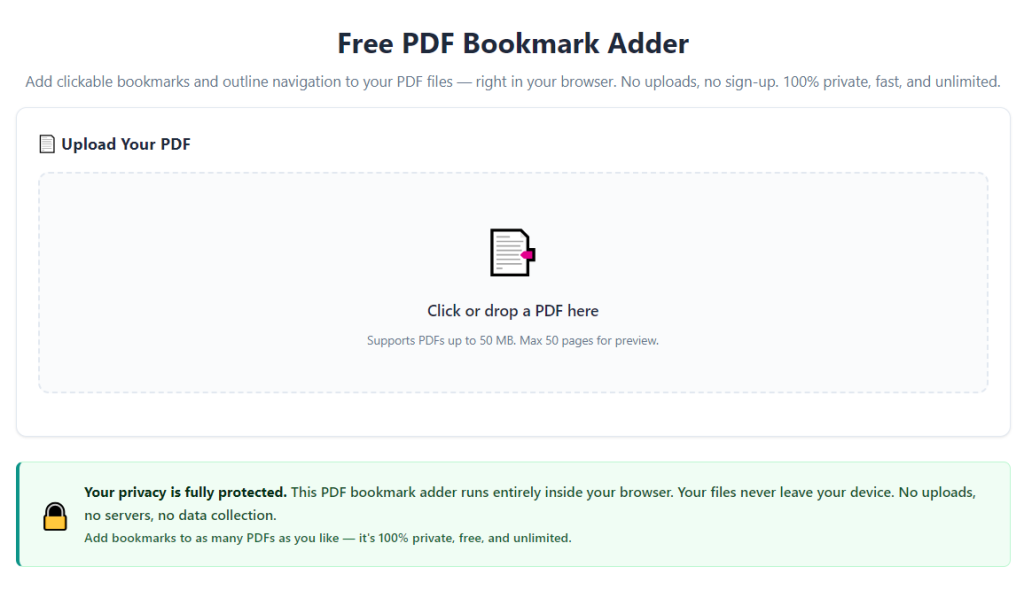
Launch any standard browser window and pull up the free online PDF bookmark adder workspace. Locate the central upload panel labeled for PDF file import.
Close extra browser tabs to reduce processing lag during upload and bookmark editing.
Step 3: Upload Your Target PDF Document
Click the upload button inside the main workspace panel. Select your saved PDF file from local device storage to begin file transfer.
Wait for the upload progress bar to finish fully before moving to bookmark creation; interrupting uploads corrupts file processing.
Step 4: Access the Bookmark Creation Sidebar
Once the PDF preview loads on screen, locate the dedicated bookmark editing panel on the left side of the interface. This panel displays all navigation entries you build for the document.
Read the brief on-screen tooltip to understand basic drag-and-drop nesting rules for multi-level chapter organization.
Step 5: Create Primary Main Chapter Bookmarks
Click the “New Bookmark” button inside the sidebar. Type your main chapter title into the label text box, then input the exact page number this chapter starts on.
Repeat this process for every top-level major section of your PDF guide, manual, or report.
Step 6: Add Nested Subchapter & Subsection Bookmarks
Highlight an existing main chapter bookmark you created. Click “Add Child Bookmark” to generate a tiered sub-entry underneath the parent chapter.
Enter subsection names and matching page numbers for each subheading, appendix, reference block, or supporting section inside your document. Drag bookmarks left or right to adjust hierarchy depth as needed.
Step 7: Rename, Reorder, or Delete Unwanted Bookmark Entries
Click any bookmark label to open the rename text box and adjust wording for clearer navigation. Click and drag bookmarks up or down to reorder the full sidebar sequence to match your PDF’s page layout.
Right-click unused or duplicate bookmarks to delete them without altering the original PDF page content.
Step 8: Preview Bookmark Navigation in Live PDF Viewer
Use the built-in on-screen preview panel to test every bookmark link. Click each entry to confirm the viewer jumps to the correct matching page instantly.
Fix any page number mismatches or mislabeled headings before final export to avoid broken navigation in the downloaded file.
Step 9: Initiate Watermark-Free PDF Export
Once your bookmark structure is fully organized and tested, find the “Export PDF” download button at the top of the workspace.
Select the standard quality export preset—this mode guarantees zero embedded watermarks, no page overlays, and unmodified original document formatting. Avoid any “trial export” options that add branded marks.
Step 10: Save & Verify Your Final Edited PDF
Click download to save the new bookmarked PDF to your device’s local storage folder. Open the finished file in your default PDF reader to double-check all navigation functions and confirm no watermarks appear on any page.
If bookmark links misfire, reupload the source file and repeat steps 5 through 9 to correct page number assignments before exporting a fresh clean copy.
Common Mistakes to Avoid While Using a Free Online PDF Bookmark Creator
Even with a reliable PDF bookmark adder no watermark free online, these frequent user errors ruin document navigation quality and waste editing time. Learn to avoid each pitfall for consistent polished results.
Creating Overly Long Bookmark Labels That Clutter the Sidebar
Lengthy paragraph-style headings inside bookmarks make the navigation panel hard to scan. Readers struggle to locate key sections when every entry fills multiple lines of the sidebar.
Shorten labels to concise chapter names; keep detailed descriptions inside the PDF page content instead of bookmark titles.
Ignoring Multi-Level Nesting for Long Documents
Many users only build flat single-line bookmarks and skip child subsections. This creates disorganized navigation for textbooks, business manuals, and lengthy research papers.
Take two extra minutes to nest subchapters under matching parent bookmarks for logical, easy-to-browse navigation hierarchies.
Forgetting to Test Bookmark Page Links Before Export
Rushing straight to download without previewing links leads to broken navigation. Mismatched page numbers send readers to unrelated sections when clicking sidebar bookmarks.
Always click every bookmark entry in the live preview panel to validate page jumps before exporting the final watermark-free PDF.
Uploading Password-Locked or Restricted PDFs
Encrypted, password-protected PDF files block bookmark editing functions entirely. The tool cannot modify navigation metadata if the source file has edit permissions locked.
Remove document security passwords from your PDF before upload to enable full bookmark creation and export functionality.
Accepting Low-Quality Compression Export Presets
Some export modes shrink file size heavily by compressing embedded images and fonts. While this reduces file storage space, it blurs graphics and distorts text layout in your final document.
Stick to standard or high-quality export presets to preserve original PDF visual clarity alongside your new bookmark navigation.
Overloading PDFs With Excessive Unnecessary Bookmarks
Adding a bookmark for every single paragraph bloats the sidebar and defeats the purpose of streamlined navigation. Only create entries for major chapters, core subsections, and critical reference appendices.
Trim redundant minor entries to keep the bookmark panel clean and user-friendly for anyone reading your PDF.
Expert Optimization Tips to Maximize Results From Your PDF Bookmark Adder No Watermark Free Online
Use these actionable professional strategies to build consistently navigable, clean PDFs with zero watermarks every time you edit documents online.
- Create a rough chapter outline in a separate text file before uploading your PDF. Copy pre-written headings into the bookmark tool to speed up bulk entry and avoid typos in navigation labels.
- Set a consistent naming format for all bookmark labels across your brand or academic documents. Standardized capitalization and shorthand makes every PDF you publish look uniform and professional.
- Color-code separate bookmark groups when the tool supports label tinting. Assign unique shades to chapters, appendices, reference sections, and glossaries for faster visual scanning in the PDF sidebar.
- For recurring document templates (course handbooks, client proposals), save your bookmark hierarchy workflow notes to reuse the same navigation structure for every new matching PDF.
- Run a quick bookmark link preview after every major edit batch, not just right before export. Fix page number errors incrementally instead of rewriting dozens of bookmarks all at once at the end.
- Clear your browser cache monthly if you use the tool daily to prevent slow upload speeds or frozen bookmark editing panels during large PDF processing jobs.
- Share your clean, watermark-free bookmarked PDFs via cloud storage or direct email downloads. Avoid third-party file hosting platforms that re-add watermarks to your edited documents after upload.
- When updating old archived PDFs, rework outdated bookmark page numbers to match revised content layout before re-exporting a fresh clean version with zero branding overlays.
Final Thoughts
Functional, unmarked navigation bookmarks transform plain multi-page PDFs into user-friendly, professional digital resources. Paid desktop editors and generic watermarked free online tools create unnecessary cost and visual clutter that drags down document quality.
A trusted PDF bookmark adder no watermark free online solves both pain points entirely. It delivers unlimited access to full bookmark creation, nested hierarchy editing, and clean watermark-free exports without subscription fees, hidden unlock charges, or branded page overlays on your finished files.
This web-based tool works seamlessly for students, small business teams, course creators, freelance writers, and administrative staff handling every type of PDF document. Whether you edit textbooks, client proposals, training guides, research papers, or personal archived records, the streamlined browser-based workflow cuts editing time drastically.
By following the full step-by-step tutorial and expert optimization tips covered above, you can build logically organized, fully navigable PDFs with zero watermarks in minutes. Every exported file stays true to your original formatting while adding valuable clickable sidebar navigation that improves reader experience and professional document presentation long-term.
After learning the operation method, click the link below to enter the tool page for immediate use.