When shopping for a new home, most buyers only focus on mortgage principal and interest payments. They overlook recurring mandatory costs that drastically raise monthly housing expenses. Private mortgage insurance (PMI) and annual property tax are two of the biggest hidden expenses for first-time and repeat home buyers alike.
Standard basic affordability tools ignore these critical line items. Their final payment estimates end up misleading buyers, who later face sticker shock once monthly bills kick in after closing.
A precise house affordability calculator including PMI and property tax fixes this major blind spot in home budget planning. It folds every mandatory recurring housing expense into one unified monthly estimate for realistic, trustworthy budgeting.
This in-depth, beginner-friendly tutorial breaks down the flaws of simplified mortgage calculators, core advantages of a PMI and tax-inclusive affordability tool, non-negotiable built-in features, real homebuyer use cases, and a full step-by-step walkthrough to run accurate housing budget projections.
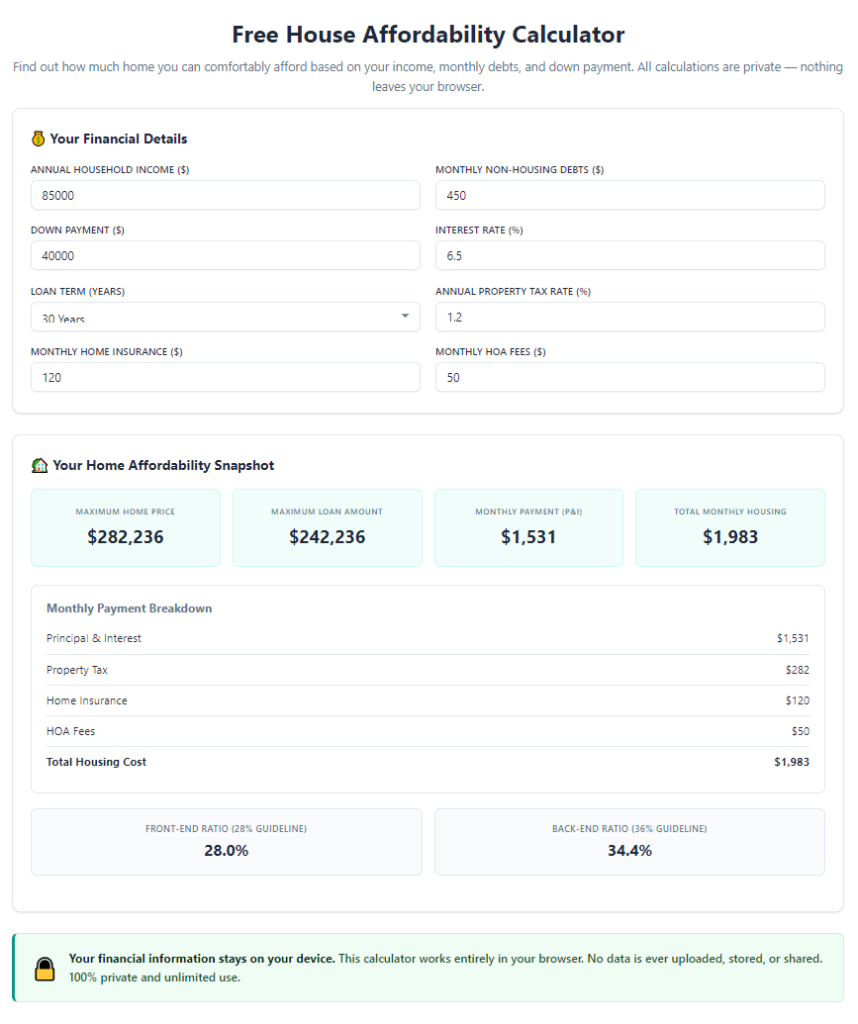
Common Limitations of Basic Home Affordability Calculators
Simple free mortgage calculators widely available online skip key cost categories that shape real monthly housing budgets. Their incomplete math leads to poor financial planning decisions for aspiring homeowners.
Only calculates principal and interest
Basic tools solely compute the loan’s core payment split between principal repayment and interest charges. They leave out every extra recurring housing expense required by lenders and local governments.
No built-in PMI cost estimation
Private mortgage insurance applies to any home loan with a down payment below twenty percent. Standard calculators have no fields to input down payment ratios or auto-generate corresponding monthly PMI premiums.
Zero property tax customization options
Property tax rates vary wildly by county, city, and home assessed value. Generic calculators lack fields to input local tax percentages or annual assessed home values, so tax costs never factor into final totals.
Fails to show total housing front-end ratio
Lenders judge loan eligibility using front-end debt-to-income ratios that include PMI, tax, insurance, and mortgage payments. Simplified tools cannot generate this critical lending metric for loan qualification checks.
Produces overly optimistic monthly budget figures
Buyers rely on incomplete payment numbers to set their home search budget. Once they factor in PMI and property tax post-offer, many realize the home they hoped to buy stretches their monthly income far too thin.
Core Benefits of House Affordability Calculator Including PMI and Property Tax
Switching to a dedicated house affordability calculator including PMI and property tax aligns your home search budget with real-world monthly spending obligations, removing costly miscalculations from your homebuying journey.
Delivers fully accurate total monthly housing payment estimates
Every mandatory recurring cost feeds into one single final monthly number. Principal, interest, PMI premiums, annual property tax split into monthly installments, and even baseline insurance costs combine for a complete financial snapshot.
Automatically computes PMI based on down payment size
The tool uses your entered down payment percentage to calculate exact monthly PMI charges without manual math. It also highlights when PMI will drop off once your loan balance hits the eighty percent loan-to-value threshold.
Customizable local property tax inputs
Users input their local county tax rate and the home’s projected assessed value. The calculator converts annual tax obligations into equal monthly payments to fold into your regular housing expense line item.
Generates lender-approved debt-to-income ratios
Lenders heavily weigh front-end and back-end DTI ratios for mortgage approval. This calculator runs full ratio math that accounts for PMI and property tax, matching the exact formulas loan officers use during pre-approval reviews.
Prevents budget shock after closing
By accounting for hidden recurring fees upfront, buyers set realistic price ceilings during home searches. No last-minute budget adjustments are needed once they receive formal loan estimates with full PMI and tax breakdowns.
Works for first-time buyers, refinancers, and move-up homeowners
Whether you are purchasing your first starter home, trading up to a larger property, or refinancing an existing mortgage, the house affordability calculator including PMI and property tax adapts to all home financing scenarios.
Simplifies side-by-side home price comparisons
You can run separate calculations for multiple target home price points instantly. Compare how different property values shift combined PMI, tax, and mortgage payments to narrow your affordable price range quickly.
Must-Have Features of a Reliable House Affordability Calculator Including PMI and Property Tax
Not all housing budget tools include integrated PMI and property tax logic. When selecting a high-quality house affordability calculator including PMI and property tax, prioritize these buyer-focused, finance-accurate core features.
Adjustable home purchase price input field
A clear dedicated box to enter your target maximum home price serves as the foundation of every calculation. The tool uses this figure to generate loan amounts, tax assessments, and PMI calculations automatically.
Down payment percentage and dollar value dual inputs
Dual entry options let buyers input either a fixed dollar down payment amount or a percentage of the total home price. The tool instantly converts this data to calculate loan-to-value ratios for accurate PMI math.
Custom mortgage term and interest rate sliders
Adjustable fields for 15-year and 30-year loan terms plus variable interest rate inputs let users test different loan scenarios to see how rates shift combined monthly payments including PMI and tax.
Built-in PMI calculation engine with LTV thresholds
The tool automatically triggers PMI cost calculations when loan-to-value exceeds eighty percent. It displays exact monthly PMI costs and projected timeline for PMI cancellation once equity thresholds are met.
Local property tax rate and assessed value fields
Separate input boxes for annual county tax percentage and projected home assessed value enable precise tax math. The calculator divides total yearly tax bills into equal monthly installments added to your housing payment.
Additional monthly expense add-on fields
Optional inputs for homeowners insurance premiums, HOA monthly dues, and recurring utility estimates create an even more complete picture of total housing costs beyond just PMI and property tax.
DTI ratio output dashboard
A dedicated results panel displays front-end housing DTI (mortgage + PMI + tax + insurance divided by gross monthly income) and total back-end DTI including all other personal monthly debt payments.
Editable gross monthly household income field
Input combined pre-tax income for all household borrowers to power affordability limits and DTI calculations that factor PMI and property tax into lender qualification metrics.
Printable or copyable full breakdown reports
After running calculations, users can copy the complete line-item breakdown to documents. Every cost category separates mortgage, PMI, monthly property tax, insurance, and total combined housing expenses for easy record-keeping.
Common Real-World Use Cases for PMI & Property Tax Included Affordability Calculators
A versatile house affordability calculator including PMI and property tax supports every stage of the home buying process, from early budget planning to final loan offer review.
Pre-search home budget planning for first-time buyers
New buyers with minimal real estate knowledge frequently overlook PMI and tax costs. Running early calculator sessions sets realistic maximum home prices before starting property tours or agent consultations.
Mortgage pre-approval preparation
Before speaking with loan officers, buyers run self-calculations to understand which price brackets fit their income without exceeding acceptable DTI limits that include PMI and property tax obligations.
Comparing multiple home listings at different price points
When browsing homes across a wide price range, separate calculator runs show exactly how each price tag raises monthly PMI payments and annual property tax installments. This streamlines narrowing your search list.
Refinance budget recalculations for existing homeowners
Homeowners refinancing their current loans can input updated home values, new loan terms, adjusted PMI requirements, and revised property tax assessments to compare old versus new total monthly housing costs.
Investment rental property budget forecasting
Real estate investors calculate total monthly carrying costs including PMI and property tax to estimate cash flow for rental homes. Accurate expense projections simplify rental rate setting and profit forecasting.
Seasonal home market budget adjustments
During shifting real estate markets with changing interest rates or reassessed property tax values, buyers rerun calculations to update their affordable home ceiling without missing hidden PMI and tax fees.
Post-inspection loan estimate review
Once buyers receive official loan estimates listing PMI premiums and projected property tax amounts, they cross-reference these figures against calculator outputs to spot calculation errors from lenders.
Step-by-Step Complete Tutorial: How to Use House Affordability Calculator Including PMI and Property Tax
Follow this straightforward, finance-aligned workflow to generate precise, lender-matching housing budget numbers using a trusted house affordability calculator including PMI and property tax.
Step 1: Gather all core household financial data
Start by compiling every key financial number needed for accurate calculation. Write down combined gross monthly household pre-tax income, total available cash for a down payment, current average local mortgage interest rates, and your county’s standard annual property tax percentage.
Also note all existing monthly debt payments (car loans, student loans, credit card minimums) for complete back-end DTI ratio calculations later in the process.
Step 2: Open the house affordability calculator tool
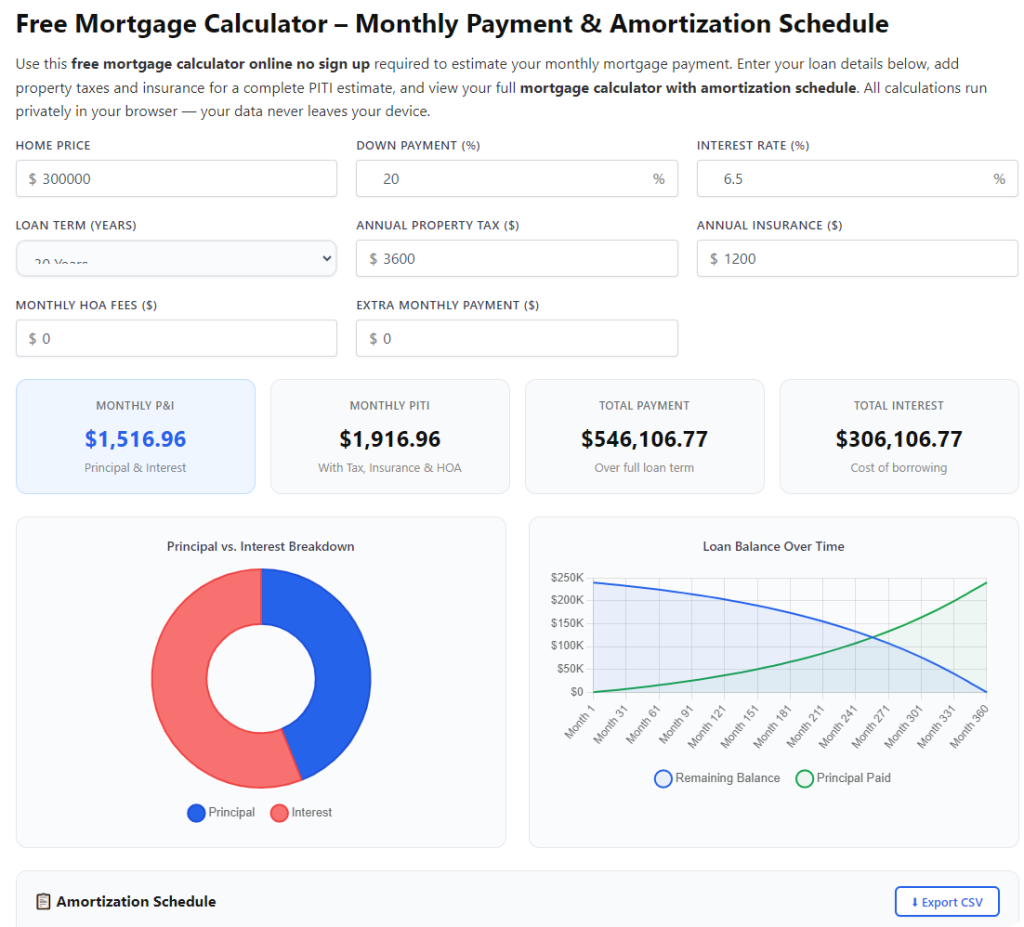
Launch the calculator tool in your browser. The main interface will display organized input sections separated into income, home purchase details, loan parameters, PMI settings, and property tax fields. No registration or paid access is required for core calculation functions on top-tier versions of this tool.
Take thirty seconds to identify each input category to avoid skipping critical PMI and tax fields during data entry.
Step 3: Input your total target home purchase price
Locate the home price input box and type in your maximum realistic target property value. This number drives all subsequent math for loan size, property tax assessments, and PMI loan-to-value calculations.
If you are comparing multiple home price points, note each price separately to run independent calculation batches later for side-by-side analysis.
Step 4: Enter your down payment information
Use either the dollar amount or percentage down payment field to input your planned cash contribution toward the home purchase. The calculator instantly computes your loan-to-value ratio to activate automatic PMI cost generation.
If your down payment equals or exceeds twenty percent of the home price, the tool will mark PMI monthly costs as zero and note no ongoing private mortgage insurance obligations.
Step 5: Fill out mortgage loan term and interest rate details
Select either a 15-year or 30-year fixed loan term matching your financing plan. Input the current projected mortgage interest rate you expect to lock in with your lender. Adjustable rate loan variants are also supported on advanced tool versions.
These two variables directly shift base principal and interest payments, which combine with PMI and monthly property tax to create your full housing expense total.
Step 6: Input local property tax rate and assessed value estimate
Locate the dedicated property tax section of the calculator. Enter your county’s annual real estate tax percentage rate, plus the projected assessed value of the target home (most areas assess homes at a percentage of full market purchase price).
The tool automatically divides the total annual tax bill into equal twelve monthly installments that appear as a separate line item in your full payment breakdown.
Step 7: Add supplementary recurring housing expenses (optional)
Input estimated annual homeowners insurance premiums and monthly HOA fees if the property you plan to buy belongs to a homeowners association. While not part of core PMI and tax calculations, these figures build an even more realistic full monthly housing budget.
This step is recommended for buyers who want a complete view of all recurring home-related bills beyond mandatory mortgage, PMI, and property tax costs.
Step 8: Submit all inputs to generate full affordability results
Once every required field (home price, down payment, loan terms, PMI triggers, property tax data, household income) is fully filled out, click the calculate button to run the complete financial analysis.
Within seconds, the tool displays a structured results dashboard separating individual cost line items and one unified total monthly housing payment that merges mortgage, PMI, and monthly property tax obligations.
Step 9: Review the detailed line-item cost breakdown
Start by reviewing the individual expense categories first: monthly principal + interest payment, monthly PMI premium, monthly split property tax cost, and any added insurance or HOA fees.
Verify the PMI calculation logic: confirm the tool only generates PMI charges when your LTV ratio sits below eighty percent, and note the projected timeline for PMI cancellation once you build sufficient home equity.
Double-check the monthly property tax line to confirm the tool correctly divided your total annual tax obligation into twelve equal monthly payments.
Step 10: Analyze your front-end and back-end DTI ratio outputs
Locate the debt-to-income ratio panel within the results section. The front-end housing ratio includes mortgage, PMI, and monthly property tax as required by all mortgage lenders. Most loan programs require this figure to stay below twenty-eight to thirty percent of gross monthly income.
The back-end ratio adds all outside personal debt payments to your full housing cost (including PMI and tax). Lenders generally cap this total ratio at thirty-six to forty-three percent depending on loan type. Use these metrics to judge loan approval odds for your target home price range.
Step 11: Adjust variables to test alternate budget scenarios
If your DTI ratios exceed lender acceptable limits, tweak input values to create more affordable scenarios. Lower your target home purchase price, increase your planned down payment to eliminate PMI entirely, or test longer loan terms to reduce base mortgage payments.
Each time you adjust a variable, re-run the calculation to see how monthly PMI charges and property tax splits shift alongside your total combined housing payment.
Step 12: Copy or save your finalized calculation breakdown
Once you land on a realistic, lender-qualifying home budget that accounts for full PMI and property tax costs, copy the complete line-item breakdown to a personal document or note file for future reference during home tours and lender consultations.
You can run separate saved calculations for multiple target home price ranges to easily compare budget impacts of different property values throughout your home search process.
Common Cost Calculation Mistakes to Avoid With House Affordability Calculator Including PMI and Property Tax
Even when using a comprehensive house affordability calculator including PMI and property tax, simple input errors or misinterpretation of tool outputs lead to flawed home budget planning for buyers.
Skipping the property tax input fields entirely
Many users rush through data entry and ignore dedicated tax rate and assessed value boxes. This removes a massive recurring monthly expense from final payment totals, creating drastically understated affordability estimates.
Entering total annual PMI costs instead of letting the tool auto-calculate
Manually typing rough guesses for PMI premiums leads to inaccurate monthly figures. The tool’s built-in LTV-based PMI engine generates precise industry-standard premium amounts far better than manual guesswork.
Confusing assessed home value with full market purchase price
Property tax calculations rely on county assessed values, not the full listing price of the home. Inputting the total purchase price as the assessed value overinflates monthly tax payment estimates and skews your budget ceiling downward unnecessarily.
Forgetting to recalculate PMI after adjusting down payment amounts
When testing larger down payment scenarios that push LTV above eighty percent, users often fail to re-run calculations to confirm PMI drops to zero. This leaves unnecessary PMI costs factored into their final monthly payment totals incorrectly.
Ignoring DTI ratio outputs that include PMI and property tax
Buyers only focus on the raw monthly payment number and overlook front-end DTI metrics. Lenders judge eligibility using ratios that include PMI and tax, so a seemingly manageable monthly payment can still disqualify you from loan approval.
Using outdated local property tax percentage rates
County tax rates shift periodically due to local government budget votes. Inputting old tax percentages results in monthly tax splits that do not reflect current real estate expense obligations for the area you plan to buy in.
Pro Expert Tips to Maximize Accuracy From House Affordability Calculator Including PMI and Property Tax
Use these industry-backed tactics to get the most reliable, lender-aligned budget projections every time you operate a house affordability calculator including PMI and property tax.
- Research your exact county’s current property tax rate from official local government resources before entering data, never rely on generic statewide average tax figures.
- Run three separate calculation batches for low, mid, and high target home price ranges to build a full tiered budget that accounts for variable PMI and property tax costs at different price points.
- Test a higher down payment scenario to see if eliminating PMI entirely creates significant monthly budget breathing room for other household expenses or savings goals.
- Update calculation inputs whenever mortgage interest rates shift noticeably during your home search to maintain accurate combined PMI + tax + mortgage payment estimates.
- Save every finalized calculation breakdown in a dedicated folder to cross-reference against formal loan estimates provided by mortgage lenders once you submit purchase offers on homes.
- If shopping in multiple counties with different tax rates, create separate calculator sessions for each location to compare how varying property tax levels change your maximum affordable home price ceiling.
- Always recalculate full figures after adjusting loan terms, as shifting between 15-year and 30-year mortgages alters base payments while PMI and property tax monthly splits remain fixed based on home value and down payment.
Final Thoughts
Home buying financial planning fails without accounting for mandatory recurring hidden costs like private mortgage insurance and annual property tax. Basic mortgage calculators omit these critical line items and deliver dangerously optimistic monthly payment estimates to aspiring homeowners.
A fully featured house affordability calculator including PMI and property tax eliminates all budget blind spots built into simplified housing cost tools. It unifies mortgage principal, interest, automatic PMI math, and monthly split property tax payments into one transparent, lender-compliant total housing expense breakdown.
This tool serves every buyer demographic: first-time home shoppers planning their initial budget, repeat buyers trading up properties, real estate investors forecasting rental cash flow, and homeowners preparing to refinance existing mortgages. The integrated PMI and property tax logic removes manual spreadsheets and confusing separate math work for each individual housing cost category.
By following the complete step-by-step calculation workflow, avoiding common input and interpretation mistakes, and applying the expert accuracy tips shared above, you will establish a realistic, sustainable home purchase budget that fully accounts for every mandatory monthly housing cost including PMI and local property tax obligations. Accurate upfront budgeting removes financial stress during your home search and prevents costly post-closing payment shock for years after moving into your new property.
After learning the operation method, click the link below to enter the tool page for immediate use.