Animated GIFs have become one of the most popular and practical visual formats for modern digital communication. From social media posts and blog content to school presentations, business marketing materials, and casual chat reactions, GIFs add dynamic, engaging elements that static images simply cannot match. Unlike complex video files, GIFs are lightweight, universally compatible across all devices and platforms, and require no special player software to open and view. This makes them the go-to format for quick, shareable animated content for creators, students, marketers, and everyday internet users.
Despite their popularity, creating custom GIFs remains unnecessarily complicated for most casual users. The majority of online GIF creation tools force visitors to complete tedious account registration, email verification, and profile setup before unlocking basic editing and export features. Many even lock high-quality outputs, custom speed settings, and watermark-free downloads behind premium subscriptions. For users who only need to make a quick GIF for personal use or a single project, these mandatory signups are a massive waste of time and compromise personal privacy. This is why a free GIF maker no signup required is an essential tool for every content creator and casual user.
A reliable free GIF maker no signup required lets anyone turn images and short clips into polished animations instantly, with zero account creation, zero data tracking, and zero hidden costs. This in-depth, beginner-friendly guide breaks down everything you need to know, including tool advantages, core features, real-world use cases, a complete step-by-step workflow, common editing mistakes, and expert tips for professional GIF results.
Why Signup-Based GIF Makers Are Frustrating for Casual Users
To understand the true value of a free GIF maker no signup required, it is important to break down the core flaws of traditional registration-only GIF creation tools. Most mainstream platforms prioritize user data collection and paid conversions over user experience, creating unnecessary barriers for simple animation tasks.
First, mandatory signups kill workflow efficiency. Most users need to create GIFs on the fly for last-minute social posts, school projects, or work presentations. Stopping to create an account, confirm an email address, and set up a personal profile turns a 60-second task into a multi-minute chore. For casual, one-time use, this extra effort is completely unnecessary and discourages users from creating custom animations entirely.
Second, registered tools pose genuine privacy risks. When you sign up for online creative platforms, you consent to data collection policies that allow sites to store your uploaded images, video clips, and finished animations. Some platforms repurpose user creations for marketing materials or train algorithm models on user content without explicit permission. For users creating personal or brand-exclusive GIFs, this unapproved data storage creates privacy and copyright concerns.
Third, most signup-based GIF makers restrict core features for free users. Even after completing registration, free accounts often face limitations like low-resolution exports, forced watermarks, limited frame counts, and fixed animation speeds. To unlock full customization and clean outputs, users must pay for monthly premium plans, which is impractical for anyone who only creates GIFs occasionally.
Finally, registered accounts lead to endless spam and promotional updates. After submitting an email for signup, users receive constant marketing emails advertising tool upgrades, new features, and subscription discounts. A quality free GIF maker no signup required eliminates all these pain points by offering full, unrestricted GIF creation tools with zero personal data required.
Key Benefits of a Free GIF Maker No Signup Required
A premium free GIF maker no signup required delivers user-centric advantages that traditional GIF tools cannot compete with. These benefits make it the top choice for casual creators, students, small business marketers, and social media enthusiasts of all skill levels.
Zero registration and zero data collection: The biggest advantage of this tool is its no-signup policy. Users access all editing features, upload media, create animations, and download finished files without entering an email, name, phone number, or any personal information. No user data is stored or tracked during the creative process.
Instant, on-demand GIF creation: Without login barriers, users jump straight into editing. You can open the tool, upload your media, customize settings, and export a finished GIF in under two minutes, perfect for fast-paced content workflows and last-minute project needs.
100% free full feature access: True no-signup GIF makers offer complete functionality at no cost. Users enjoy unlimited GIF creation, full customization controls, high-resolution exports, and watermark-free downloads with no trial periods, usage caps, or paywall restrictions.
Enhanced content privacy and security: Since no account is linked to your creations, your uploaded media and finished animations remain completely anonymous. Reputable tools automatically delete all uploaded files after processing, ensuring no third-party access to your personal or brand content.
No software downloads required: This browser-based tool works on desktops, laptops, tablets, and mobile devices. There is no need to install heavy desktop software or mobile apps, saving device storage and avoiding lengthy installation updates.
Beginner-friendly interface: Quality no-signup GIF makers feature clean, intuitive layouts with no complex menus or confusing settings. Even first-time creators can master animation basics and produce polished results with no prior editing experience.
Must-Have Features of a Quality Free GIF Maker No Signup Required
Not all no-signup GIF creation tools deliver consistent, professional results. Many basic free tools lack customization options or downgrade output quality drastically. A reliable free GIF maker no signup required always includes these professional-grade features to ensure high-quality, fully customizable animations every time.
Multi-media import support: Top tools accept static image formats including JPG, PNG, and BMP, as well as short video clips. This lets users build GIFs from photo sequences, screen recordings, and short video snippets for maximum creative flexibility.
Customizable animation speed: Users can manually adjust frame duration to create fast, snappy animations or slow, smooth looping visuals. Fine-tuned speed control prevents choppy playback and ensures professional, fluid motion in every GIF.
Seamless loop controls: The tool offers infinite loop, limited loop, and single-play settings. Infinite looping is ideal for social media content and reaction GIFs, while limited loops work well for instructional and presentation animations.
Image sequence editing: Creators can upload multiple images, drag and drop frames to reorder sequences, delete unwanted frames, and adjust individual frame timing for precise animation control.
High-resolution export options: Premium tools support crisp, high-definition GIF exports without blurriness or pixelation. Finished animations stay sharp on social media feeds, websites, and digital presentations.
Watermark-free outputs: Genuine no-signup GIF makers deliver completely clean animations with no branded logos, text overlays, or promotional stamps on finished files.
Common Real-World Use Cases for No-Signup GIF Creation
A versatile free GIF maker no signup required serves a wide range of personal, academic, and professional creative needs, making it a staple tool for modern digital content workflows.
Social media content creation: Content creators and social media managers make custom GIFs for Instagram posts, TikTok captions, blog visuals, and community engagement. Custom animations boost post interaction far better than generic stock GIFs.
Academic and classroom projects: Students create simple animated diagrams, process charts, and presentation visuals to make school assignments more dynamic and engaging. The no-signup feature lets students finish projects quickly without account setup delays.
Small business marketing: Freelancers and small business owners design branded GIFs for product previews, service demos, email newsletters, and social ads. Clean, custom animations elevate brand content without expensive design software costs.
Personal casual use: Users create custom reaction GIFs, meme animations, and family photo loops for chatting with friends and sharing on personal social profiles. The privacy-focused tool keeps personal media secure.
Instructional and tutorial content: Educators and content creators make step-by-step animated guides and process demonstrations. Looping GIFs help viewers follow simple tutorials without playing full video files.
Step-by-Step Guide to Using a Free GIF Maker No Signup Required
This simple, foolproof workflow works for all premium versions of a free GIF maker no signup required. Follow these steps to create professional, custom animations in minutes with zero registration.
Step 1: Launch the No-Signup GIF Maker Tool
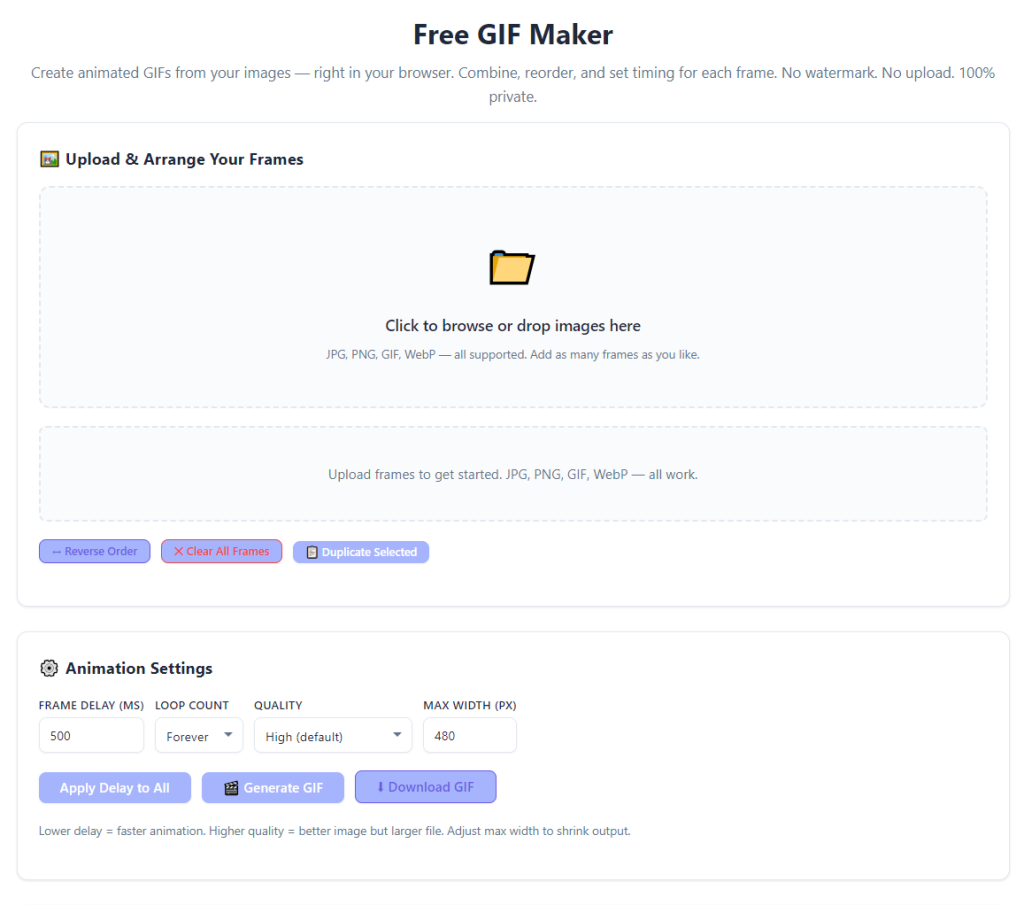
Open the browser-based free GIF maker tool. Confirm the interface has no login buttons, registration prompts, email fields, or paywall popups. A genuine free GIF maker no signup required grants full creative access instantly.
Step 2: Upload Images or Short Video Clips
Upload your media files via drag-and-drop or standard file selection. You can upload a sequence of static images or a short video clip to convert into an animated GIF. The tool supports all mainstream image and short video formats for maximum flexibility.
Step 3: Edit and Arrange Animation Frames
Rearrange uploaded frames into your desired sequence, delete unnecessary frames, and trim video clips to isolate the exact segment you want to animate. Organizing frames logically ensures smooth, coherent animation flow.
Step 4: Customize Speed and Loop Settings
Adjust the frame duration to control animation speed. For smooth, natural motion, avoid overly fast frame rates that create choppy playback. Select your preferred loop setting—choose infinite loop for social media content or limited loops for instructional visuals.
Step 5: Preview the Finished Animation
Use the built-in preview tool to test playback speed, frame flow, and overall animation quality. Make quick adjustments to timing or frame order before finalizing your GIF to fix choppy or awkward transitions.
Step 6: Export and Download Your GIF
Generate and download your finished animation. The tool will export a high-quality, watermark-free GIF file ready for immediate sharing, posting, or embedding in presentations and documents.
Common GIF Creation Mistakes to Avoid
Even with a user-friendly free GIF maker no signup required, simple editing errors can ruin animation quality. Avoid these common mistakes to ensure smooth, professional-looking GIFs every time.
Overloading too many frames: Excessive frames create oversized GIF files that load slowly on social media and websites. Keep frame counts concise for fast loading and smooth playback.
Setting inconsistent frame speeds: Mixed frame durations create choppy, unprofessional animation. Maintain consistent timing across all frames for fluid motion.
Skipping the preview step: Failing to preview often results in awkward pauses, fast playback, or out-of-order frames that require re-creation.
Using low-quality source media: Blurry or compressed source images produce low-quality GIFs. Always use clear, high-resolution original media for sharp final animations.
Expert Tips for Professional GIF Results
Use these professional tips to maximize the performance of your free GIF maker no signup required and create polished, high-quality animations for any use case.
- Optimize frame count for file size: Trim redundant frames to balance animation smoothness and lightweight file size for fast online loading.
- Match speed to content type: Use slower speeds for instructional animations and slightly faster speeds for casual reaction and social media GIFs.
- Always preview before export: A quick playback check eliminates timing errors, frame misalignment, and choppy transitions before downloading.
- Keep content concise: Short, focused GIFs perform better online and retain viewer attention far better than lengthy animations.
Final Thoughts
Custom GIF creation is one of the simplest ways to elevate digital content, yet most online tools overcomplicate the process with mandatory signups, data collection, paywalls, and privacy risks. For casual creators, students, and small business users, these unnecessary barriers turn a quick creative task into a tedious, invasive process.
A reliable free GIF maker no signup required completely transforms the GIF creation workflow by delivering fast, private, unrestricted animation tools with zero strings attached. It eliminates account setup delays, protects user privacy through anonymous processing, offers full customization controls, and produces clean, high-quality animations for personal, academic, and professional use.
You should never have to sacrifice privacy, time, or money to create a simple custom GIF. Ditch restrictive signup-only platforms that waste your time and harvest your data. Start using a free GIF maker no signup required to craft beautiful, custom animations instantly, streamline your creative workflow, and elevate all your digital content with zero hassle.
After learning the operation method, click the link below to enter the tool page for immediate use.