This complete guide breaks down every detail of using a reliable online PDF watermark tool that requires zero registration, charges no fees, and exports fully clean files without third-party branding marks. Whether you handle business contracts, student assignments, creative portfolios, or internal company documents, this workflow eliminates all common frustrations tied to standard PDF editing platforms.
Most casual and professional users run into two major headaches with typical PDF watermark software. First, nearly every mainstream platform demands email signups, password creation, or account verification before unlocking basic watermark functions. Second, even tools labeled “free” stamp a large semi-transparent tool watermark across every page of your finished PDF, ruining the polished look you need for shared files.
A trusted free add watermark to PDF no signup no watermark tool solves both of these critical issues at once. It lets you upload documents, design fully custom text or image watermarks, and download unmarked finished PDFs in seconds, with no personal data submission and zero mandatory branding overlays added to your work.
This tutorial covers the limitations of standard PDF watermark tools, exclusive benefits of signup-free clean-output platforms, must-have functional features, common real-world use cases, and a step-by-step actionable workflow to add professional watermarks to any PDF without hidden barriers.
Common Frustrations With Regular PDF Watermark Tools
Before diving into the signup-free workflow, it helps to outline the persistent drawbacks that make ordinary PDF editors inconvenient for daily document work. Every barrier below wastes time, compromises file quality, or creates privacy risks for sensitive files.
Mandatory account creation for basic access
Nearly all top PDF editing platforms lock watermark features behind a registration wall. Users must input active emails, create secure passwords, and sometimes confirm accounts via verification links just to add a simple text stamp to a single PDF. This lengthy setup process is unnecessary if you only need one quick edit and do not plan to use the tool long-term.
Permanent tool watermarks on all free exports
The biggest letdown of generic free PDF watermark software is forced branding. Even after you design your own custom watermark, the platform adds its own large logo or text overlay across every page of your exported document. Removing this secondary stamp requires paid premium upgrades, which adds unexpected costs to simple one-off editing tasks.
Privacy risks from uploading files to logged-in accounts
When you register an account on a PDF tool, all uploaded documents get linked to your user profile and stored on external servers. Confidential files such as client contracts, student research papers, proprietary business reports, and personal legal paperwork face exposure risks if the platform’s data storage lacks strict security protocols.
Repetitive login interruptions across devices
Registered tools require consistent sign-ins every time you switch browsers, phones, laptops, or clear your cache. If you edit PDFs on multiple devices throughout the week, constant password re-entry disrupts fast, streamlined document processing sessions.
Restrictive file size and batch limits for free users
Most standard free tiers cap single PDF upload sizes and limit how many files you can watermark in one session. Users working with multi-page portfolios, long research papers, or bulk batches of business documents must split files or pay extra to bypass these arbitrary limits.
Core Benefits of Free Add Watermark to PDF No Signup No Watermark
Switching to a dedicated free add watermark to PDF no signup no watermark platform reworks your entire PDF editing routine for speed, privacy, and professional file quality. Every advantage below directly addresses the pain points of traditional watermark tools.
Zero registration, zero personal data collection
You can open the tool in any browser and start editing PDFs instantly. There are no email input fields, password forms, profile creation screens, or identity verification pop-ups blocking access to core watermark features. You never share your contact information with the platform at any stage of the editing process.
100% clean exported PDFs with no hidden branding overlays
No secondary tool logo, text stamp, or semi-transparent watermark gets added to your finished document. Only the custom watermark you design (text, logo, signature, copyright notice) appears on the PDF pages. Every exported file stays fully polished and ready for client sharing, school submissions, or internal company distribution.
Complete file privacy with no permanent cloud storage
Since no user account ties to your uploads, the tool does not save your PDFs to long-term cloud storage servers. Uploaded documents only exist temporarily during your active editing session and get cleared automatically once you close the browser tab or download the finished file. This eliminates data leakage risks for sensitive confidential content.
Unlimited free single and batch PDF processing
There are no daily upload caps, file size restrictions, or page limits for guest users. You can upload short one-page forms, multi-hundred-page research manuscripts, or full batches of client contracts to add matching watermarks all in one session without paying for premium tiers.
Instant cross-device compatibility with no login barriers
Access the identical full tool functionality on desktop computers, tablets, and mobile phones. You can upload PDFs from any device’s local storage, design custom watermarks, and download clean files without recalling usernames or passwords for every new session.
Full customization for text and image watermark styles
Unlike limited free tiers on competing platforms, this signup-free tool unlocks all watermark design controls for guest visitors. You adjust font, color, transparency, rotation, placement, and tiling patterns for text marks, or upload custom logos, signatures, and copyright graphics as image watermarks with no restrictions.
Must-Have Features of a Reliable Free Add Watermark to PDF No Signup No Watermark
Not every login-free PDF watermark platform delivers consistent, professional results. The highest-quality versions of free add watermark to PDF no signup no watermark tools include these user-focused, document-centric features that separate premium functionality from basic stripped-down editors.
Dual watermark support: text and custom image uploads
Top-tier signup-free tools support two core watermark formats to cover all use cases. Text options work for copyright lines, draft labels, confidentiality disclaimers, and draft status stamps. Image upload functionality lets users add brand logos, handwritten signatures, official seals, and custom graphic marks without file format limitations for standard image types.
Full visual adjustment controls for every watermark
Complete design customization tools include adjustable opacity sliders, rotation angles, font selection, font size, text color, horizontal/vertical positioning, and tiled repeat patterns across all PDF pages. You can place subtle faint background watermarks or bold front-page stamps based on your document’s intended use.
Bulk multi-PDF batch processing
Instead of uploading and editing one file at a time, the best tools accept simultaneous multiple PDF uploads. You apply the identical custom watermark setting to every document in your batch and download all finished clean files together in one compressed package to save hours of repetitive editing work.
Secure local file upload processing
The tool runs lightweight file processing within your browser rather than fully uploading raw PDFs to external remote servers. This cuts down data transfer times and adds an extra layer of privacy for confidential client, academic, and legal documents during watermark application.
One-click instant clean PDF download
After finalizing your watermark layout, a single download button exports the edited file with zero embedded tool branding, no pop-up paywall prompts, and no mandatory account creation steps before saving your work to local device storage.
Cross-browser lightweight interface with no ads
Distracting pop-up ads, subscription banners, and upsell prompts are absent from high-quality signup-free tools. The minimalist layout keeps focus entirely on PDF preview and watermark adjustment panels without slowing down file upload or rendering speeds.
Real-World Use Cases for Signup-Free Clean PDF Watermark Tools
A versatile free add watermark to PDF no signup no watermark platform fits every common personal, student, freelance, and corporate document workflow with no restrictive access rules. Below are the most frequent scenarios where this tool delivers unmatched convenience and clean file output.
Freelance creative and client business document sharing
Graphic designers, copywriters, consultants, and independent contractors send draft proposals, project deliverables, and pricing PDFs to clients daily. Custom watermarks label files as confidential, draft versions, or branded client materials, and the tool’s clean output ensures no third-party logo distracts from professional brand presentation. No account creation lets freelancers quickly edit files between client calls without lengthy setup steps.
College and high school student academic work
Students add copyright, draft, or confidentiality watermarks to research papers, thesis drafts, lab reports, and group project documents before sharing with professors or teammates. The zero-signup design avoids submitting personal student emails to unknown platforms, and clean exported PDFs meet strict school assignment formatting rules with no unwanted tool branding on submitted work.
Small business internal and client contract management
Small teams without dedicated PDF editing software process NDAs, service contracts, invoices, and policy handbooks in bulk. Batch watermarking stamps every document with company copyright or confidential disclaimers, and the lack of mandatory account storage protects sensitive client financial and legal information from prolonged cloud retention.
Legal and administrative personal document marking
Individual users add signature watermarks, privacy disclaimers, and personal copyright labels to tax documents, scanned legal forms, personal portfolios, and scanned ID copies before digital sharing. No registration eliminates privacy concerns around uploading sensitive personal paperwork to logged-in tool accounts.
Content creator portfolio and manuscript marking
Writers, photographers, and digital artists watermark PDF portfolios, book manuscripts, and catalog samples to prevent unauthorized uncredited distribution. Fully customizable image watermarks feature original brand logos, and the tool’s clean exports produce polished portfolios ready to send to publishers, agents, and brand collaborators.
Temporary quick document edits for one-time tasks
Many users only need to watermark a single PDF once or twice per month. The signup-free workflow eliminates wasting minutes creating an account just for a minor edit, making this tool perfect for occasional, spontaneous document processing without long-term platform commitments.
Step-by-Step Guide: How to Use Free Add Watermark to PDF No Signup No Watermark
Follow this simple, privacy-focused workflow to add custom watermarks to any PDF file, with zero registration and zero tool branding on your final exported document. Every step is optimized for both casual single-file edits and bulk batch document processing.
Step 1: Prepare your source PDF and custom watermark assets
Gather all PDFs you plan to edit, saved locally on your computer, tablet, or mobile device. If you intend to use an image watermark (logo, signature, seal), save the graphic file to your device’s storage beforehand in a standard readable format. Note down your desired watermark text content (confidentiality lines, copyright text, draft labels) to avoid typing mid-editing delays.
Step 2: Open the signup-free PDF watermark tool in your browser
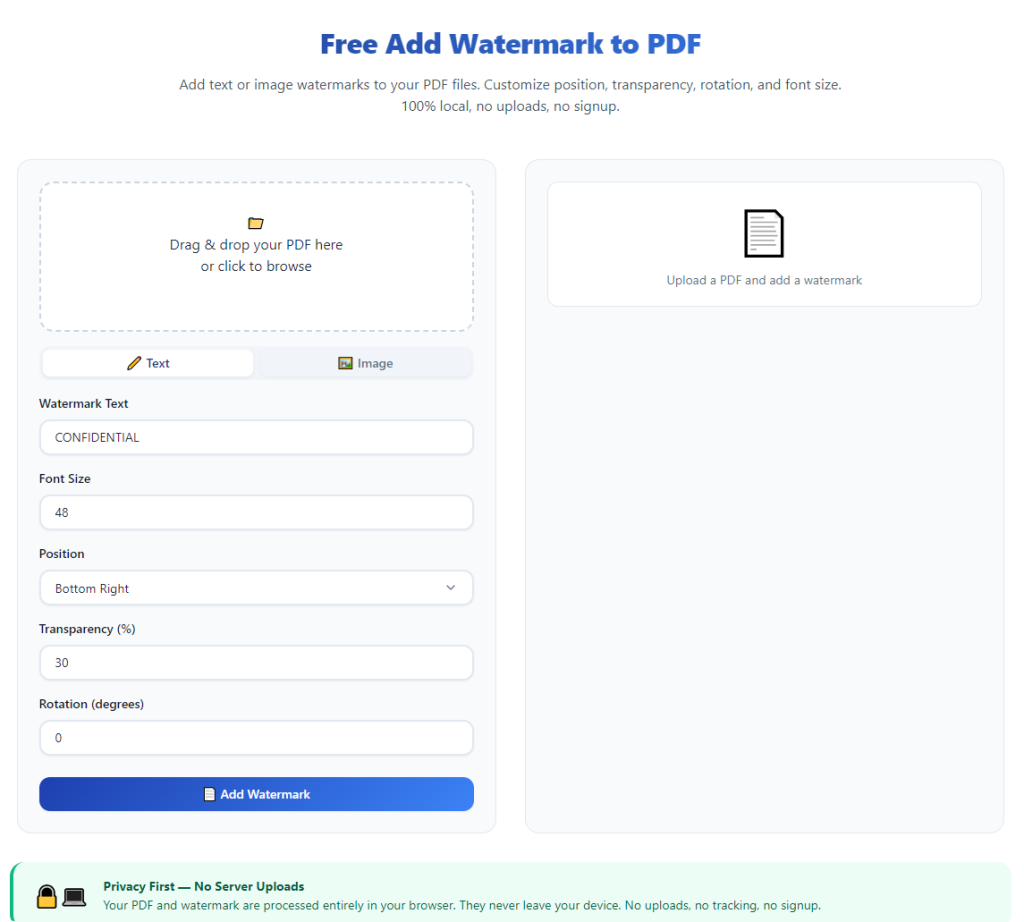
Launch any standard web browser and pull up the tool’s main interface. You will land directly on the upload dashboard with no login screens, email signup pop-ups, or subscription offer banners blocking your access to core functions. Take a quick moment to locate the PDF upload zone, text watermark editor, and image upload button on the main screen.
Step 3: Upload single or multiple PDF files for editing
Click the upload area or drag-and-drop your target PDFs into the designated space on the page. The tool will render a page preview of your uploaded documents within seconds. You may add additional files to your batch at any point before finalizing your watermark settings if you need to expand your document list mid-process.
Step 4: Select your watermark format (text or custom image)
Choose between the text watermark tab or image upload tab based on your marking needs. Select text for quick typed disclaimers, copyright notices, or draft stamps. Select image if you plan to overlay a custom brand graphic, scanned signature, or official seal onto your PDF pages.
Step 5: Fully customize all watermark visual settings
For text watermarks: input your desired wording, then adjust font style, font size, text color, transparency percentage, rotation angle, and page placement. Toggle the tile repeat setting if you want a faint repeating background watermark across every page, or disable tiling for a single centered or corner stamp per sheet.
For image watermarks: upload your saved graphic file, then resize, adjust transparency, rotate, and position the overlay to match your layout preferences. Preview the graphic on the PDF sample page to confirm sizing and visibility balance before locking settings.
Step 6: Preview watermark placement across PDF pages
Use the built-in page navigation slider to scroll through all pages of your uploaded document batch. Double-check watermark alignment, opacity, and visibility on light and dark sections of your PDF content to avoid text or graphic overlap that obscures critical document information. Adjust transparency or positioning if the mark covers essential data, signatures, or tables.
Step 7: Apply identical watermark settings to all batch files
If editing multiple PDFs in one session, confirm the “apply settings to all documents” toggle is enabled. This ensures every uploaded file receives the exact same custom watermark layout without retyping or reuploading graphic assets for each separate PDF in your batch.
Step 8: Initiate clean PDF export with no embedded tool branding
Once all previews look correct and your layout settings match your requirements, click the download or export button on the interface. There will be no forced signup prompts, paywall blocks, or upsell pop-ups appearing before your file saves. The tool processes the watermark overlay instantly, with zero secondary tool logo or branding stamped onto any page of your finished document.
Step 9: Save the unmarked PDF file to your local device storage
Select a destination folder on your device to store the newly watermarked PDF. Confirm the downloaded file opens correctly in your default PDF reader, and double-check that only your custom designed watermark appears on every page—no extra platform overlays or text marks will be present anywhere in the document.
Step 10: Repeat the workflow for additional editing batches (if needed)
Close the current upload session or refresh the tool page to clear all temporary uploaded files automatically. You can immediately start a new editing session with separate PDFs and entirely new custom watermark designs, still with zero registration or login steps required for repeat usage.
Common Mistakes to Avoid When Using Free Add Watermark to PDF No Signup No Watermark Tools
Even with a fully functional signup-free clean-output platform, these frequent user errors can reduce document professionalism or create unnecessary editing delays during PDF watermark processing.
Uploading low-resolution image files for graphic watermarks
Blurry, compressed small image graphics lose quality when overlaid across full PDF pages. Always use high-resolution PNG or JPG files for logos and signatures to maintain crisp, clear watermark visibility without pixelation on printed or digital shared documents.
Setting overly high opacity for background tiled watermarks
Heavy opaque repeating text or image marks can obscure readable PDF text, contracts, data tables, and signature blocks. Adjust transparency slider values down for background-style tiled watermarks to keep underlying document content fully legible to readers.
Forgetting to preview multi-page PDF batches before export
Many users only check the first page preview and miss misaligned watermarks on later pages with different layout formatting (landscape sheets, full-page images, dense data tables). Scroll through every page in the preview panel to catch placement errors before downloading final files.
Mixing multiple unrelated watermark designs in a single batch
Applying drastically different text, size, or transparency settings to documents in one batch creates inconsistent branding across related files (client contracts, portfolio pages, academic drafts). Separate distinct design layouts into separate upload sessions for uniform document styling.
Closing the browser tab before finishing file download
Since the tool stores uploads only temporarily in your active session, navigating away mid-download cancels processing and deletes all uploaded PDFs instantly. Wait for the full file save confirmation before closing the editing page to avoid re-uploading all documents from scratch.
Relying on generic default text without custom edits
Pre-filled sample text on the tool’s text panel rarely matches your specific needs for confidentiality, copyright, or draft labeling. Always rewrite the default wording to fit your exact document use case for clear, purposeful watermark messaging.
Pro Tips to Maximize Results From Free Add Watermark to PDF No Signup No Watermark
Use these actionable expert strategies to streamline your PDF watermark workflow, boost document professionalism, and fully leverage all benefits of signup-free, clean-output editing tools for every type of file project.
- Save frequently used text watermark wording (confidential disclaimers, copyright lines) in a separate text note file to copy-paste instantly during future editing sessions and cut down typing time.
- Prepare standardized logo/signature image assets with transparent backgrounds for image watermarks; transparent graphics blend naturally onto light and dark PDF page backgrounds without solid white block overlays.
- Separate personal, academic, and business PDF batches into distinct editing sessions to maintain consistent watermark styling standards for each category of document.
- Test different transparency levels for every new watermark design once before bulk processing large file batches, to avoid re-editing dozens of documents due to poor visibility balance.
- Bookmark the tool page in your browser for one-click instant access whenever you need quick PDF watermark edits; no login or account lookup is required for repeat visits.
- After downloading finished watermarked PDFs, store original unmarked source files in a separate device folder for future revisions, so you can reprocess documents with updated watermark designs later if needed.
- Use the batch upload feature for recurring monthly document workflows (invoices, internal reports, student assignments) to cut repetitive single-file editing time in half.
- Avoid uploading highly sensitive legal or financial PDFs to any online tool if you require absolute offline processing; reserve the browser-based signup-free platform for non-top-secret shared drafts and portfolios only.
Final Thoughts
Custom watermarks are an essential layer of branding, confidentiality protection, and copyright control for every digital PDF document shared online or distributed digitally. Traditional PDF editing platforms create unnecessary barriers with mandatory account signups and intrusive permanent tool branding on all free exported files, forcing users to choose between privacy, clean document design, and low-cost editing.
A reliable free add watermark to PDF no signup no watermark tool eliminates every one of these compromises. It delivers unlimited free access to full watermark customization, complete user privacy with no account data storage, and fully unbranded clean PDF exports ready for professional, academic, and personal distribution with zero hidden fees or registration hoops to jump through.
The platform works seamlessly for casual one-off edits and heavy bulk batch processing alike, adapting to student, freelance, small business, and individual personal document workflows without restrictive usage caps or file limits. When paired with the structured step-by-step editing workflow outlined above, this tool lets anyone produce polished, consistent watermarked PDFs in minutes while protecting their personal data and avoiding ugly third-party branding overlays on finished work.
By avoiding the common editing mistakes and applying the pro workflow tips covered in this guide, you can fully streamline your PDF marking routine and consistently generate professional, unmarked documents without sacrificing privacy, speed, or visual quality for any digital file project.
After learning the operation method, click the link below to enter the tool page for immediate use.