Every driver, road trip planner, small business fleet manager, and daily commuter deals with unpredictable fuel spending. Estimating gas costs by mental math almost always leads to flawed budget planning.
Rough guesswork fails to account for fluctuating local gallon prices, varying vehicle MPG ratings, and differing trip mileages. Many people end up overspending or underbudgeting for travel.
Separate spreadsheets or manual math formulas waste time. You must track miles, look up current gas rates, and recalculate MPG expenses every time you plan a drive.
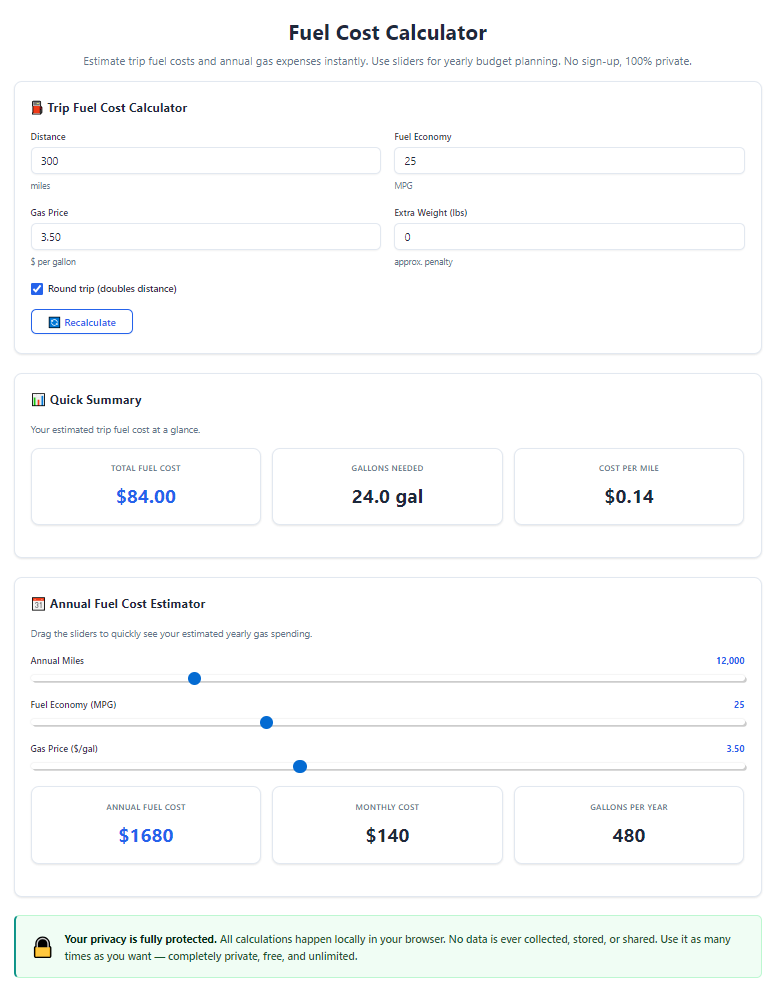
A dedicated fuel cost calculator with MPG and gallon price input eliminates all these messy manual calculations. It combines three critical data points to generate precise fuel cost totals for any vehicle and trip.
This in-depth, beginner-friendly guide covers flaws of manual fuel math, core tool advantages, non-negotiable tool features, everyday real-world use cases, and a complete step-by-step walkthrough for accurate fuel budget calculations.
Common Problems With Manual Fuel Cost Estimation
Calculating gas expenses without a dedicated calculator creates consistent financial planning errors for all types of drivers and travel planners.
Inaccurate mental math estimates
Most travelers round MPG values and gallon prices to simple whole numbers. This rounding error compounds over long road trips or weekly commutes, creating huge budget gaps.
Time-consuming handwritten math
To get a semi-accurate number manually, you must divide total miles by vehicle MPG, then multiply the gallon count by current gas prices. This multi-step process repeats for every single trip.
Failure to adjust for changing gallon prices
Local fuel rates shift week to week. Manual calculations rely on outdated price numbers, making all prior budget figures irrelevant within days.
No separation between city and highway MPG
Vehicles deliver drastically different MPG on highways versus stop-and-go city roads. Manual math rarely splits these two values, skewing final fuel cost totals heavily.
Difficulty forecasting recurring commute costs
Daily and weekly commutes require repeated recalculations. Without a standardized input tool, tracking monthly fuel spending becomes a tedious, inconsistent chore.
Poor fleet budget tracking for small business owners
Owners managing multiple work vehicles struggle to compute individual fuel expenses. Manual tracking across several cars creates disorganized, hard-to-compare cost records.
Key Advantages of Fuel Cost Calculator With MPG And Gallon Price Input
Integrating a reliable fuel cost calculator with MPG and gallon price input into your travel planning routine streamlines budgeting and delivers fully precise fuel spending figures in seconds.
Combines all three critical data fields in one interface
This specialized tool centralizes MPG ratings, current gallon fuel prices, and total trip mileage as core inputs. No switching between separate sheets or note pages to cross-reference values.
Generates instant, error-free total fuel cost results
Once you fill in the three required data points, the calculator runs standardized automotive math automatically. Human calculation mistakes from division and multiplication are completely eliminated.
Adapts to fluctuating local gallon pricing
You can update the gallon price input field every time local gas rates change. Recalculating trip budgets with fresh pricing takes only a single edit and one click.
Supports split city/highway MPG breakdowns
Top versions of this calculator include separate MPG input slots for urban and highway driving. It weights mileage proportions to output a blended, realistic average fuel expense.
Works for one-time road trips and recurring commutes alike
Whether you map out a cross-country vacation or calculate monthly work travel costs, the same MPG and gallon price input layout adapts to short and long-term budget planning.
Saves hours of repetitive math work over time
Commuters, frequent travelers, and fleet managers run fuel cost estimates dozens of times monthly. The calculator cuts multi-minute manual math down to a 10-second input and result process.
No advanced math knowledge required for accurate outputs
You do not need to memorize fuel expense formulas or unit conversions. Simply enter straightforward real-world values for MPG, gallon price, and miles traveled to receive clear dollar amounts.
Must-Have Features of a Quality Fuel Cost Calculator With MPG And Gallon Price Input
Not all online fuel calculators include complete, user-focused functionality. The highest performing fuel cost calculator with MPG and gallon price input includes these essential planning features for drivers and business operators.
Dedicated input boxes for three core metrics
Separate, clearly labeled fields for vehicle MPG, local fuel price per gallon, and total trip miles form the foundation of the tool layout. Inputs stay distinct to avoid accidental value mixing.
Dual MPG entry options for city and highway driving
Premium tools add secondary MPG input slots, letting users split total trip miles between urban stop-start travel and open highway driving for weighted cost calculations.
Real-time total fuel cost dollar output
After submitting your MPG, gallon price, and mileage figures, the tool displays a clear total dollar amount for fuel expenses, formatted for easy budget note-taking.
Gallon consumption subtotal breakdown
Beyond final cost, the calculator shows exactly how many gallons of fuel the trip will consume. This extra metric helps users compare tank capacity against travel distance.
Adjustable trip length customization
You can input single-day miles, weekly commute totals, or multi-day road trip distances. The input field accepts small local errand mileages and cross-country travel numbers equally well.
Quick reset button for new calculation batches
A one-click reset clears all MPG, gallon price, and mileage inputs instantly. You can run sequential estimates for multiple vehicles or separate trips without manual text deletion.
Unit clarity for gallon price formatting
The gallon price input accepts decimal pricing matching real-world gas station labels, including fractional cent values common at retail fuel locations.
Printable or copyable final calculation results
All generated fuel cost totals and gallon usage numbers can be copied to notes or printed for physical budget records, perfect for fleet expense tracking and travel planning documents.
Real-World Use Cases for Fuel Cost Calculator With MPG And Gallon Price Input
A versatile fuel cost calculator with MPG and gallon price input serves every type of driver and travel planner across personal, recreational, and small business scenarios.
Daily commuter monthly budget planning
Regular workers driving to and from jobs input their vehicle’s MPG, neighborhood gallon gas prices, and weekly round-trip miles. The calculator projects total monthly fuel spending to build accurate personal budgets.
Cross-country road trip cost forecasting
Vacation planners map long-distance travel miles, enter their car’s highway MPG rating, and input average regional gallon fuel prices. The tool generates a full fuel budget before booking lodging or travel activities.
Small business fleet expense management
Shop owners, delivery operators, and service technicians use the calculator for each work vehicle. Separate MPG inputs per car, combined with local gallon pricing, let managers forecast monthly fleet fuel overhead.
Weekend errand and local trip budgeting
Short-distance errands, grocery runs, and day trips benefit from fast calculations. Users plug in city MPG values, current neighborhood gallon gas costs, and short mileage to estimate minor travel fuel spending.
Vehicle comparison shopping before purchase
Shoppers evaluating new or used cars input each model’s listed MPG, their regular local gallon fuel price, and average weekly driving miles. They directly compare long-term fuel expenses between competing vehicles.
Multi-stop travel and combined route planning
Travelers combining city sightseeing and highway driving split their total mileage between the two MPG input fields. The weighted calculation delivers a far more realistic total fuel cost than single MPG estimates.
Student campus commute budget tracking
College students driving between home and campus enter their vehicle MPG, regional gallon gas rates, and monthly round-trip mileage to plan semester travel spending within limited student budgets.
Step-by-Step Complete Tutorial: Use Fuel Cost Calculator With MPG And Gallon Price Input
Follow this simple, repeatable workflow to generate precise fuel cost estimates every time you open the fuel cost calculator with MPG and gallon price input.
Step 1: Gather your three core data values first
Locate your vehicle’s official MPG rating; separate city and highway figures if you plan to split travel mileage. Note the current average fuel price per gallon at local gas stations. Write down total miles you expect to drive for the trip or commute you are calculating.
Storing these three numbers ahead of time eliminates mid-calculation pauses to look up vehicle specs or gas pricing.
Step 2: Open the fuel cost calculator tool
Launch the calculator within your browser. The primary interface will immediately show three core empty input sections labeled clearly for MPG, gallon fuel price, and total trip miles.
No account creation, downloads, or extra setup steps are required to access the full MPG and gallon price input functionality.
Step 3: Enter your vehicle MPG rating into the designated field
Type your vehicle’s miles-per-gallon value into the dedicated MPG input box. If the tool offers split city/highway MPG slots, fill in both values and assign a mileage percentage to each driving style for weighted results.
Avoid rounding MPG numbers up or down to whole integers; use the exact manufacturer listed rating for maximum calculation precision.
Step 4: Input the current local fuel price per gallon
Navigate to the gallon price input field and type the exact retail gas price per gallon including decimal cents, matching current station pricing in your travel area.
Update this value every time local fuel rates shift to keep all future calculations aligned with real-world spending costs.
Step 5: Fill in total planned trip mileage
Enter the full number of miles you intend to drive for the commute, road trip, or errand route into the mileage input box. For recurring weekly commutes, input total weekly round-trip miles for monthly budget projections.
For multi-segment travel, combine all route miles into one single total before entering the number.
Step 6: Submit inputs to run the fuel cost computation
Locate and click the calculate button positioned below the three MPG, gallon price, and mileage input sections. The tool processes all values instantly with no loading delays.
Within one second, two key results populate on screen: total gallons of fuel required for the trip, and the final total dollar fuel cost.
Step 7: Review full breakdown metrics
First check the total gallon consumption subtotal to confirm it logically matches your trip length and vehicle MPG. Next review the final dollar fuel cost number as your core budget figure.
If you used split city/highway MPG inputs, verify the weighted mileage split aligns with your planned travel route proportions.
Step 8: Adjust input values for alternative scenarios
If you want to compare different variables, edit one input at a time: swap a different vehicle’s MPG rating, update gallon prices to reflect cheaper or expensive regional fuel, or adjust total trip mileage lengths.
Re-run the calculation after each single edit to isolate how each factor shifts your overall fuel spending total.
Step 9: Copy or save calculation results for budget records
Use the built-in copy function to save the total fuel cost and gallon consumption figures to your personal notes, spreadsheet, or business expense log. You may also print the full calculator breakdown for physical budget filing.
Group multiple calculation results for separate vehicles or trips to build a complete travel fuel budget document.
Step 10: Reset all inputs for your next calculation batch
Click the reset button to erase all filled MPG, gallon price, and mileage entries. The tool returns to its blank default state, ready for a new set of travel expense estimates without manual text deletion.
Repeat the full workflow for every vehicle, commute, or road trip you need to budget for accurate long-term fuel spending tracking.
Common Mistakes to Avoid While Using Fuel Cost Calculator With MPG And Gallon Price Input
Even with a fully functional fuel cost calculator with MPG and gallon price input, these frequent user errors skew calculation accuracy and ruin travel budget planning efforts.
Using rounded, approximate MPG values
Rounding official vehicle MPG up or down creates consistent cost miscalculations. Always input the precise manufacturer listed city and highway MPG numbers instead of rough rounded figures.
Outdated gallon fuel price entries
Leaving last week’s or last month’s gallon pricing in the input field generates irrelevant cost totals. Refresh this value with current local gas rates before every new calculation session.
Mixing up city and highway MPG values
Entering highway MPG for stop-and-go city commute mileage drastically understates fuel costs. Match the correct MPG rating to the style of driving you plan to complete.
Forgetting to calculate round-trip mileage
Inputting only one-way trip miles underestimates total fuel expenses by half. Always add outbound and return route miles together before entering the total mileage figure.
Ignoring split MPG functionality for mixed travel routes
Road trips combining city sightseeing and highway driving cannot rely on a single MPG number. Skipping the dual MPG input feature creates inaccurate blended cost estimates.
Running one calculation and failing to test alternative scenarios
Only computing fuel costs with your current vehicle and local gallon prices removes comparison value. Test different MPG ratings and regional gallon prices to build flexible travel budgets.
Misreading decimal formatting for gallon price inputs
Entering whole dollar amounts without decimal cent values inflates or deflates final fuel cost totals. Match exact retail gas station pricing including fractional decimal points in the gallon price input.
Pro Practical Tips to Maximize Accuracy From Your Fuel Cost Calculator With MPG And Gallon Price Input
Use these actionable planning strategies to get the most reliable fuel budget numbers every time you operate the calculator tool.
- Bookmark the calculator for instant browser access before every trip planning session, eliminating delays locating the MPG and gallon price input interface.
- Maintain a small reference note storing each of your vehicles’ official city and highway MPG ratings, so you never need to look up specs mid-calculation.
- Update your gallon price input field twice weekly to reflect local gas station fluctuations, keeping all budget projections aligned with real retail fuel costs.
- Run separate calculations for short local errands and long highway trips to create segmented monthly fuel spending budgets for clear financial tracking.
- When vehicle shopping, generate side-by-side calculation sets using each car’s MPG and your standard commute mileage to compare long-term fuel overhead differences.
- Save batches of completed calculation results in a dedicated budget document, grouping by month or road trip to track seasonal shifts in fuel spending totals.
- Use the dual MPG input feature for every multi-type travel route; blended city/highway calculations deliver far more realistic cost estimates than single MPG inputs.
- Cross-check calculator gallon consumption subtotals against your vehicle’s fuel tank capacity to plan safe refuel stop locations during long road trips.
Final Thoughts
Fuel cost planning is a foundational piece of responsible personal travel budgeting and small business fleet financial management. Manual math and mental guesswork consistently produce unreliable spending estimates that disrupt household and company budgets.
Generic calculation tools lacking dedicated MPG and gallon price input fields force users to complete half the math manually, wasting valuable planning time and introducing avoidable human error.
A well-built fuel cost calculator with MPG and gallon price input resolves every core fuel budgeting pain point. It centralizes the three essential travel cost variables into a simple input layout and delivers instant, precise dollar and gallon usage breakdowns for any driving scenario.
This accessible tool works equally well for casual weekend travelers, daily commuting professionals, student drivers, and small business fleet managers overseeing multiple work vehicles.
By following the step-by-step calculation workflow and implementing the expert accuracy tips covered in this guide, you can generate perfectly reliable fuel cost projections, eliminate budget overspending, and streamline all of your travel financial planning tasks for every vehicle and trip you take.
After learning the operation method, click the link below to enter the tool page for immediate use.