Tracking accurate working hours is a core daily task for managers, HR staff, remote workers, shift employees, and small business owners. Every payroll cycle requires precise tallying of clock-in and clock-out times to avoid overpayments, payroll disputes, and compliance errors.
Most people rely on manual spreadsheet math or mental calculations to separate active work time from unpaid lunch periods. This old method creates frequent arithmetic mistakes that throw off entire payroll batches.
Even basic time calculators fail to account for mandatory lunch deductions automatically. Users are forced to calculate total shift length first, then manually subtract lunch time in a separate step, doubling their administrative workload.
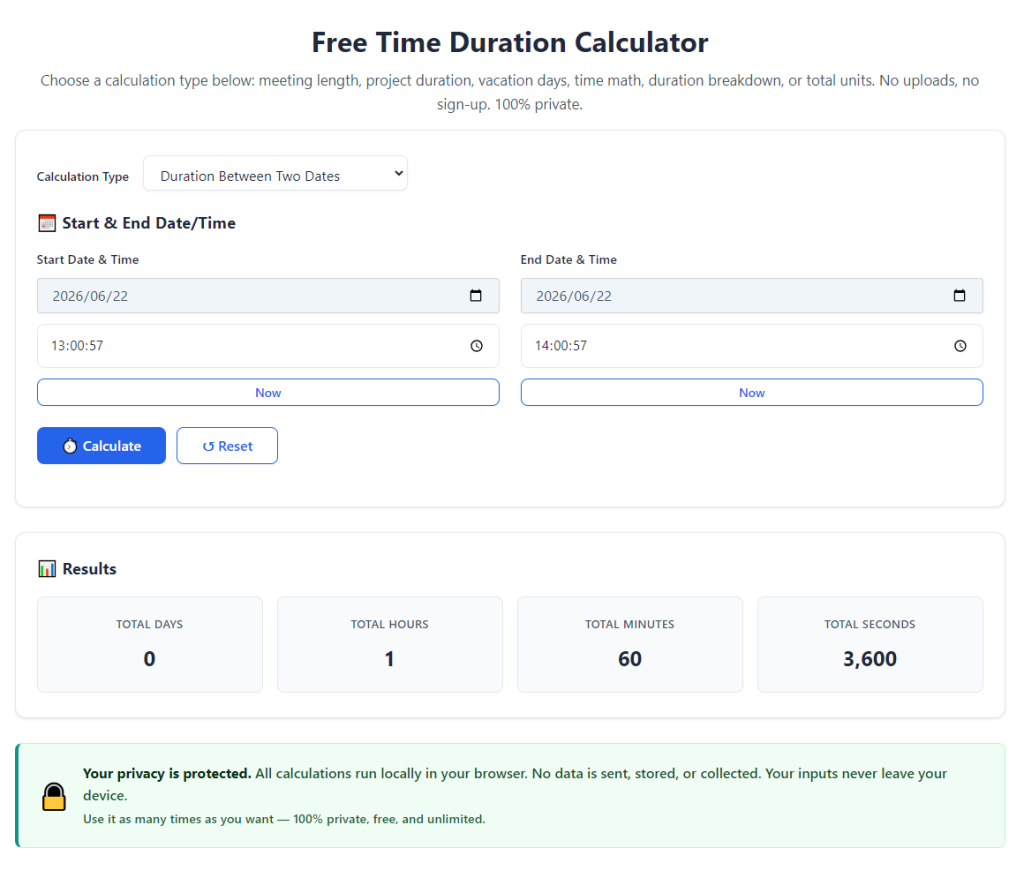
A dedicated time duration calculator subtract lunch break hours streamlines this entire process. The tool computes raw shift duration and automatically deducts designated lunch time to output clean, usable net working hours for timesheets, payroll, and attendance logs.
This detailed guide breaks down the flaws of manual hour tracking, core advantages of specialized time duration calculators, non-negotiable tool features, real workplace use cases, and a full step-by-step walkthrough for error-free hour calculation every single shift.
Common Pain Points of Manual Work Hour Calculation
Calculating net work hours without a purpose-built time duration tool creates consistent administrative headaches for every team handling employee attendance.
Manual double-step math leads to frequent calculation errors
To get true working time by hand, you first calculate total shift length between clock-in and clock-out, then subtract lunch duration separately. Two separate math steps multiply the risk of addition, subtraction, and conversion errors for hours and minutes.
Spreadsheet formulas require constant setup and edits
Many small teams use generic spreadsheets to log shifts, but every new employee or adjusted lunch policy demands formula rewrites. Untrained staff often break cell formatting and skew all subsequent hour totals.
Uneven lunch break rules complicate uniform tallying
Different staff groups follow separate lunch policies: some take 30-minute unpaid breaks, others one full hour, while part-time staff skip formal lunch deductions entirely. Manual tracking makes consistent application of these rules nearly impossible.
Wasted administrative time on repetitive payroll prep
HR coordinators and business owners spend hours each pay cycle recalculating individual employee shifts. Time spent on basic hour subtraction could instead go to employee onboarding, compliance reviews, or business planning.
Risk of payroll overpayment or labor compliance violations
Incorrectly omitting lunch break deductions inflates recorded working hours, leading to unnecessary overpayments. On the flip side, miscalculations that remove too much lunch time trigger employee complaints and labor regulation conflicts.
Difficulty tracking split shifts and staggered lunch windows
Staff with broken schedules, mid-shift meal periods, or rotating lunch slots are especially hard to calculate manually. Standard math cannot quickly separate multiple unpaid break segments from total clocked time.
Core Benefits of Time Duration Calculator Subtract Lunch Break Hours
Integrating a reliable time duration calculator subtract lunch break hours into your attendance workflow eliminates every flaw tied to manual hour tallying and generic time tools.
Automatically deducts lunch time from total shift duration in one step
The tool combines two separate calculations into a single operation. Input clock-in time, clock-out time, and designated lunch length, and the platform instantly returns net paid working hours with no extra math required from the user.
Eliminates human arithmetic errors for consistent payroll accuracy
All hour and minute conversions run through standardized built-in logic. You remove the risk of miscalculations that stem from mental math, messy spreadsheet entries, or rushed end-of-week timesheet processing.
Supports flexible lunch break length customization for all staff policies
Adjustable lunch deduction settings accommodate every workplace rule: 30-minute short breaks, 60-minute full lunch periods, multiple split meal windows, and zero deductions for part-time or short-shift workers.
Cuts payroll and attendance admin time drastically
Tasks that once took hours of manual recalculation finish in seconds. Managers can process full teams of employee timesheets in a fraction of the usual weekly administrative window.
Compatible with all shift types including split, night, remote, and weekend schedules
Whether tracking standard 9-to-5 office shifts, overnight retail rotations, remote flexible hours, or part-time weekend work, the calculator accurately separates lunch time from total logged duration regardless of schedule structure.
Generates standardized net hour values ready for timesheet and payroll entry
Final calculated work hours output in clean hour-minute or decimal hour formats, matching the formatting requirements of most payroll systems, attendance trackers, and HR documentation templates.
Prevents labor compliance and payroll dispute risks
Uniform automatic lunch deductions ensure every employee’s timesheet follows company policy identically. This consistency reduces employee grievances and keeps payroll records aligned with local labor hour tracking standards.
Must-Have Features for a Reliable Time Duration Calculator Subtract Lunch Break Hours
Not all time tracking calculators include built-in lunch deduction functionality. The top-tier time duration calculator subtract lunch break hours includes these workplace-focused core features for daily administrative use.
Dual time input format (12-hour AM/PM and 24-hour military time)
All shift schedules, from standard office hours to overnight industrial rotations, log seamlessly. Users can input clock-in and clock-out timestamps using whichever time format their workplace already adopts.
Customizable lunch break duration slider or input field
Directly type exact lunch break minutes or select preset common values (30, 45, 60 minutes). The tool immediately applies this fixed deduction to every duration calculation without repeated retyping.
Multiple lunch segment support for split meal breaks
For staff who take two separate unpaid breaks across long shifts, the calculator accepts multiple lunch time entries and subtracts all combined break minutes from total shift length automatically.
Two output display modes: hour-minute format and decimal payroll hours
Payroll systems frequently use decimal hour values for wage multiplication. The tool shows both raw hh:mm net work time and converted decimal hours side-by-side for instant payroll data transfer.
Bulk multiple entry functionality for team-wide timesheet processing
Instead of calculating one employee shift at a time, batch input dozens of clock-in, clock-out, and lunch break sets to generate a full team hour summary in a single session.
Error prevention prompts for invalid time entries
The tool flags impossible inputs such as clock-out times earlier than clock-in times, negative lunch durations, or overly long break periods that violate company policy. This catches typos before flawed hour calculations are saved.
Save and export calculated hour logs for record-keeping
Store individual or bulk calculated shift records to reference during payroll audits, employee attendance reviews, and labor compliance inspections without re-running every calculation from scratch.
Clean, simplified interface free of irrelevant advanced features
No confusing project scheduling modules, overtime tax calculators, or complex calendar overlays clutter the core workflow. The tool prioritizes fast time duration and lunch deduction calculations above all extra functions.
Real-World Workplace Use Cases for Lunch Deduction Time Duration Calculators
A versatile time duration calculator subtract lunch break hours fits every industry and role that requires accurate tracking of paid working hours minus unpaid meal breaks.
Small business retail shift payroll processing
Retail store managers track rotating opening and closing shifts for hourly staff. Varying lunch break lengths between full-time and part-time employees make automated lunch subtraction essential for weekly payroll runs.
Office HR department monthly timesheet reconciliation
HR coordinators review submitted employee time logs at month-end. The calculator standardizes lunch deductions across all departments to eliminate inconsistent manual math across dozens of individual staff timesheets.
Remote and hybrid team flexible hour tracking
Remote workers often log irregular start and end times with variable lunch windows. The tool adapts to non-traditional schedules while reliably removing designated unpaid lunch duration from total logged hours.
Manufacturing and warehouse split shift attendance logging
Factory staff working extended double shifts frequently take two separate meal breaks. Multi-lunch deduction functionality accurately tallies net production hours for overtime and base pay calculations.
Freelance and contract hourly client billing
Independent contractors track billable client hours and subtract personal unpaid lunch periods mid-workday. The calculator outputs clean net billable hours to attach to client invoices with transparent breakdowns.
Education and school staff attendance tracking
Teachers, custodians, and administrative school staff follow fixed lunch schedules. Bulk calculation functionality lets school admins process full faculty timesheets quickly before district payroll submissions.
Construction field crew daily work log tallying
Field crews operate variable start/end times on job sites with mandatory unpaid lunch breaks. Fast single-entry calculations streamline end-of-day crew hour logging for weekly contractor payroll.
Hospitality restaurant and hotel shift hour tracking
Hospitality teams work staggered split shifts with short or long meal breaks. Automated lunch subtraction prevents undercalculated or overcalculated working hours for tipped and hourly front/back house staff.
Step-by-Step Complete Guide: How to Use Time Duration Calculator Subtract Lunch Break Hours
Follow this streamlined, beginner-friendly workflow to generate error-free net working hours every time with your dedicated time duration calculator subtract lunch break hours.
Step 1: Gather complete shift data for the employee or log entry
Collect three core pieces of information before opening the calculator: exact clock-in timestamp, exact clock-out timestamp, and total length of unpaid lunch break taken during the shift.
Note if the shift includes multiple separate lunch segments to input all break durations separately later.
Step 2: Open the time duration calculator tool
Launch the calculator interface on your browser or local device. The primary screen will display distinct input boxes labeled for clock-in time, clock-out time, and lunch break duration.
Skip past any advanced secondary modules; focus only on the core time and lunch deduction fields for basic single-shift calculations.
Step 3: Select your preferred time display format
Toggle between 12-hour AM/PM or 24-hour military time based on how your workplace records attendance logs. Lock this format setting for consistent entry across all subsequent calculations.
Step 4: Input the shift clock-in and clock-out timestamps
Type the exact hour and minute values for when the employee started and finished their shift into the matching input fields. Double-check AM/PM labels to avoid reversed day/night time math errors.
For split multi-day overnight shifts, confirm the tool supports cross-midnight duration tracking before finalizing time entries.
Step 5: Enter total unpaid lunch break minutes to deduct
Type the full length of the unpaid lunch period into the dedicated lunch deduction field. If multiple separate meal breaks occurred during the shift, locate the add-break button to input each segment’s duration individually.
Leave the lunch field blank or input zero minutes if the shift has no mandatory unpaid lunch deduction per company policy.
Step 6: Initiate the full duration calculation with automatic lunch subtraction
Click the calculate generate button to trigger the tool’s core logic. The system will first compute the raw total time between clock-in and clock-out, then automatically subtract all entered lunch break minutes.
Results populate on-screen within one second, with two separate readouts: total raw shift duration and final net paid working hours.
Step 7: Review both standard hh:mm and decimal hour outputs
Scan the two format results to confirm accuracy. The hh:mm value works for internal attendance logs, while the decimal hour conversion copies directly into most payroll software wage calculation fields.
Verify the subtracted lunch minutes match the actual break length recorded on the employee’s physical or digital timesheet to catch typos in input values.
Step 8: Save or copy the final net working hour value
Use the one-click copy function to transfer the decimal or hour-minute net work time directly to your timesheet, payroll spreadsheet, or client billing document.
If processing bulk team shifts, locate the save entry button to store this employee’s calculated hours within the tool’s temporary log storage for later batch export.
Step 9: Repeat the process for all remaining employee shift entries
Cycle through each individual staff timesheet entry one by one, reusing your saved time format and standard lunch break length preset to maintain uniform calculations across the entire team.
Adjust the lunch deduction field only for part-time staff or special shift exceptions that follow modified meal break policies.
Step 10: Export all finalized calculated hour records for payroll storage
Once every employee shift calculation finishes, open the tool’s export menu to download the full batch of logged timestamps, lunch deductions, and net working hour totals as a standardized record file.
Archive the exported logs alongside your regular payroll documentation for labor compliance audits and future attendance reference checks.
Common Mistakes to Avoid When Using Time Duration Calculator Subtract Lunch Break Hours
Even with an accurate dedicated calculator, these frequent user errors create flawed hour totals and payroll inconsistencies when processing shift logs.
Inputting paid lunch breaks into the deduction field
Only unpaid mandatory meal periods belong in the lunch subtraction input box. If a workplace policy covers staff lunch time as paid working hours, set the lunch duration value to zero to prevent unnecessary hour deduction.
Forgetting to add multiple split lunch segments for long double shifts
Entering only one meal break when an employee took two separate unpaid lunch windows undercalculates total break time, inflating final net working hours and causing payroll overpayment.
Mixing 12-hour and 24-hour time formats mid-bulk processing
Switching time display settings halfway through calculating a team’s shifts creates cross-format math confusion. Lock one consistent time format before starting a full payroll batch to eliminate timestamp misreads.
Rushing timestamp entry without double-checking AM and PM labels
A misplaced AM/PM marker turns a standard 8-hour day shift into a 16-hour overnight calculation. Always cross-reference clock-in and clock-out AM/PM tags against the original attendance log.
Ignoring the decimal hour conversion output for payroll entry
Manually converting hh:mm values to decimals by hand defeats the tool’s built-in conversion feature and reintroduces avoidable arithmetic mistakes during wage multiplication.
Skipping record export after finishing bulk shift calculations
Unsaved calculated hour logs disappear once you close the tool window. Always export completed payroll batches before exiting to retain audit-ready attendance records long-term.
Applying identical lunch break lengths to all staff without policy differentiation
Full-time and part-time employees often follow separate meal deduction rules. Applying a 60-minute lunch subtraction to short part-time shifts that offer no unpaid breaks skews all resulting hour totals.
Expert Pro Tips to Maximize Accuracy & Speed With Time Duration Calculator Subtract Lunch Break Hours
Use these practical workflow tactics to cut payroll admin time and guarantee perfect hour calculations every pay cycle with your lunch deduction time duration calculator.
- Bookmark the calculator tool in your primary browser folder for instant one-click access at the start of every payroll processing session.
- Create preset lunch break templates for your company’s standard policies (30 min, 45 min, 60 min) to avoid retyping identical deduction values for most employee shifts.
- Process timesheets in small group batches instead of one massive team list to reduce eye strain and input typos during long calculation sessions.
- Cross-check 10% of finished calculated shift entries against original physical clock logs as a quick quality control step before finalizing payroll.
- Label all exported calculation log files with the exact pay cycle date range for simple organized storage and fast retrieval during labor compliance audits.
- Train all team managers to use the same calculator and uniform input rules to maintain consistent lunch deduction standards across every department’s attendance logs.
- Use the zero-minute lunch preset for remote micro-shifts, student intern hours, and temporary contract staff exempt from formal unpaid meal break policies.
Final Thoughts
Accurate work hour tracking forms the foundation of fair, compliant payroll operations for every business, school, agency, and freelance operation. Manual shift math that requires separate lunch break subtraction creates unnecessary administrative burden and consistent calculation errors that carry financial and compliance risks.
Generic time calculators lack built-in lunch deduction functionality, forcing users to complete disjointed two-step math workflows for every single employee timesheet entry. This outdated process wastes valuable HR and managerial time each pay cycle.
A specialized time duration calculator subtract lunch break hours solves every core pain point tied to manual hour tallying. The integrated tool computes full shift duration and automatically removes designated unpaid lunch break minutes in one seamless step, delivering clean, audit-ready net working hour outputs formatted for immediate payroll use.
With customizable lunch break inputs, dual time format support, bulk batch processing, and exportable record logs, this calculator adapts seamlessly to every industry, shift type, and workplace meal policy. It eliminates arithmetic errors, streamlines payroll prep, and mitigates labor compliance disputes related to miscalculated working hours.
By following the structured step-by-step calculation workflow and implementing the expert efficiency tips covered in this guide, any manager, HR coordinator, or independent contractor can reliably generate error-free net work hours by properly leveraging a time duration calculator subtract lunch break hours for all daily and pay-cycle attendance tracking tasks.
After learning the operation method, click the link below to enter the tool page for immediate use.