Transcribing voice audio into written text is one of the most common daily tasks for students, professionals, and content creators. Whether you’re recording lectures, meeting discussions, voice notes, or interview audio, manual transcription is incredibly slow and exhausting. Typing every spoken word by hand takes hours and often leads to missing critical details.
Unfortunately, most popular speech-to-text platforms create unnecessary barriers. They force new users to create accounts, verify personal information, subscribe to premium plans, or download heavy software just to access basic transcription features. These tedious steps turn a quick task into a long, frustrating process.
For users who value speed and privacy, sharing personal data for simple voice transcription feels unnecessary and risky. This is why a free speech to text no registration needed tool has become the ideal solution for fast, private, and accessible voice-to-text conversion for everyone.
This detailed, beginner-friendly tutorial covers the downsides of registered transcription tools, core advantages of using free anonymous speech-to-text software, key functional features, real-world use cases, and a complete step-by-step workflow to get accurate text transcripts effortlessly.
Why Registered Speech-to-Text Tools Are Inconvenient
Most mainstream voice transcription tools prioritize user data collection over convenience. Their mandatory registration systems create multiple workflow drawbacks for regular users.
Time-consuming account setup
Traditional tools require email verification, password creation, and profile setup before use. These extra steps delay transcription work and interrupt creative or study workflows.
Unnecessary privacy exposure
Meeting recordings, personal voice notes, and private lecture content get uploaded to registered platform servers. This creates potential data leakage risks for sensitive audio files.
Basic features locked behind subscriptions
Many tools advertise free transcription but limit accurate voice recognition, long audio support, and clean output to paid premium members only.
Persistent login requirements
Registered platforms force frequent re-login sessions. Users must repeatedly verify their identity, which disrupts quick, on-the-go transcription tasks.
Clunky software downloads
Some desktop-based transcription tools require heavy installations. They take up device storage and slow down system performance for simple text conversion jobs.
Key Benefits of Free Speech to Text No Registration Needed
A reliable free speech to text no registration needed tool eliminates every flaw found in traditional transcription platforms, delivering a seamless user experience.
Zero sign-ups and zero personal data required
Users access full transcription features instantly with no emails, phone numbers, or account creation. Every conversion session remains completely anonymous and private.
100% free core functionality
All basic and advanced speech-to-text features stay permanently free. There are no hidden fees, trial expirations, or usage limits for standard transcription tasks.
Instant real-time transcription
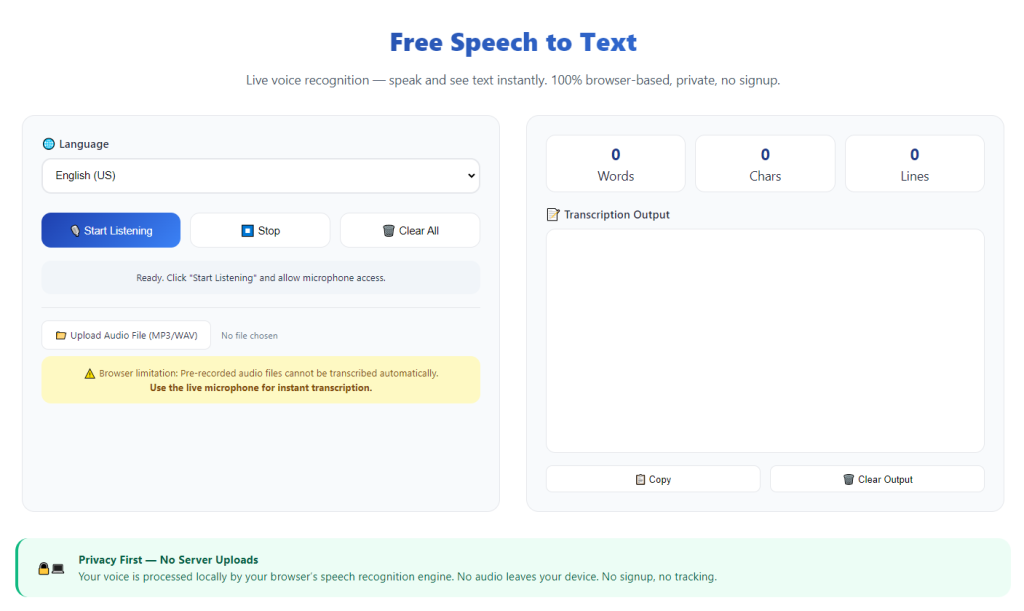
The tool converts live voice input and uploaded audio instantly. Spoken words appear as clean written text in real time, with no waiting or processing delays.
Full audio privacy protection
Since no account is linked and no data is stored, your private audio files and transcripts never get saved online. This protects sensitive personal, academic, and business content.
No software installation required
The tool runs fully online via standard browsers. It works on mobile, tablet, and desktop devices without taking up local storage space.
Boosts daily productivity drastically
Automated voice transcription replaces slow manual typing. Users convert hours of audio into accurate text in minutes, saving massive amounts of working time.
Must-Have Features of a Quality Anonymous Transcription Tool
Top-tier platforms with free speech to text no registration needed functionality include professional features that match premium paid tools.
Accurate real-time voice recognition
Advanced AI algorithms detect clear speech, moderate accents, and natural speaking rhythms. It minimizes typing errors and produces highly readable raw transcripts.
Support for live microphone input
Users can speak directly through device microphones for live transcription. This works perfectly for real-time note-taking during lectures and meetings.
Compatible with common audio formats
Quality tools support standard audio file types for pre-recorded transcription. Users upload existing voice recordings and receive instant text conversions.
Punctuation and basic grammar formatting
The system automatically adds basic punctuation and sentence spacing. Raw transcripts come clean and structured, reducing post-transcription editing work.
Instant text copy and export
Once transcription finishes, users can copy the full text instantly. There are no locked export features or premium download restrictions.
Ad-free clean interface
Trusted anonymous tools feature distraction-free layouts. No pop-up ads or upgrade prompts interrupt your transcription workflow.
Common Use Cases for Free Anonymous Speech Transcription
A free speech to text no registration needed tool fits countless academic, professional, and personal daily scenarios.
Lecture and class note transcription
Students record live lectures and convert audio to text instantly. Fast transcription helps capture every key point without missing important lesson details while handwriting notes.
Business meeting documentation
Professionals transcribe team discussions, client calls, and conference meetings. Accurate text records make it easy to review action items and track project progress later.
Content creator scripting
Writers and creators voice draft ideas quickly. Converting voice notes to text speeds up script writing, blog drafting, and social media content creation.
Interview and research transcription
Researchers convert interview recordings and field notes into organized text files. Anonymous tools ensure sensitive research data stays private and secure.
Personal voice note organization
Users convert daily voice memos, reminders, and personal recordings into readable text. It simplifies file organization and long-term content storage.
Step-by-Step Guide: Use Free Speech to Text No Registration Needed
Follow this simple, foolproof workflow to complete accurate transcription with zero sign-ups and zero privacy risks.
Step 1: Prepare Your Audio or Voice Input
Get ready your live speaking content or pre-recorded audio file. Ensure your device microphone works clearly or your audio file has stable sound quality for best accuracy.
Avoid noisy backgrounds to reduce recognition errors during transcription.
Step 2: Open the Anonymous Transcription Tool
Launch a reliable free speech to text no registration needed platform. Confirm that it requires no login, no personal details, and no subscription to start converting audio.
Step 3: Choose Your Transcription Mode
Select live microphone transcription for real-time voice input or upload your pre-recorded audio file. Both modes offer full free access with no limitations.
Select the correct language setting to match your voice content for maximum accuracy.
Step 4: Start Voice to Text Conversion
Begin speaking clearly or start the audio playback. The tool will transcribe every spoken word in real time, generating continuous text on the screen.
Speak at a natural pace and pause briefly between sentences for clean punctuation formatting.
Step 5: Review and Edit Raw Transcript
Once transcription completes, scan the full text for minor errors. Fix small recognition mistakes, adjust punctuation, and refine sentence flow manually.
Most raw transcripts require only light editing for professional usability.
Step 6: Copy and Save Final Text
After reviewing and polishing the transcript, copy the complete text. Paste it into your document editor and save the file for notes, reports, or content drafting.
Common Transcription Mistakes to Avoid
These simple errors can reduce accuracy even when using a high-quality anonymous transcription tool.
Speaking too fast or unclearly
Rushed speech and mumbled words create recognition errors. Maintain a steady, clear tone for precise transcription results.
Working in noisy environments
Background noise confuses AI recognition. Always use quiet spaces for important transcription tasks.
Ignoring post-transcription edits
Automated tools occasionally mishear words. A quick review fixes minor mistakes and ensures perfect transcript quality.
Using registered tools for private audio
Signed platforms store your audio data. Always choose no-registration tools for confidential content.
Expert Tips for Perfect Transcription Results
Use these professional tips to maximize speed and accuracy every time you use the tool.
- Always use free speech to text no registration needed for private audio to keep your content fully anonymous and secure.
- Speak slowly and articulate clearly to minimize AI misrecognition and reduce editing time.
- Process shorter audio segments for highly accurate transcripts instead of extremely long unbroken recordings.
- Review transcripts immediately after conversion to fix errors while the audio content remains fresh in your mind.
- Adjust device microphone settings to ensure clear input volume before starting live transcription sessions.
- Avoid premium registered tools for basic transcription tasks to save time and protect personal privacy.
Final Thoughts
Manual transcription is slow, tedious, and prone to errors, while most modern speech-to-text tools create unnecessary barriers through mandatory registration and paywall restrictions. These hurdles make simple voice-to-text conversion far more complicated than it needs to be.
A trusted free speech to text no registration needed tool solves these issues completely. It delivers fast, accurate, and private transcription with zero sign-ups, zero fees, and zero data privacy risks.
Whether you are transcribing classroom lectures, business meetings, creative voice drafts, or research interviews, this tool streamlines your workflow and eliminates hours of manual typing work.
By following this comprehensive user guide, you can consistently generate clean, accurate text transcripts from any voice audio, boost daily productivity, and protect your content privacy at all times.
After learning the operation method, click the link below to enter the tool page for immediate use.