Unwanted line breaks are one of the most common and frustrating text formatting issues for all types of writers. When you copy content from web pages, PDF files, scanned documents, or old text editors, random line breaks and unnecessary paragraph splits often appear out of nowhere.
These broken text layouts disrupt reading flow, ruin uniform document formatting, and make clean drafts look unpolished. Fixing broken line breaks manually is extremely tedious. It requires merging split sentences, deleting blank lines, and restructuring paragraphs one by one, which wastes tons of editing time.
Worse still, most online text cleaning tools force users to register accounts, verify emails, or pay for basic line break removal features. This simple formatting fix should never require personal data sharing or premium subscriptions. This is why a free line break remover no registration is the perfect solution for fast, anonymous, and hassle-free text formatting.
This complete tutorial explains the harms of unwanted line breaks, limitations of traditional editing methods, core advantages of using a free line break remover no registration, key tool features, real usage scenarios, and a step-by-step workflow for perfect formatting results every time.
How Unwanted Line Breaks Ruin Your Text Quality
Many users underestimate the impact of random line breaks on academic, professional, and personal documents. These small formatting errors create multiple noticeable issues.
Breaks smooth reading flow
Unnatural line splits cut complete sentences into fragmented chunks. Readers have to pause repeatedly to follow broken content, which reduces readability and content engagement significantly.
Destroys uniform document layout
Formal documents require consistent paragraph structure. Random line breaks create uneven text blocks, messy alignment, and unstructured layouts that look unprofessional and rushed.
Causes submission and publishing errors
Academic platforms, content management systems, and business document tools often reject poorly formatted text. Broken line structure can lead to assignment revisions, post formatting glitches, and client content reworks.
Creates disjointed paragraph logic
Uncontrolled line breaks separate connected ideas and related sentences. This breaks logical paragraph flow and makes your writing look unorganized and confusing.
Slows down content editing
Every broken line requires manual merging and adjustment. Large documents with dozens of random breaks can double or triple your overall editing workload.
Why Manual Editing & Registered Tools Are Inefficient
Most users rely on traditional methods to fix line break issues, but these approaches come with obvious drawbacks and limitations.
Manual line merging is time-consuming
Fixing line breaks by hand means scanning every single line, deleting splits, and reconnecting sentences. For long essays, articles, and reports, this process takes hours of repetitive work.
Built-in editor tools have limited functions
Standard word processors only fix basic paragraph breaks. They cannot batch remove irregular line splits, hidden line breaks, and fragmented sentence divisions from copied external content.
Registered tools waste user time and privacy
Most online cleaners require account registration and email verification before unlocking line break removal features. This turns a 10-second fix into a multi-minute setup process.
Data privacy risks for private content
Registered tools store user text data and track editing activity. This creates privacy risks for student assignments, business drafts, and personal study notes.
Basic features locked behind paywalls
Many platforms advertise free text cleaning but restrict bulk line break removal and advanced formatting fixes to premium paid users.
Core Benefits of Free Line Break Remover No Registration
A trusted free line break remover no registration solves all common formatting pain points, delivering a fast, safe, and user-friendly editing experience.
100% anonymous instant usage
The biggest advantage is zero registration requirements. You never need to input personal information, create passwords, or verify emails to use full line break cleaning functions.
Preserves original text content completely
This tool only targets redundant line breaks and fragmented splits. All original wording, sentence structure, punctuation, and content meaning stay fully unchanged after cleaning.
Eliminates all messy line break types
It removes random single line splits, excessive blank lines, fragmented sentence breaks, and unnecessary paragraph gaps in one single click.
Saves massive editing hours
Batch automatic cleaning replaces slow manual fixes. Long documents with hundreds of broken lines get fully optimized in just a few seconds.
Completely free with no hidden charges
All core line break removal features are permanently free to use. There are no trial limits, usage caps, or forced upgrade prompts for regular formatting tasks.
Cross-device flexible access
You can use the tool on mobile, tablet, and desktop browsers. No login credentials are required, making on-the-go text formatting extremely convenient.
Must-Have Features of a Quality Free Line Break Remover No Registration
Top-tier anonymous line break removers include professional features that separate premium tools from low-quality basic alternatives.
Targeted line break elimination logic
The tool intelligently identifies only redundant and unnatural line breaks. It preserves intentional paragraph divisions and necessary spacing to maintain clean document structure.
Full text content protection
The algorithm never modifies words, phrases, or punctuation. It only adjusts line structure, ensuring zero changes to your original writing and core information.
Bulk long-text processing support
It handles full essays, lengthy articles, multi-page reports, and large copied text blocks without truncation or incomplete cleaning errors.
Automatic paragraph restructuring
Broken fragmented sentences reconnect automatically. The tool merges split content into complete, smooth paragraphs with consistent flow.
Clean ad-free user interface
Reliable no-registration tools feature simple, distraction-free layouts. Users can focus on text editing without intrusive pop-ups or disruptive ads.
Instant one-click results
The entire cleaning process finishes in seconds. There are no waiting queues, loading delays, or complicated manual settings to adjust.
Common Use Cases for No-Registration Line Break Removal Tools
A free line break remover no registration serves a wide range of academic, professional, and personal formatting scenarios.
Academic essay and assignment formatting
Students frequently copy research content from PDFs and web sources, which always contains broken line splits. The tool cleans messy layouts quickly while keeping research content accurate and original.
Blog and online content creation
Content creators optimize copied research drafts for publishing. Fixed line structure ensures clean, readable articles with consistent visual layout across all platforms.
Business report and proposal editing
Professional documents require neat and uniform formatting. Removing random line breaks helps business reports look structured, formal, and credible for clients and team reviews.
Study note and resource organization
Learners tidy up copied textbook excerpts and lecture transcripts. Clean paragraph structure makes study materials easier to read, review, and store long-term.
Resume and formal document polishing
Job seekers fix fragmented text in resumes and cover letters. Smooth, consistent formatting creates a professional and organized impression for recruiters.
Step-by-Step Guide: Use Free Line Break Remover No Registration
Follow this beginner-friendly workflow to fix broken text formatting perfectly with zero registration and zero content changes.
Step 1: Prepare Your Fragmented Text
Copy the text with messy line breaks, split sentences, and excessive blank lines. This includes PDF extracts, web-copied content, and unformatted draft files.
You do not need to pre-edit any breaks, as the tool will handle all cleaning automatically.
Step 2: Open the Anonymous Line Break Tool
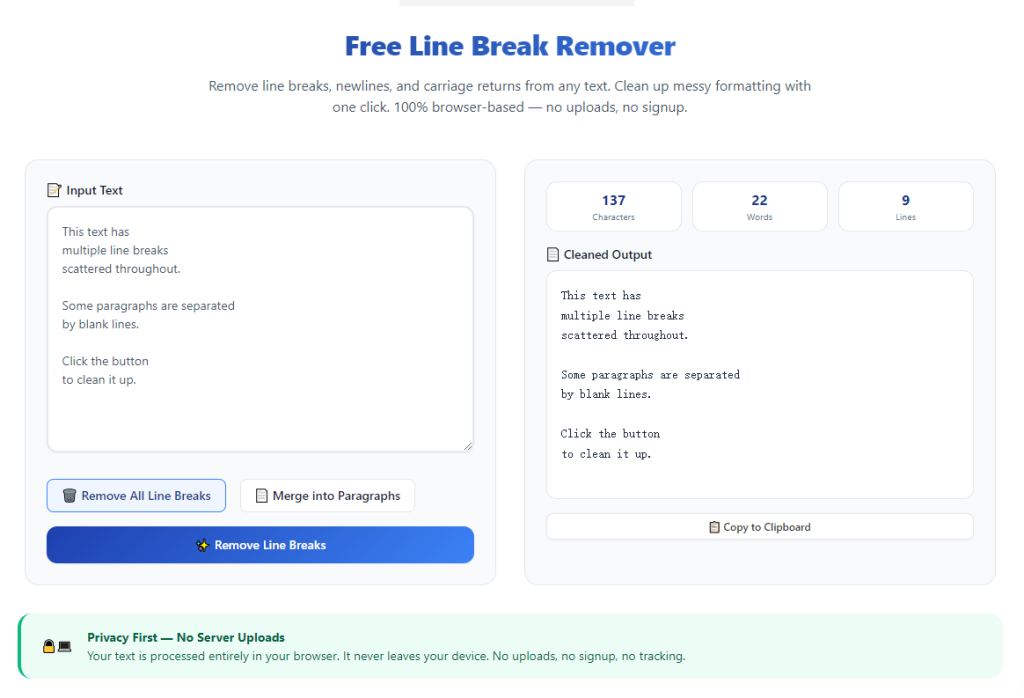
Launch a reliable free line break remover no registration. Confirm the platform requires no sign-up, email input, or personal data to start editing.
Step 3: Paste Your Full Text Block
Paste your fragmented text completely into the tool’s input area. The tool supports both short snippets and long-form document content with no usage limits.
Make sure no text is missing to ensure full and uniform formatting repair.
Step 4: Run Automatic Line Break Cleaning
Start the cleaning process. The tool will scan your entire text, remove all redundant line splits, merge fragmented sentences, and delete excessive blank lines instantly.
All original text content, wording, and core meaning remain fully preserved during processing.
Step 5: Review Cleaned Paragraph Structure
Check the optimized text for smooth, unified paragraphs. Verify that all broken sentences are reconnected and unnecessary line gaps are eliminated.
Confirm that intentional paragraph breaks for new sections are still properly retained.
Step 6: Copy and Save Final Formatted Text
Once you are satisfied with the clean layout, copy the finalized text. Paste it back into your document editor and save the polished version for submission, publishing, or personal use.
Common Line Break Issues & Quick Fixes
Even with a premiumfree line break remover no registration, minor structural adjustments may be needed for special formatting cases.
Over-merged paragraph blocks
In long articles, the tool may merge separate sections. Simply add manual paragraph breaks to restore logical content division.
Retained minor blank lines
Rare hidden blank lines may remain after bulk cleaning. Run a second quick scan to eliminate leftover spacing errors completely.
List or bullet point formatting shifts
Structured lists may lose minor line spacing. Adjust manually to restore original list layout and readability.
Expert Tips for Perfect Line Break Cleaning
Use these professional tips to maximize formatting quality every time you use the tool.
- Always clean web and PDF copied content before editing, as these sources always carry hidden line break errors.
- Use a free line break remover no registration to keep private academic and business content fully anonymous.
- Process full documents at once to maintain consistent paragraph structure across all sections.
- Review cleaned text briefly to restore intentional section breaks removed during bulk processing.
- Complete all content writing first before fixing line breaks to avoid new formatting errors.
- Avoid multi-purpose editing tools to prevent accidental wording changes during line break cleanup.
Final Thoughts
Unwanted line breaks are a trivial yet disruptive formatting problem that affects nearly every type of written content. Manual fixes are slow, and registered editing tools create unnecessary privacy risks and access barriers.
A dependable free line break remover no registration simplifies text formatting completely. It delivers fast, accurate line break cleanup, preserves all original text content, and allows 100% anonymous usage with zero cost.
Whether you are a student, content creator, or business professional, this tool streamlines your editing workflow, eliminates messy fragmented text, and produces clean, professional documents effortlessly.
By following this complete step-by-step guide, you can permanently solve line break issues in seconds, improve document readability, and maintain consistent formatting for all your writing projects.
After learning the operation method, click the link below to enter the tool page for immediate use.