PDF is one of the most widely used file formats for personal, academic and professional work. Its fixed layout ensures text, images and layouts stay consistent across every device, which makes it ideal for sharing, printing and archiving all kinds of documents. Even with these great advantages, many users run into a common issue: pages that appear sideways, upside down or at awkward angles.
Misaligned PDF pages usually happen after scanning physical documents, downloading files from online platforms or receiving shared files from other devices. When pages are not in the right position, simple tasks like reading content, taking notes or printing documents become annoying. Many people struggle to find a simple solution that does not cost money or require complicated setup.
Traditional methods to fix page orientation often come with obvious downsides. Premium PDF editors charge fees for basic rotation features. Free desktop programs need large downloads and regular updates, taking up valuable storage space. Default viewers only let you rotate pages temporarily, and changes will not be saved to the original file.
If you want a simple, cost-free way to fix orientation issues, learning how to rotate PDF pages online free is the best choice. Browser-based tools eliminate downloads, hidden charges and complex settings. This in-depth guide will walk you through everything you need to know, from the benefits of online tools to a complete step-by-step workflow.
Why You Need to Rotate Misaligned PDF Pages
Before you learn how to rotate PDF pages online free, it is important to understand why correcting page orientation is such a necessary step for daily document management.
Improve overall readability
When PDF pages are tilted or inverted, readers have to twist their devices or turn their heads to read content. This creates eye strain and slows down reading speed, especially when working with long reports or multi-page books. Correct rotation makes content easy to view from the start.
Guarantee smooth printing results
Improper page angles often lead to messy printouts. Content may get cut off, or pages will print in the wrong direction. You will waste paper and ink, and spend extra time reprinting files. Rotating pages in advance ensures every print job turns out neat and orderly.
Enable easy content extraction
Most text selection and copying tools work poorly on misaligned pages. You may fail to highlight words or extract key information for notes and references. After you rotate pages to the right position, all basic text functions work normally again.
Maintain a professional look for sharing
Whether you send PDFs to classmates, colleagues or clients, properly oriented pages show attention to detail. Messy inverted files leave an unpolished impression. Taking a moment to fix orientation helps you present clean and professional documents every time.
These small troubles can add up and affect your daily efficiency. That is why mastering how to rotate PDF pages online free is a valuable skill for anyone who works with digital documents regularly.
Shortcomings of Traditional PDF Rotation Solutions
Many users still rely on old-fashioned ways to adjust PDF page angles. These methods have multiple limitations, which make them far less convenient than choosing to rotate PDF pages online free.
Paid professional PDF software
Full-featured desktop PDF editors pack dozens of advanced tools, but they lock basic page rotation behind paid memberships. For users who only need a one-time fix, paying for a monthly or yearly plan is completely unnecessary and a waste of money.
Bulky software installation and updates
Even free desktop PDF applications require you to download and install files on your device. These programs occupy hard drive space, and frequent software updates will interrupt your work. For simple orientation changes, installing extra software is overkill.
Temporary rotation in default viewers
The built-in PDF viewers on computers and mobile phones support rotation for viewing purposes only. Once you close and reopen the file, all adjustments disappear. You cannot save permanent changes with these basic tools.
Complex navigation for beginners
Multi-function editing tools have crowded menus and confusing layouts. New users may spend several minutes searching for the rotation button, turning a quick task into a time-consuming process.
All these drawbacks explain why modern users prefer free online tools. When you rotate PDF pages online free, you bypass all the troubles brought by traditional methods.
Core Advantages of Free Online PDF Rotators
A reliable tool to rotate PDF pages online free is designed for simplicity and practicality. It brings a set of clear benefits that fit the needs of students, office workers and casual users.
Completely free with no hidden costs
The biggest advantage is zero fees. You can process as many PDF files as you need every day. There are no trial limits, paywalls or upgrade prompts. All core rotation functions stay fully accessible for every user.
No downloads or software required
The entire process runs inside your regular web browser. You do not need to install any programs, plug-ins or toolkits. This keeps your device lightweight and free from unnecessary software clutter.
Cross-device and cross-system compatibility
You can rotate PDF pages online free on desktops, laptops, tablets and mobile phones. No matter what operating system your device uses, the online tool works stably as long as you have an internet connection.
Full protection for original formatting
Top-quality online rotators only adjust page angles. They will not shift text, distort images, change fonts or break table layouts. Your document remains exactly the same except for the corrected orientation.
Rapid processing speed
File upload and rotation take only a few seconds. Even large PDFs with hundreds of pages can be processed quickly. You can finish the task and move on to other work without long waiting times.
Intuitive interface for all skill levels
Buttons and functions are clearly labeled and easy to understand. You do not need professional editing experience to use the tool. Beginners can complete page rotation without reading long tutorials.
Watermark-free output files
Trustworthy free online tools will not add brand logos, text stamps or overlay marks to your finished PDFs. The corrected files are clean and suitable for formal sharing, submission and printing.
Common Use Cases for Online PDF Page Rotation
The ability to rotate PDF pages online free applies to a wide range of daily scenarios. Here are the most common situations where this tool can solve your problems effectively.
Scanned documents and official forms
Scanned files are the most frequent source of orientation errors. When you scan physical forms, contracts or paperwork, pages often turn out sideways. Free online rotation can fix these scanned files in just a few clicks.
Academic materials and school assignments
Students often download lecture notes, research papers and study materials from different websites. Many of these files have wrong page angles. Rotating pages makes studying, note-taking and completing assignments much more convenient.
Business documents and team shared files
In the workplace, teams share reports, meeting records and project files across different devices. File orientation may get messed up during transmission. Using a free online rotator ensures everyone reads standard, well-aligned documents.
Digital books and reading collections
Compiled e-books, reading booklets and learning packets sometimes have mixed page directions. Rotating all pages to a unified angle creates a smooth and comfortable reading experience.
Personal archives and old files
Old downloaded PDFs, scanned photos and personal records may have orientation issues. A free online tool helps you organize your personal file library and keep all documents neat and easy to browse.
Step-by-Step Tutorial: How to Rotate PDF Pages Online Free
Follow this simple, step-by-step workflow to rotate PDF pages online free. Every step is easy to follow, and you will get perfectly oriented PDF files in minutes.
Step 1: Prepare and Back Up Your PDF
Find the misaligned PDF file on your device. Take a quick look to check which pages need rotation. It is a good habit to save a copy of the original file first, so you can restore it if you make mistakes during editing.
Delete any damaged or blank pages in advance to avoid processing errors.
Step 2: Launch a Free Online PDF Rotator
Open your usual web browser and visit a dedicated online tool to rotate PDF pages online free. Choose a tool with a clean interface and few pop-up ads for a smooth experience.
Step 3: Upload Your PDF Document
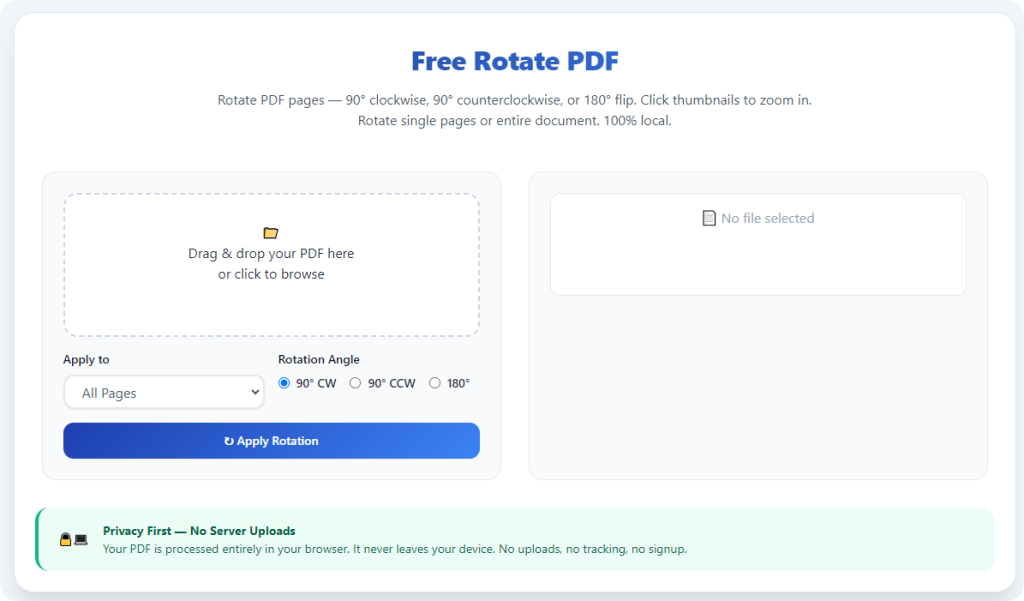
Upload your file by dragging and dropping it into the upload area, or click the select file button to pick the document manually. The tool will load your file quickly, no matter how many pages it has.
If you have multiple files to fix, process them one by one for more precise control.
Step 4: Adjust Page Orientation
Use the rotation controls to adjust page angles. Most tools offer 90-degree clockwise and counterclockwise rotation options, which work for nearly all sideways and upside-down pages.
You can choose to rotate a single selected page, multiple pages or the entire document at once. Select the mode that fits your specific needs.
Step 5: Preview the Adjusted Pages
After making rotation changes, check the live preview window carefully. Confirm that all content is in the correct position. If some pages are still tilted, make extra adjustments right away.
This preview step helps you catch small errors before you download the final file.
Step 6: Generate and Download the Final File
Once all pages are correctly oriented, click the process button to save your changes. The tool will create a new PDF with permanent rotation settings.
Download the finished file to your device. Now you can read, print, copy text or share the PDF without any orientation problems.
Common Issues and Practical Fixes
Even when you use a tool to rotate PDF pages online free, you may run into minor technical problems. Use these simple solutions to keep your workflow running smoothly.
Slow or failed file upload
Unstable internet connection is the main cause of slow uploads. Pause other network tasks and wait for a stable signal before uploading large PDF files.
Layout changes after rotation
Low-quality online tools may distort content. Stick to professional dedicated rotators, which focus only on angle adjustment and fully protect your original layout.
Processing page freezes
Temporary browser cache errors can stop the process. Refresh the page, re-upload your backup file and start the rotation task again.
Orientation resets after download
This usually happens when you forget to confirm processing before downloading. Always complete the final generation step to lock in your rotation changes permanently.
Professional Tips for Better PDF Rotation Results
These practical tips will help you get the best results every time you rotate PDF pages online free, and protect your files from unnecessary risks.
- Always keep the original PDF file stored locally for future reference or re-editing.
- Split extra-large files into smaller parts before uploading to avoid slow processing speeds.
- Use standard 90-degree rotation for most sideways pages, as this is the most common fix for orientation errors.
- Close unused browser tabs while working to reduce system load and speed up the online tool.
- Do not upload highly confidential or private files to public online tools to protect your data security.
- After downloading, open the new PDF and test printing to confirm all pages work as expected.
Final Thoughts
Wrong page orientation is one of the most frequent small troubles for PDF users. Traditional solutions such as paid software, bulky installations and temporary viewer rotation all bring extra trouble and cost.
Learning how to rotate PDF pages online free offers a simple, efficient and budget-friendly alternative. Free browser-based tools require no downloads, no fees and no complex operations. They correct page angles quickly while keeping your document formatting intact.
Whether you are fixing scanned paperwork, school materials, business reports or personal archives, this online method can handle all your rotation needs. It cuts down wasted time and lets you focus on your core work.
For daily PDF orientation fixes, free online rotators are undoubtedly the most practical choice. Once you get used to this workflow, you will never struggle with upside-down or sideways PDF pages again.
After learning the operation method, click the link below to enter the tool page for immediate use.