Small businesses rely heavily on social media to connect with customers, showcase products and build brand recognition within local communities.
Most small team owners and solo entrepreneurs wear multiple hats every day. Finding extra time to brainstorm, write and polish social posts becomes a constant challenge.
Coming up with fresh captions, promotional lines and interactive content consistently often leads to creative burnout. Many small brands end up posting irregularly or using generic content.
A reliable AI social media post generator for small business marketing solves these common hurdles. It streamlines content creation while keeping your brand voice authentic and appealing.
This comprehensive guide covers the limitations of manual content creation, key advantages of AI-powered tools, essential features, real marketing scenarios and a complete step-by-step usage tutorial.
Common Challenges of Manual Social Media Content Creation
Creating social media posts by hand works for occasional updates, yet it creates long-term struggles for small business marketing efforts.
Limited time for regular content production
Running daily operations, serving customers and managing inventory leave little spare time. Writing multiple social posts each week cuts into core business hours significantly.
Creative blocks and repetitive content ideas
After weeks of posting updates, most creators run out of unique angles. Repetitive posts fail to grab attention and make feeds look stale to followers.
Lack of writing experience for persuasive marketing copy
Many small business owners excel at their trade but not at copywriting. Weak wording fails to highlight product value or encourage customer engagement.
Difficulty adapting content for different platforms
Each social platform has its own tone, length rules and audience habits. Rewriting content to fit multiple channels doubles your manual workload.
Inconsistent posting schedules hurt brand visibility
When content creation falls behind, posting becomes sporadic. Algorithms favor active accounts, and irregular updates cause your reach to drop steadily over time.
Key Benefits of AI Social Media Post Generator for Small Business Marketing
Integrating a professional AI social media post generator for small business marketing into your routine transforms how you handle daily social marketing tasks.
Drastically cuts down content writing time
Instead of spending hours drafting posts, you get ready-to-use content in seconds. This frees you up to focus on customer service, sales and business growth.
Generates endless fresh content ideas and angles
Advanced AI models pull from diverse marketing styles and trending topics. You will never run out of creative concepts for product highlights, promotions and community posts.
Adapts tone and style to match your brand identity
Top tools let you set brand guidelines, from friendly and casual to professional and formal. All generated posts stay aligned with your unique business voice.
Supports content tailored for multiple social platforms
You can create short snappy captions, long storytelling posts or visual-focused text for different channels. No need to rewrite the same message repeatedly.
Helps maintain a steady and reliable posting calendar
With fast content generation, you can build a full week or month of posts ahead of time. A consistent schedule keeps your brand visible to existing and new followers.
Affordable solution for small teams with tight budgets
Hiring professional copywriters or social media managers is costly for small operations. An AI post generator delivers similar results at a fraction of the ongoing expense.
Must-Have Features for a Quality AI Social Media Post Generator for Small Business Marketing
When selecting a dependable AI social media post generator for small business marketing, prioritize these practical features to match your brand’s daily needs.
Custom brand voice and tone settings
Adjust tone options such as warm, playful, professional or persuasive. The AI will follow your chosen style across every generated post for unified branding.
Platform-specific content templates
Pre-built templates fit the format rules of major social channels. Each template optimizes post length, line breaks and structure for better performance on its target platform.
Multiple content category options
Choose categories like product promotions, customer testimonials, holiday greetings, tips and behind-the-scenes stories. This covers all common small business social content types.
Editable generated text for manual tweaks
All AI-produced content is fully editable. You can adjust phrases, add personal details or insert special offers to make posts more authentic to your business.
Hashtag suggestion and integration tool
Built-in relevant hashtags help boost organic reach. The tool recommends popular and niche tags suited for local businesses and industry audiences.
Batch generation for bulk content planning
Create multiple posts in one session to fill up your content calendar. Batch functionality streamlines weekly and monthly marketing planning work.
Practical Marketing Scenarios for AI Social Media Post Generator
A fully functional AI social media post generator for small business marketing works across nearly every social marketing task for local shops, service providers and startup brands.
Daily product and service spotlight posts
Regularly highlight best-selling items or core services. The AI crafts concise, compelling captions that explain key benefits and draw customer attention quickly.
Limited-time promotions and discount announcements
Sales, special deals and seasonal offers need urgent, persuasive wording. The generator creates attention-grabbing posts that encourage followers to take action right away.
Community engagement and interactive content
Questions, polls and fun prompts build interaction with your audience. AI tools come up with natural conversation starters to boost comments and shares on your pages.
Behind-the-scenes and brand story content
Sharing your business story or daily workflow builds trust. The AI writes warm, approachable narratives that connect your brand on a personal level with local customers.
Holiday, season and local event posts
Align your social content with holidays, community events and seasonal trends. The generator adapts tone and messaging to fit timely themes effortlessly.
Customer review and testimonial sharing
Turn positive customer feedback into polished social posts. AI rephrases reviews into engaging captions that showcase your business’s great reputation and service quality.
Step-by-Step Guide: Use AI Social Media Post Generator for Small Business Marketing
Follow this simple workflow to operate your AI social media post generator for small business marketing and create high-quality social content efficiently every day.
Step 1: Define your content goal and basic details
Clarify what you want the post to achieve, such as promoting a product, sharing an update or engaging followers.
Jot down key information including product names, offer details or main talking points to input into the tool later.
Step 2: Launch the AI post generator tool
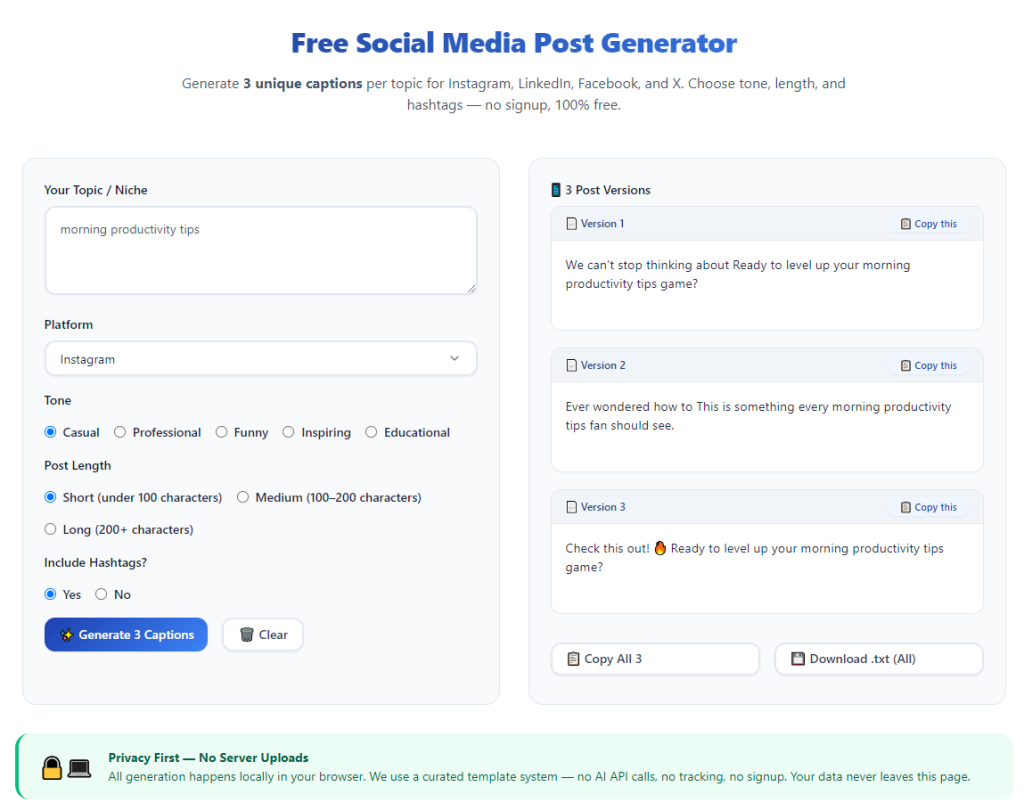
Open the tool on your preferred device and wait for the main interface to load completely.
Familiarize yourself with core sections: prompt input, tone settings, platform selection and content category menus.
Step 3: Set brand tone and target social platform
Select a tone that matches your business style, whether friendly, professional or energetic.
Choose the social platform you are creating content for. This lets the AI adjust post length and layout automatically.
Step 4: Select content category and enter key prompts
Pick a content category that matches your goal, such as promotion, story or community post.
Type in your key details, keywords and core message. Clear prompts help the AI generate content that stays on target for your marketing needs.
Step 5: Generate initial post drafts
Click the generate button to let the AI create multiple content options. Most tools provide several unique versions for you to choose from.
Browse through all drafts and pick the one that best fits your vision and brand style.
Step 6: Edit and customize the selected post
Tweak sentences, add personal notes or insert special discount codes. Small edits make AI content feel more genuine and tailored to your business.
Review the full text to ensure there are no awkward phrases and all key information is clearly presented.
Step 7: Add suggested hashtags and finalize
Insert relevant hashtags provided by the tool. Mix popular tags and local niche tags to expand your reach to potential customers.
Once everything is ready, copy the finished post and schedule or publish it directly to your social pages.
Step 8: Save drafts or start a new content session
Save unused quality drafts for future posting to save extra work later.
Reset the settings and prompts to start creating another post for your next marketing task.
Common Mistakes to Avoid When Using AI Social Media Post Generator
Even with a powerful AI social media post generator for small business marketing, simple errors can lower content quality and campaign performance.
Using overly vague prompts for content creation
Short or unclear prompts lead to generic, bland posts. Always include specific details about products, offers or topics to get targeted content.
Skipping manual editing for fully AI-generated text
AI content works best with light edits. Failing to adjust wording can make posts sound robotic and disconnected from your real brand voice.
Using a single tone for all types of posts
A serious tone does not fit fun community posts, just as casual language does not suit formal announcements. Adjust tone based on your content purpose.
Ignoring platform format rules
Long blocks of text perform poorly on visual-focused platforms. Always match post length and structure to your selected social channel.
Overloading posts with too many hashtags
Excessive hashtags look spammy and hurt engagement. Stick to a reasonable number of relevant tags for each published post.
Practical Tips to Maximize Tool Performance
These actionable tips help you get the most value from the AI social media post generator for small business marketing and elevate your overall social strategy.
- Bookmark the tool for quick access, so you can create new posts anytime you update your content calendar.
- Save your preferred brand tone and platform settings as defaults to cut down repeated adjustments each session.
- Generate a full week of content in one batch to maintain a steady posting schedule with minimal daily work.
- Blend AI content with personal photos, short videos and real customer stories for a balanced, authentic feed.
- Test different content categories to see which types get the best engagement from your local audience.
- Refresh prompts regularly to keep content fresh and avoid repeating the same themes across multiple weeks.
Final Thoughts
Social media marketing is essential for small businesses to grow their audience, boost sales and build lasting customer relationships.
Manual content creation drains time and creativity for busy small business teams, often resulting in inconsistent or low-quality social updates.
A well-designed AI social media post generator for small business marketing solves these pain points effectively. It speeds up creation, sparks new ideas and keeps your brand active online.
With customizable tones, platform templates and easy editing features, this tool adapts to every type of small business and marketing goal.
By following the step-by-step process and practical tips above, you can produce professional, engaging social posts consistently while saving hours of work each week.
After learning the operation method, click the link below to enter the tool page for immediate use.