QR codes are everywhere in modern daily life, from product labels and business cards to event tickets, payment links and shared contact details.
Many online QR reading tools force users to create accounts, verify email addresses or log in before unlocking basic scanning functions.
These extra steps waste precious time, especially when you just need a quick scan to view embedded text, links or simple information.
A reliable Free QR code decoder no registration removes all these barriers. It lets you decode QR codes right away without any form filling or account setup.
This detailed guide covers the drawbacks of registration-locked QR tools, core advantages of no-signup decoders, key features, common use cases and a full beginner-friendly operation tutorial.
Common Frustrations With QR Decoders That Require Registration
Most mainstream QR code reading platforms add mandatory registration rules that create unnecessary trouble for casual and frequent users alike.
Time wasted on lengthy account creation workflows
Filling out personal forms, creating passwords and completing email verification takes several minutes. For a fast QR scan, this process feels completely unnecessary.
Privacy risks from sharing personal information
Most people hesitate to submit names, emails or contact details just to use a basic scanning tool. Sharing private data raises concerns about data collection and misuse.
Repeated login prompts for every new session
Even after finishing registration, many tools ask you to log in each time you revisit the page. This adds repetitive work to routine QR decoding tasks.
Unwanted spam and promotional messages post sign-up
Once your email is linked to an account, you often receive regular newsletters, ads and service alerts that clutter your inbox long after use.
Limited access when you forget login credentials
Lost usernames or forgotten passwords lock you out of the tool. You have to go through password resets just to resume simple QR code scanning.
Key Benefits of Free QR Code Decoder No Registration
Switching to a trusted Free QR code decoder no registration delivers a smooth, hassle-free experience for all your QR code reading needs.
Instant access with zero signup or login steps
Open the tool on any browser and start decoding immediately. There are no pop-up prompts asking for personal details, passwords or email confirmation.
100% free full functionality with hidden restrictions
All core scanning and decoding features stay fully unlocked. You can process an unlimited number of QR codes without hitting usage limits or premium upgrade requests.
Enhanced privacy with no personal data collection
Since no account is required, the tool never gathers or stores your personal information. Your scanning activity stays private and secure at all times.
Consistent performance across all devices
Use the decoder on smartphones, tablets and desktop computers freely. There is no need to sync accounts or adjust settings between different devices.
No follow-up emails or promotional spam
Without registering an email address, you will never receive unsolicited messages or marketing content from the service after you finish scanning.
Lightweight build for fast loading and quick responses
Tools built to run without user accounts have simplified code. They load quickly even on slow network connections, perfect for on-the-go QR decoding.
Must-Have Features for a Quality Free QR Code Decoder No Registration
When selecting a dependable Free QR code decoder no registration for regular use, check these practical features to match your daily requirements.
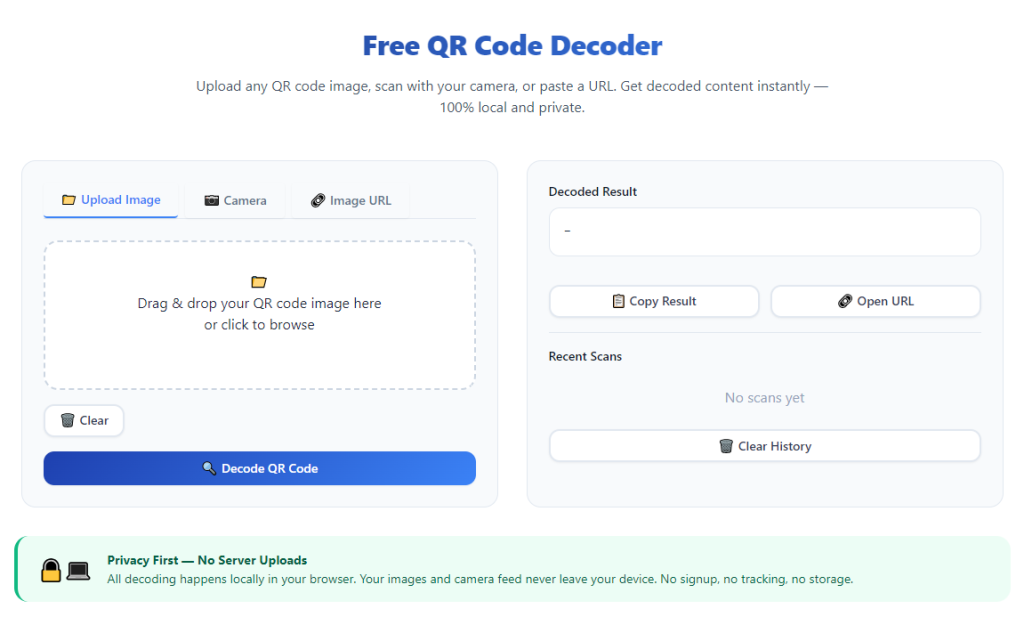
Dual input support: Camera scan and image upload
Top tools let you scan QR codes directly with your device camera or upload saved image files. This works for printed codes, digital pictures and screenshots.
Accurate decoding for all standard QR code types
It successfully reads QR codes containing plain text, web links, contact info, Wi-Fi details, event data and short notes of all lengths.
Clear display for fully decoded content
After scanning, the complete embedded information appears in a readable layout. You can view, copy or review content without distorted text or broken links.
One-click copy function for decoded results
A simple copy button lets you move decoded text or links directly to your clipboard. This saves time when sharing or reusing QR code content.
User-friendly responsive interface
The layout adapts to small mobile screens and large desktop monitors. Buttons and display areas stay easy to tap or click on every device.
Quick reset option for continuous scanning
Clear the current scan result with one click to start decoding a new QR code right away. This streamlines work when you need to process multiple codes in a row.
Common Usage Scenarios for No-Registration Free QR Code Decoder
A fully functional Free QR code decoder no registration fits a wide range of personal, professional and daily lifestyle scenarios.
Reading QR codes on printed materials
Brochures, flyers, business cards and posters often carry QR codes for extra details. Use the tool to scan these printed codes quickly with no account steps.
Decoding digital QR images and screenshots
When you receive QR code images via messages or social media, upload the file to view embedded content instantly. No login is needed for quick digital scans.
Checking event tickets and admission passes
Many events use QR codes for tickets and entry credentials. Decode these codes on the spot to verify details without going through registration processes.
Retrieving links and shared web addresses
QR codes frequently store long web links. Decode the code to extract the full URL and visit the page directly, saving you from typing long addresses manually.
Accessing Wi-Fi credentials via QR codes
Public spaces and offices use QR codes to share Wi-Fi login details. A no-registration decoder lets you read network information fast and connect smoothly.
Viewing contact information from digital business cards
Digital business cards store names, phone numbers and emails inside QR codes. Decode the content to save contact details easily during networking activities.
Step-by-Step Guide: Use Free QR Code Decoder No Registration
Follow this simple workflow to operate a Free QR code decoder no registration and get accurate decoded content in just a few seconds.
Step 1: Prepare your QR code for scanning
Locate the QR code you need to decode. It can be a physical printout, a saved image file or a screenshot on your device screen.
Make sure the code is clear, well-lit and free of blurs or obstructions to guarantee smooth scanning results.
Step 2: Open the no-registration QR code decoder
Launch any standard browser on your phone, tablet or desktop. Open the QR decoder tool and wait for the main interface to load fully.
You will see the main operating area immediately, with no signup popups, login boxes or personal data request prompts.
Step 3: Choose your scanning method
Select camera mode if you want to scan a physical QR code directly. Grant temporary camera permission when prompted by your browser.
Pick the image upload option if your QR code is saved as a picture file. Browse your device storage to select the correct image.
Step 4: Complete the QR code scan or upload
For camera scanning: Hold your device steady and align the frame fully around the QR code. Keep a proper distance for the camera to focus clearly.
For image upload: Confirm the selected file and submit it to the tool. The system will start processing the QR code right away.
Step 5: View the fully decoded content
Within moments, all information embedded in the QR code will appear on the display area. Read through the text, link or contact details carefully.
Check the full content to ensure no characters or parts of the original data are missing after decoding.
Step 6: Copy decoded content for further use
If you need to save or share the content, click the copy button. The full decoded text or link will be saved to your device clipboard.
You can then paste the content into notes, messages, browsers or other applications as needed.
Step 7: Reset the tool for next QR code decoding
Once you finish working with one QR code, use the reset button to clear all current content.
The tool returns to its default state, ready for you to scan or upload another QR code without delays.
Common Mistakes to Avoid While Using the Decoder
Even with a convenient Free QR code decoder no registration, small operating errors can lead to failed scans or incomplete decoded content.
Poor lighting and blurry visuals cause scan failures
Dark environments, glares and blurry images stop the tool from recognizing QR patterns. Always use bright, even lighting before starting a scan.
Partial framing of the QR code during camera scanning
If the code sits outside the camera frame or only partially shows up, decoding will not work. Center the entire QR code inside the viewfinder completely.
Uploading corrupted or heavily edited image files
Images with heavy cropping, distortion or pixel damage cannot be decoded properly. Use original, unmodified QR code images for best results.
Closing the page before copying important decoded data
Scan results disappear once you navigate away from the page. Always copy or note down key content before closing the decoder tab.
Using outdated browser versions for scanning
Old browsers may lack camera or file upload support. Update your browser regularly to maintain full functionality of the QR decoder.
Practical Tips to Boost Usage Efficiency
These simple tips help you make the most of Free QR code decoder no registration in all your daily scanning tasks.
- Bookmark the decoder page for one-click access, so you can launch it instantly whenever you need to read a QR code.
- Clean the camera lens on your mobile device regularly to avoid smudges that cause blurry scans and recognition issues.
- Keep saved QR images organized in a dedicated folder for fast selection when using the upload function.
- Use the copy feature immediately after successful decoding to prevent losing content before you save it elsewhere.
- Reset the tool after every single scan to avoid mixing old results with new QR code data during continuous use.
- Test the tool occasionally with a standard QR code to confirm scanning and decoding performance stays stable.
Final Thoughts
QR codes have become a standard part of sharing information in everyday life, personal communication and professional work.
Tools that force account creation turn a simple scan into a tedious task, while also bringing potential privacy and spam troubles.
A well-built Free QR code decoder no registration eliminates all these drawbacks. It delivers fast, accurate and private QR decoding for every scenario.
With dual scanning modes, cross-device compatibility and straightforward operation, this tool adapts perfectly to casual users and frequent QR readers alike.
By following the step-by-step guide and practical tips above, you can decode any QR code effortlessly, without unnecessary sign-ups or interruptions.
After learning the operation method, click the link below to enter the tool page for immediate use.