Working with web links, query text and web parameters is a common task for internet users, content creators and tech enthusiasts every single day.
Special characters, spaces and symbols inside regular text often break web addresses. These issues lead to invalid links, failed page loads and data transmission errors.
Manually rewriting characters to fix links takes plenty of time. It also easily leads to mistakes, especially when dealing with long or complex web content.
Learning How to use URL encoder decoder online solves these common problems. This handy web tool handles encoding and decoding work in seconds with reliable performance.
This in-depth tutorial explains the risks of manual URL editing, core advantages of online encoder decoder tools, key features, real application scenarios and a full step-by-step usage guide for all skill levels.
Common Problems Caused by Manual URL Editing
Trying to adjust web links and special character text by hand creates a series of avoidable issues for both casual users and professional web workers.
Invalid web links that fail to open properly
Spaces, accents and unique symbols are not supported in standard web addresses. Leaving these characters unchanged will make the entire URL unreadable by browsers.
Time-consuming manual character replacement
Each special symbol needs a specific encoded counterpart. Replacing them one by one on long links turns a simple task into slow, repetitive work.
Human errors lead to broken parameters
One wrong character during manual editing can alter the original link meaning. This redirects users to wrong pages or completely blocks access to target content.
Inconsistent formatting across different devices
Manually adjusted URLs often look different when opened on mobile and desktop. Irregular formatting causes unstable loading performance on various browsers.
Troubleshooting broken links wastes extra effort
When a modified URL stops working, users have to check every character one by one. This lengthy troubleshooting process cuts down overall work efficiency heavily.
Key Benefits When You Learn How to Use URL Encoder Decoder Online
Once you master How to use URL encoder decoder online, all the troubles from manual URL modification will disappear completely from your daily workflow.
One-click processing for fast encoding and decoding
Paste your original text or link into the tool, and you will get fully converted results instantly. There is no need to memorize complex character rules or write code manually.
100% accurate conversion following standard web rules
Online URL encoder decoder tools follow universal web standards strictly. Every character is converted correctly to ensure links work normally on all mainstream browsers.
Supports both encoding and decoding in one single tool
You can turn regular text into standard web-friendly URLs, or restore encoded links back to readable plain text. The dual functions meet two core needs at the same time.
No software download or complicated setup required
Access the tool directly through any web browser. It runs fully online, so you save local storage space and skip tedious installation and configuration steps.
Stable performance across mobile, tablet and desktop
The online tool adapts well to all screen sizes and device types. You can process URLs at home, in the office or while traveling with consistent results.
Easy content copying for immediate reuse
Finished encoded or decoded content can be copied to the clipboard with one tap. You can paste the new URL directly into messages, documents or web platforms right away.
Must-Have Features for a Reliable Online URL Encoder Decoder
As you learn How to use URL encoder decoder online, you should recognize essential features that make a tool practical and reliable for long-term use.
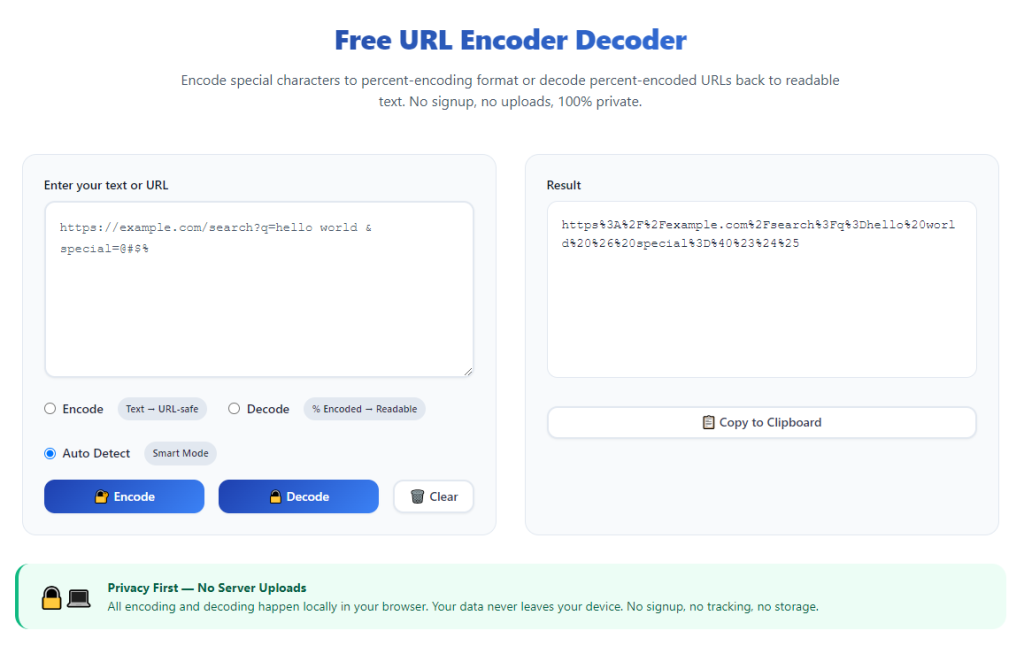
Dual function switch for encoding and decoding modes
A clear toggle button lets you switch between two working modes freely. Choose encoding for raw text, or decoding for existing encrypted web links conveniently.
Large input and output text areas
Spacious text boxes hold long links and multi-line content. You can process multiple URLs or large blocks of text without layout distortion or content truncation.
One-click copy button for converted results
Instead of selecting text manually, use the built-in copy function. It ensures you capture the full converted content quickly and without missing any characters.
Quick clear button to reset all content
After finishing one conversion task, clear all text in the input and output areas with a single click. This prepares the tool for the next group of content right away.
Support for all common special characters
Qualified tools handle spaces, punctuation marks, accents and symbols perfectly. No character will be left unprocessed or converted incorrectly.
Lightweight design with fast page loading
Simple interface and clean code make the tool load in a split second. Even on slow network connections, you can start URL processing without long waiting times.
Wide Application Scenarios for Online URL Encoder Decoder
A fully functional tool, after you learn How to use URL encoder decoder online, serves a large number of scenarios for personal use, content creation and technical work.
Sharing web links across social platforms and messages
Many social apps and chat tools do not support links with spaces or special symbols. Encode the URL first to make sure the shared link can be opened normally by others.
Web content creation and blog post editing
Content creators often insert external links into articles. Using the online tool to standardize URLs prevents broken links and improves overall page browsing experience.
Website testing and technical troubleshooting
Web developers and testers regularly check link parameters. Decode complex encoded URLs to view original content and locate potential errors during site testing.
Building custom web parameters and query links
When creating personalized web query links, convert plain text into standard URL format. This guarantees the parameters can be recognized and executed correctly by web servers.
Saving and organizing collected web resources
When storing a large number of links in notes or documents, decode encoded URLs to restore readable text. It makes resource sorting and checking much easier later on.
Online form data submission and link embedding
Embedding links into online forms or embedded widgets requires standard URL format. Online encoding keeps the whole submission process stable and error-free.
Step-by-Step Guide: How to Use URL Encoder Decoder Online
Follow this simple beginner-friendly workflow to master How to use URL encoder decoder online and get standard converted links every time.
Step 1: Prepare your original text or web link
Copy the raw text, long web address or encoded link that you need to process. Double-check to make sure you capture the full content without missing parts.
Remove extra blank lines or unnecessary spaces if needed, to keep the original content neat before conversion.
Step 2: Open the online URL encoder decoder tool
Launch any regular browser on your device and access the online tool page. The main interface will show input box, mode switch and result area clearly.
Spend a few seconds getting familiar with all buttons and areas, so you can operate smoothly during formal conversion work.
Step 3: Select the correct working mode
Choose the encoding mode if you need to turn plain text or regular links into standard web URLs.
Pick the decoding mode if you want to restore an existing encoded URL back into readable plain text content.
Step 4: Paste content into the input area
Click or tap the input text box, then paste your prepared link or text inside. You can also type short content directly if you do not have a copied version.
Do not add extra unrelated characters in this area, to avoid affecting the final conversion result.
Step 5: Run encoding or decoding process
Click the execution button to start conversion. The tool will process all content instantly without extra waiting time.
Within one second, the fully converted content will appear in the output text area below.
Step 6: Copy the finished result for reuse
Check the converted content briefly to confirm it matches your expectation. Then click the copy button to save the result to your device clipboard.
You can now paste the new URL into chat windows, documents, web pages or any other platforms you need.
Step 7: Clear content for next round of conversion
After finishing all usage for the current content, hit the clear button to empty both input and output boxes.
The tool will reset to its original state, ready for you to process the next batch of links or text content.
Common Mistakes to Avoid While Using Online URL Encoder Decoder
Even after you learn How to use URL encoder decoder online, simple operational errors may lead to abnormal links and failed usage.
Selecting the wrong mode between encode and decode
Using decoding mode on plain text or encoding mode on existing encoded links will create completely unreadable content. Always confirm your mode choice first.
Pasting incomplete or truncated links
Missing part of the original URL will make the converted link invalid. Always copy the full address before starting any conversion work.
Leaving massive redundant spaces in raw content
Too many extra spaces will generate overly long encoded URLs. Clean up unnecessary blank spaces in advance for more concise conversion results.
Forgetting to copy results before clearing the page
Once you click the clear button, all content disappears. Always copy useful converted links before resetting the tool interface.
Processing mixed multi-type content at one time
Mixing normal text and encoded links in one input will cause format confusion. Split different content and process them separately for best results.
Practical Tips to Improve Usage Efficiency
These practical tips help you make the most of How to use URL encoder decoder online and optimize your daily link processing work.
- Bookmark the online tool page for one-click access, so you can open it instantly whenever you need to process web links.
- Classify your links in advance. Process all plain text content first, then handle encoded links in another round to avoid mode switching mistakes.
- Check a small part of the converted result first before bulk copying, to verify the tool works normally for your content.
- Keep the tool tab open during link sharing and editing work. This allows repeated conversion without reopening the page many times.
- Trim long useless characters from raw URLs before conversion, to keep the final link neat and easy to share.
- Use the clear function after every finished task to maintain a tidy interface and prevent old content from mixing with new input.
Final Thoughts
URL encoding and decoding has become a basic yet essential part of daily internet use, whether for personal sharing, content creation or technical website work.
Manual character replacement and editing are slow, error-prone and inefficient. They cannot meet the demand for fast and stable link processing in modern online work.
A standard online URL encoder decoder changes this situation completely. When you fully understand How to use URL encoder decoder online, every link conversion task becomes simple and reliable.
With dual working modes, easy operation and cross-device compatibility, this online tool fits perfectly into the daily routines of all kinds of internet users.
By following the step-by-step instructions and practical tips listed above, you can handle all URL encoding and decoding work effortlessly, and always keep your web links standard and accessible.
After learning the operation method, click the link below to enter the tool page for immediate use.