Color selection is one of the most frequent tasks for designers, developers, content creators, and digital marketers. Matching exact shades, sampling screen colors, and extracting precise color codes ensures consistent branding, clean design work, and accurate web development styling.
Unfortunately, most traditional color picker tools come with major drawbacks. They require bulky software downloads, mandatory installations, and constant updates. These programs take up storage space, consume system resources, and create unnecessary barriers for quick color sampling tasks.
For users who only need fast, occasional, or daily color picking functionality, full design software suites are overkill. A free color picker no installation solves this problem perfectly by delivering professional color sampling entirely through a standard web browser.
This detailed user tutorial breaks down the limitations of installed color tools, core benefits of a free no-install color picker, essential features, real-world use cases, and a step-by-step workflow to sample and apply precise color codes for any project.
Problems With Installed Color Picker Software
Downloadable desktop color picker programs were once the only option for precise color sampling. However, they create multiple workflow issues for modern digital creators.
Wastes local device storage
Dedicated design and color tools require full program installations. Even lightweight desktop utilities occupy valuable hard drive space that many portable devices cannot afford to spare.
Needs constant updates and maintenance
Installed tools push frequent software patches, compatibility updates, and feature upgrades. These interrupt work sessions and force users to pause tasks for routine maintenance.
Cross-device accessibility limits
Desktop-only tools lock users to a single device. Creators switching between laptops, desktops, and mobile workstations cannot access their color tools freely.
Complex setup for beginners
Many installed color pickers include advanced settings that require configuration before use. New users face a steep learning curve for a simple sampling task.
Background resource consumption
Installed utilities often run in the background after startup. They consume RAM and processing power, slowing down other design and editing applications.
Key Benefits of Free Color Picker No Installation
A reliable free color picker no installation eliminates every flaw of desktop software while delivering professional-grade color sampling performance for all users.
Zero downloads and zero setup
The tool runs entirely inside your web browser. There is no software to download, no installation wizard to complete, and no system permission required to start sampling colors.
100% permanently free functionality
All core color picking features remain free for unlimited use. There are no trial periods, hidden paywalls, premium locked features, or usage restrictions.
Full cross-device compatibility
You can access the tool on any device with a functional browser. It works seamlessly on desktops, laptops, tablets, and mobile devices for flexible on-the-go color sampling.
Instant one-click color sampling
No-install color pickers deliver immediate results. Users can sample any on-screen color and generate accurate codes in seconds, speeding up design workflows drastically.
Automatic backend updates
All tool improvements, bug fixes, and algorithm upgrades happen server-side. Users always experience the latest optimized version without manual updating.
Lightweight and fast performance
Browser-based tools do not run in your device background. They activate only during use, saving system resources and maintaining smooth device performance.
Must-Have Features of a Quality No-Install Color Picker
Top-tier platforms offering a free color picker no installation include professional features that match premium desktop alternatives.
Multi-format color code generation
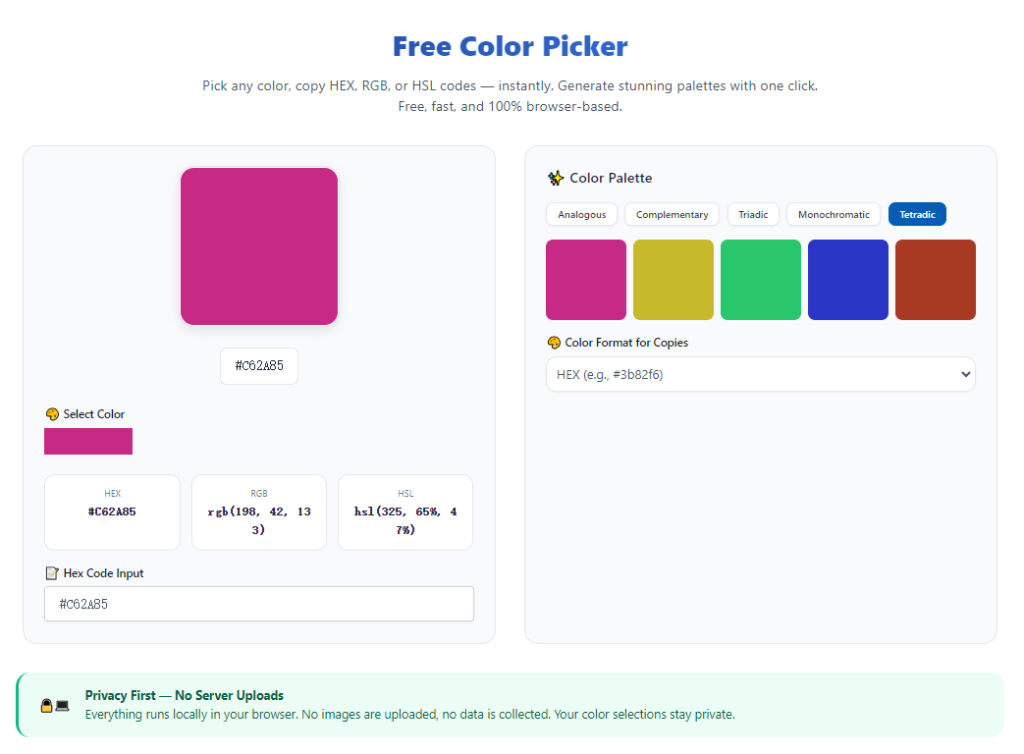
Quality tools produce accurate HEX, RGB, and HSL color codes. These universal formats fit web development, graphic design, and digital content creation standards.
Precision pixel sampling
The tool captures exact single-pixel colors on any screen area. It eliminates color distortion and blurred sampling common with low-quality free tools.
Real-time color preview display
Users view a live color preview while hovering over screen elements. This visual confirmation ensures perfect shade matching before copying codes.
One-click code copying
Generated color codes can be copied instantly to the clipboard. This removes manual typing errors and speeds up project styling work.
Color history tracking
Advanced no-install tools save recent sampled colors. Users can revisit and reuse previous shades to maintain consistent design palettes.
Clean ad-free interface
Professional browser-based color pickers feature distraction-free layouts. No pop-ups or disruptive elements interrupt your design workflow.
Top Use Cases for Free No-Install Color Picker Tools
A free color picker no installation supports countless design, development, and content creation tasks for beginners and professionals alike.
Web development and CSS styling
Developers sample existing website colors to match theme styles perfectly. Accurate HEX and RGB codes ensure consistent site styling across all pages.
Graphic design and branding work
Designers extract brand shades from logos, banners, and marketing assets. Uniform color sampling maintains brand identity across all visual content.
Social media content creation
Content creators match post backgrounds, overlay colors, and graphic elements. Precise color coordination improves feed aesthetics and visual consistency.
UI and UX interface design
Interface designers sample prototype colors to refine app and web layouts. Accurate color codes create clean, professional user interfaces.
Digital art and illustration editing
Artists sample reference image colors to replicate exact tones in digital artwork. This improves color accuracy and overall art cohesion.
Step-by-Step Guide: Use Free Color Picker No Installation
Follow this simple workflow to capture perfect color codes for any project without downloading any software.
Step 1: Prepare Your Target Visual Content
Open the image, webpage, or design file containing the color you want to sample. Make sure the target area is fully visible on your screen for precise pixel selection.
Avoid blurry or compressed previews to prevent inaccurate color sampling results.
Step 2: Launch the Browser-Based Color Picker
Open your preferred web browser and access a trusted free color picker no installation tool. Confirm that no download, signup, or setup is required to begin.
Step 3: Activate the Color Sampler Tool
Enable the on-screen color picker sampler. Most no-install tools feature a simple eyedropper icon that activates instant screen detection.
Your cursor will transform into a precision sampling tool ready for pixel selection.
Step 4: Select Your Target Color
Hover the eyedropper over your desired color shade. Watch the real-time preview to confirm the tone matches your requirements.
Click once to lock in the exact pixel color and generate official color codes.
Step 5: Copy Your Preferred Color Code
The tool will display HEX, RGB, and HSL values instantly. Select the code format that fits your project needs and copy it to your clipboard.
Use HEX codes for web design and RGB for graphic editing projects for best compatibility.
Step 6: Save or Reuse Color Data
Save important shades using the color history feature for future use. Apply the copied codes directly to your design, development, or content projects instantly.
Common Color Picking Mistakes to Avoid
These simple errors can compromise color accuracy even when using high-quality no-install tools.
Sampling low-resolution visuals
Blurry or compressed images contain distorted color pixels. Always sample high-quality displays for accurate, consistent shades.
Ignoring screen brightness distortion
Overly bright or dim screen settings alter perceived colors. Adjust your display to standard brightness before professional color sampling.
Using outdated installed tools
Old desktop color pickers often generate incorrect codes. Modern browser-based tools deliver updated, industry-standard color values.
Forgetting to save color history
Failing to log sampled shades leads to inconsistent palette design. Always track key brand and project colors for uniformity.
Expert Tips for Perfect No-Install Color Picking
Use these professional tips to maximize accuracy and efficiency with your free browser color picker tool.
- Use a free color picker no installation for quick daily sampling tasks to avoid unnecessary software clutter.
- Always sample from high-resolution sources to ensure pure, undistorted color code results.
- Cross-check multiple color formats to match exact platform and software requirements.
- Leverage color history features to build consistent brand and project color palettes.
- Adjust screen display settings to default before sampling for true-to-life color accuracy.
- Prefer browser-based tools on restricted work devices that block third-party software installs.
Final Thoughts
Downloadable color picker software creates unnecessary friction for modern creators. It wastes storage space, requires constant updates, and limits flexible cross-device work for simple color sampling tasks.
A high-quality free color picker no installation solves all these pain points. It delivers fast, precise, and professional color sampling purely through your browser, with zero downloads, zero setup, and zero hidden costs.
Whether you are a web developer, graphic designer, social media creator, or digital artist, this no-install tool streamlines your workflow and guarantees accurate color matching for every project.
By following this complete guide, you can effortlessly capture perfect color codes, maintain consistent visual branding, and boost overall design efficiency with a fully free, accessible online tool.
After learning the operation method, click the link below to enter the tool page for immediate use.